First, choose a controller that suits your console or PC and the features of your racing game. Adjustable lighting on the controller’s casing is only useful if the LEDs are in places that work for you. If precise control, game-supported feedback or playing wirelessly matters more, prioritise those features instead. RGB lighting doesn’t automatically mean the button symbols are illuminated.
Who is this buying guide for?
Racing in a dark room on Xbox or PC
You want to see your controller in low light, adjust its lighting and control the accelerator and brakes precisely. GameSir, PowerA and Turtle Beach describe illuminated wired models for the Xbox systems and Windows PCs listed in their specifications.
PS5 racer who values how a controller feels
You prioritise trigger feedback and vibration over decorative lighting, provided your racing game supports these features. PlayStation describes adaptive triggers and haptic feedback for the DualSense.
Switch 2 racer playing from the sofa
You’re looking for a controller specifically suited to your console and want to know in advance which features and charging options it includes. Nintendo lists Switch 2 as the supported system for the Switch 2 Pro Controller.
What should you look for when buying?
Illuminated wired Xbox or PC controller
A good fit if: you play on a supported Xbox system or Windows PC and adjustable lighting matters to you. GameSir describes Hall Effect sticks and analogue Hall Effect triggers; PowerA lists lighting zones and adjustable trigger travel.
Trade-off: you’ll need to stay connected by USB cable. Check where the LEDs are positioned: the features described don’t prove that the button symbols are illuminated.
Xbox or PC controller with lighting effects
A good fit if: you mainly want to customise the look of the controller’s casing. Turtle Beach lists seven lighting zones and four effects for the Afterglow Ignite.
Trade-off: this is a wired model. Lighting zones don’t tell you whether the button symbols are individually easy to read.
DualSense for PS5 racing games
A good fit if: you play on PS5 and your racing game supports adaptive triggers and haptic feedback. PlayStation describes these features as game-dependent.
Trade-off: a USB connection may be needed to use these features with other devices. This isn’t a controller proven to have illuminated button symbols.
Nintendo Switch 2 Pro Controller
A good fit if: you play on Switch 2 and want a controller with configurable extra buttons.
Trade-off: Nintendo lists this controller for Switch 2 only. The stated battery life is an estimate, and adjustable RGB lighting hasn’t been confirmed.
Wireless Xbox controller without a focus on RGB
A good fit if: you play on a supported Xbox or PC and don’t want a cable across your playing area. Xbox lists features including textured triggers and wireless connectivity options.
Trade-off: check the exact version and power requirements; the listed specifications don’t show that the button symbols are illuminated.
| What to consider |
What to check before buying |
Who is this important to? |
| Platform and game |
Compare the exact console version or PC support with the product specifications. Also check whether your racing game supports the triggers or feedback you want; PlayStation notes that these features depend on the game. |
I want to make sure the controller works with my system and racing game before considering extra features. Around 36% of consumers put compatibility first. |
| Visibility |
Check which parts light up and whether you can adjust or switch off the brightness or effects. PowerA describes dimming and switching off the lights on the Lumectra version reviewed. |
When I play in a dark room, I want to adjust the lighting without assuming that this will make the button symbols easier to read. Around 29% of consumers prioritise adjustable lighting. |
| Control and feedback |
Compare the type of sticks and triggers, any adjustable trigger travel and support from your racing game. PowerA lists three trigger travel settings; PlayStation says DualSense feedback depends on game support. |
I want to control the accelerator, brakes and steering precisely, or feel feedback when my game supports it. Around 21% of consumers prioritise racing controls and feedback. |
| Cable and power |
Check whether the model is wired or wireless, whether the cable will reach your playing area and what power source or charging option it needs. Nintendo lists a USB charging cable and estimated battery life for its Switch 2 Pro Controller. |
I want to sit comfortably without a cable between my controller and system, so I also need to consider charging or power. Around 14% of consumers prioritise freedom of movement. |
Common buying mistakes
-
Confusing RGB lighting with illuminated button symbols
Lighting zones may mainly illuminate the controller’s casing; that doesn’t mean you’ll be able to read the symbols on the buttons.
Look at images or specifications for the exact version and check where the LEDs are positioned and whether you can dim or switch them off.
-
Choosing based on appearance without checking the platform
A controller that doesn’t suit your system won’t give you the solution you need for your racing game.
Check the console version or PC support, then separately confirm that the features you want work with your game.
-
Assuming every racing game uses all the haptic effects
Trigger or feedback features will only work as intended if the game and connection support them.
Check support for your specific game and platform instead of comparing only the controller features.
-
Leaving cable and power checks until after you order
A wired controller needs to reach your playing area; with a wireless model, you’ll need to consider its power source or charging requirements.
Measure the distance to your system and check what’s included with the exact version.
Brands to consider
The features below apply to the specific models or versions listed, not automatically to the whole brand. A brand being mentioned doesn’t in itself mean a product is available.
GameSir
The GameSir Kaleid Flux is designed for wired racing on the Xbox systems and Windows 10/11 listed by GameSir, with RGB strips, Hall Effect sticks and analogue Hall Effect triggers.
- GameSir says a detachable 3 m USB-C cable is included.
- The lighting described doesn’t prove that the button symbols are illuminated individually.
PowerA
The Advantage Wired Controller with Lumectra reviewed is designed for wired play on supported Xbox systems or Windows 10/11, with adjustable lighting zones.
- PowerA lists four lighting zones and three trigger travel settings; the manual explains how to dim or switch off the lights.
- PowerA notes that support for some feedback features may vary between games.
Turtle Beach
The Afterglow Ignite is a wired option for Xbox and PC players looking for adjustable lighting effects on the casing.
- Turtle Beach lists seven lighting zones and four effects for this model.
- These manufacturer specifications don’t prove that the buttons are easy to read in the dark.
Sony
The DualSense is an option for PS5 racers who value supported adaptive triggers and haptic feedback more than RGB effects.
- PlayStation gives the feel of braking as an example of how adaptive triggers can be used.
- PlayStation notes that these features depend on the game and may require a USB connection outside PS5.
Nintendo
The Nintendo Switch 2 Pro Controller is designed for buyers who specifically play on Switch 2.
- Nintendo lists a USB charging cable and an estimated battery life of around 40 hours.
- Nintendo lists this model for Switch 2 only; adjustable RGB lighting hasn’t been confirmed.
Xbox
The Xbox Wireless Controller is designed for wireless play on the Xbox systems listed or a supported Windows PC, without decorative lighting as a requirement.
- Xbox lists textured triggers and Bluetooth and Xbox Wireless connectivity.
- Check the exact version and power requirements; the specifications don’t show that the button symbols are illuminated.
Joybuy products
These Joybuy products are wireless controllers for the platforms listed for each product. Check compatibility and feature support for your specific console, PC and racing game.
 No image available
Turtle Beach Afterglow Wave Wireless Controller, Transparent
A wireless option for the Switch systems named in the product title; RGB lighting doesn’t automatically make the button symbols easy to read.
The product title lists Bluetooth, TMR sticks, four RGB modes and a battery life of 40 hours.
View at Joybuy
 No image available
Xbox Wireless Controller, Heart Breaker Special Edition
A wireless controller for Xbox Series or PC, as listed for this version; decorative RGB lighting isn’t a stated reason to choose it.
The product description lists Xbox Wireless and Bluetooth, textured triggers and rubberised grips on the back.
View at Joybuy
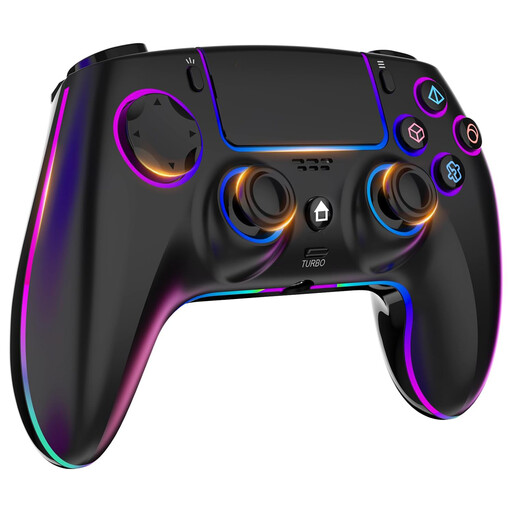 No image available
Wireless RGB Controller for PS4/PC
The product title lists PS4 and PC; check support for your racing game before relying on extra features.
The product listing mentions seven RGB colours, four lighting effects, Hall Effect sticks, dual vibration, a touchpad, a headphone jack and a 1000 mAh battery.
View at Joybuy
 No image available
Gaming Controller with Dual Vibration & Gyro for Switch & PC
An option for Switch or PC use according to the product title; check which features your system and racing game support.
The product description lists dual vibration with three intensity levels, a 6-axis gyroscope and Bluetooth 4.0.
View at Joybuy
 No image available
VIELLAN Wireless Gaming Controller with Hall Effect Joysticks, PC & PS5 Layout
A wireless PC controller according to the product title; a PS5 layout doesn’t in itself confirm PS5 compatibility.
The product title lists Hall Effect sticks, Hall triggers with 255 levels, programmable rear buttons, RGB lighting, a 1000 mAh battery and USB-C.
RGB lighting doesn’t prove that the button symbols are illuminated individually.
View at Joybuy
Frequently asked questions
Are RGB lighting zones the same as illuminated buttons?
No. The manufacturers reviewed describe lighting zones, strips or a front panel. Check separately whether the button symbols on the exact version you want to buy are visible; the term RGB doesn’t guarantee this.
How do I adjust the lighting on the PowerA Lumectra?
According to the PowerA manual, you can configure the lighting zones, adjust the brightness and switch all the LEDs on or off outside programming mode. Check the manual for the exact version.
Will I automatically get the same DualSense racing feedback on PC as on PS5?
No. PlayStation says haptic feedback and adaptive triggers are available when a game supports them, and a USB connection may be required. So check the specific PC game and connection method.
What if a controller disappoints me or breaks too soon after an online purchase?
For online consumer purchases in the Netherlands, you generally have up to 14 days after delivery to change your mind, subject to legal exceptions. You also have a legal right to a product that lasts a reasonable length of time: if it breaks sooner than you could reasonably expect under normal use, the seller must offer an appropriate solution at no cost. A manufacturer’s warranty does not replace this right.
Does a game controller need a CE marking in the Netherlands?
A CE marking is required for products covered by EU rules that require it. The European Commission lists electrical and electronic equipment as a category covered by such rules; the requirements that apply to a particular wired or wireless controller must be determined for that product. A CE logo on its own is not an independent assessment of performance.


