
Vandaag of morgen in huis

Kwaliteit gegarandeerd

Welkomstaanbiedingen ontgrendelen: GRATIS bezorging | Tot 80% korting | Gratis 30 dagen JoyPlus-proefperiode
Download de app
A QWERTY US keyboard can be a logical choice for gamers, programmers and users who work with English-language software. However, the layout often causes confusion. A keyboard may mention “QWERTY” in its title, while the actual layout is, for example, US International. Terms such as mechanical, RGB and wireless are also not always used consistently.
In this guide, you’ll learn what to look out for before buying a keyboard. Afterwards, you’ll find some popular choices for different uses.
A genuine QWERTY US layout will usually use the ANSI layout. You can recognise it by features such as the straight Enter key and the different positioning of some punctuation marks compared with a Dutch ISO keyboard. A US International model may include additional character mappings for accents.
Always check the following:
For programmers, the US layout can be convenient because brackets, braces and other symbols are often more directly accessible. However, anyone who touch-types using a Dutch ISO layout should allow for a period of adjustment.
A compact keyboard may use a membrane construction with keys that, according to the product description, offer a mechanical feel. This is different from a mechanical keyboard with individual switches beneath each key.
A mechanical model usually offers more options for:
For example, the MageGee TS91 is described as having a membrane system with a mechanical feel. That may be perfectly suitable for straightforward office or home use, but do not expect the same construction as a mechanical gaming keyboard.
A wireless keyboard usually works via Bluetooth, 2.4G or both. Bluetooth is useful for laptops, tablets and phones, while 2.4G with a USB receiver can be practical for a desktop computer. Check whether the receiver is included and whether the keyboard can be used in wired mode while charging.
A wired keyboard generally requires fewer settings. For gaming, a cable also prevents you from having to deal with a flat battery or reconnecting during a session. A detachable USB Type-C cable makes transport and replacement easier. You can also browse our range of USB Type-C keyboards.
The size determines how much space the keyboard takes up and which keys are included.
A compact keyboard gives you more room for your mouse, but check whether you regularly use Home, End, Page Up, function keys or arrow keys.
Linear switches feel smooth and consistent, making them popular for gaming. Tactile switches provide a noticeable bump when activated. Clicky switches also produce a clear clicking sound. The sound level is affected by the case, keycaps and dampening layers too.
Pay attention to manufacturers’ claims. According to a brand’s own research or product information, certain switches may have a stated lifespan or low latency. Treat such figures as product specifications rather than a guarantee that every user will have the same experience.
When choosing a keyboard for Windows and Mac, check support for each operating system. Some models work directly with both systems, but the functions of Windows and Mac keys may differ. Also consider:
If you’re looking for a Surface Pro keyboard, make sure you check the exact Surface Pro model. A magnetic Type Cover model is not automatically suitable for every generation.
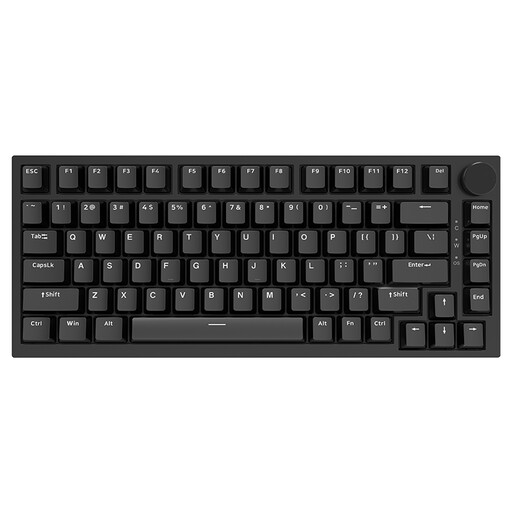
Why it suits this profile: This QWERTY US model combines a compact 75% layout with a wired USB Type-C connection and a volume knob. It’s well suited to studying, working from home and gaming without immediately stepping up to a larger model.
The specifications state a 75% layout, mechanical switches and hot-swappable support. This makes the distinction from a membrane keyboard with only a mechanical feel much clearer.
Hot-swappable PCB, PBT keycaps, gasket mount and compatibility with Windows and Mac.
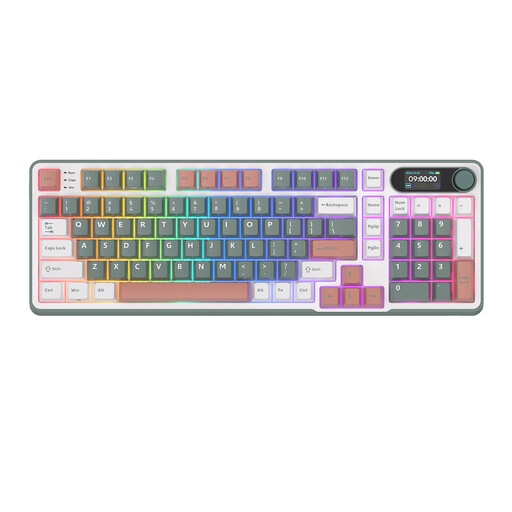
Why it suits this profile: The 96% layout retains a numeric keypad and combines it with Bluetooth, 2.4G and USB Type-C. It’s ideal for a workspace where productivity and flexibility come together.
The connection options are clearly listed, so you don’t have to rely solely on the word “wireless”. The USB-C mode also provides an alternative when wireless use isn’t preferred.
Hot-swappable switches, PBT keycaps, RGB lighting, a metal rotary knob and a smart display according to the product information.
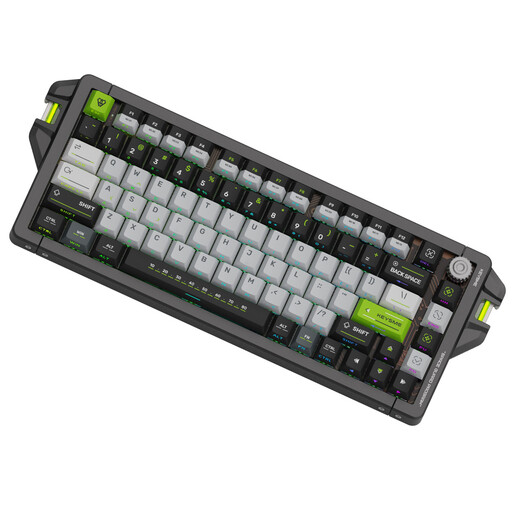
Why it suits this profile: This wired model is aimed at users looking for adjustable actuation, Rapid Trigger and a 75% layout for competitive PC gaming.
The product specifications state a wired 8,000Hz polling rate, an adjustable trigger range of 0.1–4.0 mm, and hot-swappable keycaps and switches. However, check whether your games and software support these features.
CNC aluminium case, PBT dye-sub keycaps, RGB lighting and browser-based software.
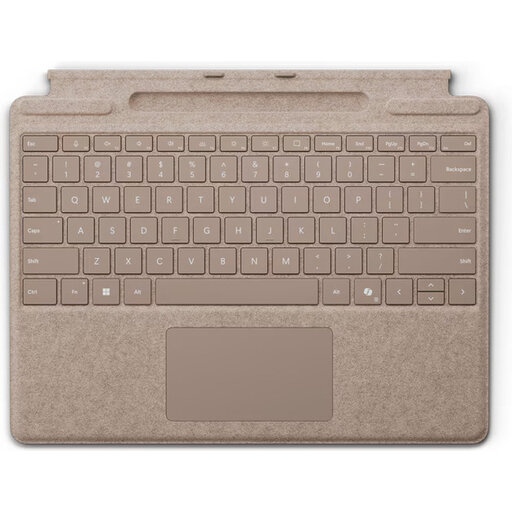
Why it suits this profile: This standalone Surface Pro model uses Smart Connect and, according to the product information, is suitable for Surface Pro 8, 9, 10 and 11. It’s designed for mobile working, with an integrated touchpad and pen storage.
The compatible Surface Pro models are listed. Even so, check your tablet’s model number before buying, as magnetic connections may vary between generations.
Backlit keys, a large touchpad, Smart Connect and a storage compartment for the Surface Slim Pen.
We’ve compiled a complete, up-to-date list of products that fully meet these strict selection criteria and the applicable European safety regulations.
Yes, usually. Set the correct keyboard layout in Windows via the language and keyboard settings. For example, choose US or US International, depending on the key legends and the characters you want to access. On a Mac, you can set the layout separately in the system settings.
It can be, but it depends on how you work. For word processing and keyboard shortcuts, a 60% keyboard is useful if you’re happy to use Fn combinations. For spreadsheets and administration, a 96% or full-size office keyboard with a numeric keypad is often more practical.
In addition to the purchase price, you’ll need to factor in charging or batteries. A model with a built-in battery uses a USB cable and can sometimes continue working while charging. Check the stated battery life under the specified conditions, as RGB lighting and intensive use can affect how long it lasts.
