
Vandaag of morgen in huis

Kwaliteit gegarandeerd

Welkomstaanbiedingen ontgrendelen: GRATIS bezorging | Tot 80% korting | Gratis 30 dagen JoyPlus-proefperiode
Download de app
A QWERTY US gaming keyboard may seem straightforward to choose at first glance. However, small differences in layout, size and switch technology can have a major impact. The wrong keyboard might not have dedicated arrow keys, could use an awkward Enter key or may not work properly with your computer’s language settings.
This buying guide helps gamers, streamers, programmers and homeworkers distinguish marketing claims from verifiable specifications.
Don’t just check the word “QWERTY”; look at the official layout too. A US International keyboard generally uses an ANSI form and has a different Enter and Shift layout from many Dutch ISO keyboards. The position of symbols such as @, ", : and ? may also differ.
If you use Windows, macOS or Linux with Dutch language settings, the key legends and the characters actually entered may not match. Set the keyboard layout in your operating system to English (United States) – International, or to the layout that corresponds to your keyboard.
The MageGee TS91 is described in the product information as a membrane keyboard with a mechanical feel. That is different from a mechanical gaming keyboard with individual switches. If you are looking for a specific typing feel, replaceable switches or a particular lifespan, check “Key type” or “Switch type”.
A mechanical keyboard can be suitable for intensive typing and gaming, but the sound, feel and force required vary by switch. A linear switch feels different from a clicky or tactile switch.
An RGB keyboard may offer per-key lighting, multiple effects or just a few fixed colours. RGB has no effect on the polling rate, switch response or build quality. Check whether the lighting is controlled via shortcut keys or software, and whether your preferred profiles can be saved to the internal memory.
The size determines how much desk space you have left and which keys are missing.
For programmers and homeworkers, 75% is often a practical middle ground. For competitive gaming, 60% or 65% can provide more room for large mouse movements. If you enter lots of figures, a full-size model is probably a better choice.
A traditional mechanical gaming keyboard uses physical switches. Look out for:
A Hall Effect keyboard uses magnetic sensors. According to product information from brands including Redragon and AULA, actuation can be adjusted in software. A Rapid Trigger keyboard is also claimed to register a key again more quickly as soon as it starts moving upwards. This can be interesting for esports, but the benefits depend on the game, the settings and your personal preference.
A wired gaming keyboard connected via USB offers a simple plug-and-play setup and does not require a battery. A wireless gaming keyboard gives you a tidier desk and greater freedom of movement, but pay attention to the connection used:
Always check whether the model works with Windows and Mac. Some features, such as RGB profiles and macros, depend on brand-specific software. A keyboard for PC and Mac may therefore be physically compatible, while certain configuration features differ between operating systems.
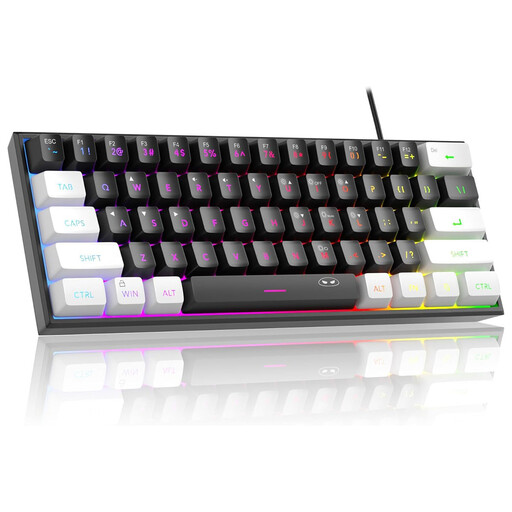
Why it suits this profile: A compact wired model for anyone with limited desk space who wants RGB lighting without immediately moving to advanced switch technology.
The product information clearly states that it uses membrane technology with a mechanical feel, rather than genuine mechanical switches.
61 keys, USB connection, RGB modes and compatibility with Windows and Mac according to the product description.
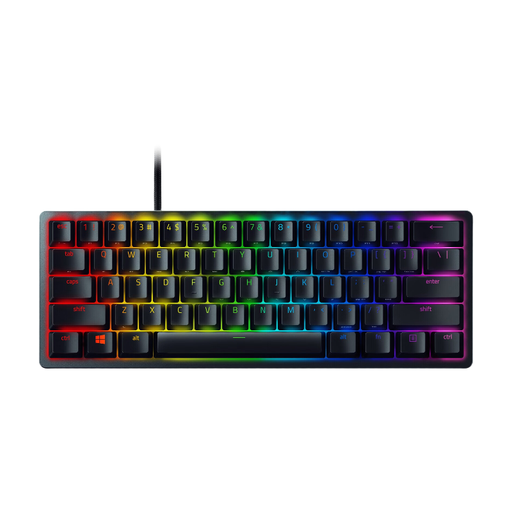
Why it suits this profile: For users who value a compact size, optical switches and programmable RGB lighting.
The specifications list a 60% layout with 61 keys, per-key RGB, N-key rollover and a detachable USB-C cable.
Razer optical clicky switches, aluminium components and support for up to five profiles according to the product information.
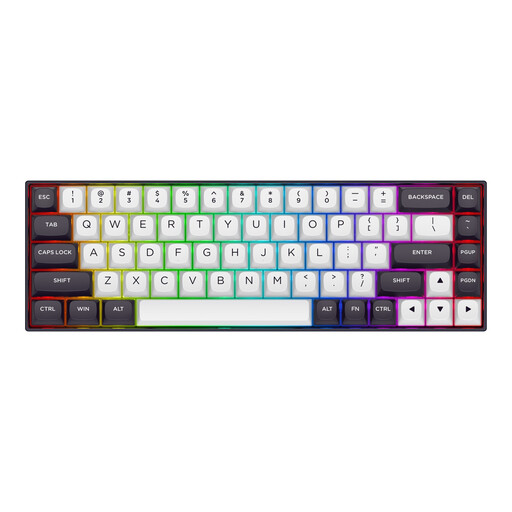
Why it suits this profile: Designed for players who want adjustable actuation and Rapid Trigger for competitive PC gaming, combined with a compact design.
According to Redragon’s product information, Hall Effect sensing, actuation from 0.2 to 4.0 mm and Rapid Trigger can be adjusted in software. Check beforehand whether your games and software support these features.
68 keys, an aluminium top plate, RGB lighting, USB-C and compatibility with Windows and macOS according to the product specifications.

Why it suits this profile: A 75% model for anyone who wants a compact size but needs arrow keys, function keys and a volume knob.
The layout and number of keys are specified as 75% and 82/83 keys. This means you need to use fewer functions via Fn combinations than with a 60% keyboard.
Hot-swappable 3- and 5-pin PCB, PBT keycaps, USB-C, gasket construction and a volume knob according to the product description.
We’ve put together a complete, up-to-date list of products that fully meet these strict selection criteria and the applicable European safety regulations.
Yes. The USB connection will normally work straight away with a PC. However, you need to select the correct keyboard layout in Windows or macOS. Otherwise, the characters displayed on screen may differ from the legends on the keycaps.
It can be, but you will usually use the arrow, Home, End and function keys via Fn combinations. For extensive typing and programming, a 75% or TKL keyboard is often more practical. If you regularly enter figures, a full-size model with a numpad is the better option.
A wired model does not use a separate battery while you type. With wireless keyboards, you need to consider charging and the energy consumption of RGB lighting. Lifespan depends on usage, cleaning, cable care and switch quality. A hot-swappable model may remain useful for longer if you want to replace individual switches later.
