Who is this relevant for?

Housemates with a Switch

They want to check whether the Joy-Cons they already have are enough for the group, and whether an extra pair is compatible with their generation of Switch. Nintendo distinguishes between Joy-Con and Joy-Con 2; the specific game determines which controls you need.

Quiz group with their own mobile phones

They want to play on a shared screen using their own mobile phones, without buying physical controllers if the game supports phone input. Jackbox Games explains that players can join through a browser using a room code; Nintendo lists phone-style play as an option for Everybody 1-2-Switch!.

Household with a mix of existing hardware

They want to make use of an existing PC, PS4 or Switch and check in advance that their chosen game, input method and any mobile app will work. Sony describes phones and tablets being used as controllers for PlayLink games.

What should you consider when choosing?

Mobile phones as player controllers

Choose this if: the quiz supports phone input and players have suitable devices. Jackbox Games uses a browser and room code; a host who also wants to play will need a second device.

Bear in mind: you’ll still need the game and host system. Nintendo says an active internet connection is required for phone-style play in Everybody 1-2-Switch!.

Individual Joy-Cons

Choose this if: your Switch game supports using Joy-Cons separately and there are more players than your existing controllers can accommodate. Nintendo lists 2–8 players for Joy-Con-style play in Everybody 1-2-Switch!.

Bear in mind: Nintendo says Joy-Con 2 only works with Switch 2; the original Joy-Con only works wirelessly with it.

A full-size controller

Choose this if: you also play games that support a full-size controller for each player. 8BitDo lists Switch compatibility for the Ultimate 2C Bluetooth Controller, but not for the separately named Ultimate 2C Wireless Controller.

Bear in mind: one controller won’t automatically be enough for several players, and it won’t help with a quiz that collects answers on mobile phones.

Existing PS4 with PlayLink

Choose this if: you already have the PS4 game and its companion phone or tablet app. Sony describes this input method for PlayLink games, including Knowledge is Power: Decades.

Bear in mind: on 14 December 2023, Sony reported download restrictions for certain Android apps on newer versions of Android. Check that the app is available on the phones you plan to use.

What to consider What should you check? Who is this important for?
Compatibility Note the exact game and console version, then check which input methods are supported and the full model name. If I’m playing on a Switch, I want to be sure that both the game and controller are compatible with that console. Around 31% of consumers prioritise compatibility.
Avoiding unnecessary hardware Check whether players answer using mobile phones or physical controllers, and what features the game requires. I’d rather use suitable phones we already own than buy controllers the quiz doesn’t need. Around 31% of consumers prioritise avoiding unused hardware.
Input for the whole group Count the suitable controllers and players you have, then compare that with the requirements of the specific game and play style. If everyone wants to answer at the same time, I want to know in advance how many separate input devices we’ll need. Around 23% of consumers prioritise having enough simultaneous inputs.
Existing equipment For PlayLink, check whether the companion app is available on the phones you’ll use. For other games, check which devices act as the inputs. I want to check first whether our existing PS4, PC, game and phones are enough. Around 15% of consumers prioritise reusing existing equipment.

Common buying mistakes

  • Buying a controller before checking the input method

    Jackbox uses browser devices as player controllers, and Everybody 1-2-Switch! offers different play styles. As a result, an extra controller could end up unused.

    Choose the game and play style first, then order any physical controllers you need.

  • Treating Joy-Con and Joy-Con 2 as interchangeable

    Nintendo says Joy-Con 2 only works with Switch 2. The original Joy-Con can only be used wirelessly with Switch 2.

    Check your console generation and the full name of the controller pair before ordering.

  • Assuming an older PlayLink quiz will work automatically

    On 14 December 2023, Sony reported download restrictions for certain PlayLink companion apps on newer versions of Android.

    Check that the required app is available on the players’ phones before relying on this option.

Brands and options to consider

Nintendo

Relevant for Joy-Con input on the original Switch and Switch 2, depending on the controller and game.

  • Nintendo explains that an original Joy-Con can be used as a standalone controller in supported games.
  • Joy-Con 2 only works with Switch 2; the controllers you need and the number of players depend on the game and play style.

8BitDo

An option for households that play other games with a full-size controller as well as quiz games.

  • 8BitDo says the Ultimate 2C Bluetooth Controller is compatible with Switch; the manufacturer specifies a firmware update for Switch 2.
  • The separately named Ultimate 2C Wireless Controller lists Windows and Android. So make sure you check the exact version.

Jackbox Games

Relevant for quiz games where players use a browser device as a controller; this is a game provider, not a physical controller brand.

  • Jackbox explains that players can join at jackbox.tv using a room code displayed on the host screen.
  • The host screen needs to be visible to the group. A host who wants to answer too will need a second device.

PlayStation

PlayLink can be a way to reuse what you already have if you own a PS4 and a compatible quiz game.

  • Sony describes smartphones and tablets being used as controllers for PlayLink games, including Knowledge is Power: Decades.
  • On 14 December 2023, Sony reported download restrictions for certain Android companion apps on newer versions of Android. An extra physical controller won’t solve a lack of app support.

Joybuy products

This selection includes Joy-Con pairs and full-size controllers for supported Nintendo Switch games. Only choose a model if the game supports its input method; one controller isn’t the same as several separate player controllers.
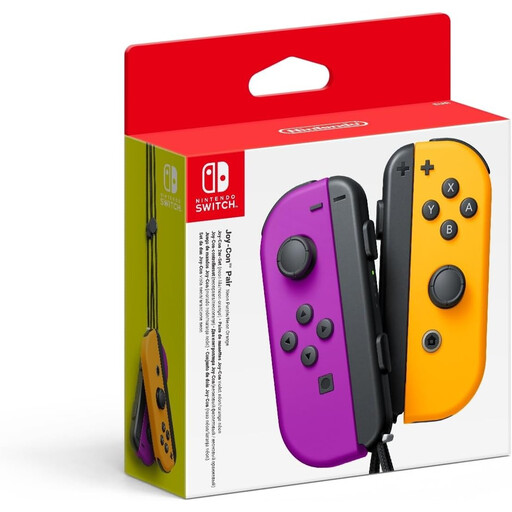
Nintendo Switch Joy-Con pair in neon purple and neon orange

Nintendo Switch Joy-Con pair – neon purple/neon orange

An option for players who want to use individual Joy-Cons in a game that supports this play style.

The product name lists a Joy-Con pair for Nintendo Switch; the game determines whether the controllers can be used separately.

View at Joybuy

Nintendo Switch 2 Joy-Con 2 pair in light blue and light red

Nintendo Switch 2 Joy-Con 2 pair – light blue/light red

A suitable option if you need extra Joy-Con 2 input for a Switch 2 game that supports it.

Nintendo says Joy-Con 2 only works with the Nintendo Switch 2 system.

View at Joybuy

NAXSIR wireless Bluetooth controller for Switch

NAXSIR wireless controller for Switch – Bluetooth

An option for a Switch game that supports a full-size controller; check that it suits the quiz’s input method.

The product name lists Switch and Bluetooth. This is one controller, so it won’t necessarily be enough for several players.

View at Joybuy

Turtle Beach Afterglow Wave Wireless Controller with Bluetooth

Turtle Beach Afterglow Wave Wireless Controller (Bluetooth)

An option for a Switch game that supports a full-size controller, but not for a quiz that only uses phone input.

The product name lists a wireless Bluetooth controller. It’s one controller, so check how many separate inputs the game needs for its players.

View at Joybuy
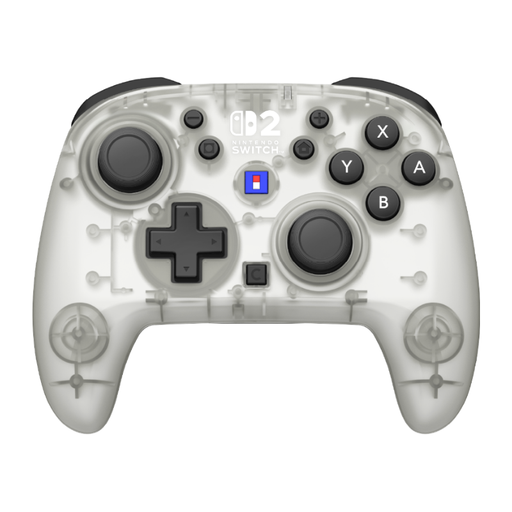
Hori Horipad Turbo Frost Wireless Controller for Nintendo Switch and Switch 2

Hori Horipad Turbo Frost Wireless Controller for Nintendo Switch and Switch 2

An option for a game on one of the listed Switch systems that supports a full-size controller.

The product name lists Nintendo Switch, Switch 2 and wireless control. This is one controller; check the input requirements of your chosen game.

View at Joybuy

Frequently asked questions

Do you need a controller for each player in Jackbox?

No. Jackbox Games says players can join using a suitable browser device and a room code. A host who also wants to play will need a second device to enter their own answers.

Can you play Everybody 1-2-Switch! without an internet connection?

Yes, according to Nintendo, if you play in Joy-Con style. Phone-style play requires an active internet connection; some games also require a phone with the necessary sensors.

Does Joy-Con 2 work with the original Nintendo Switch?

No. Nintendo says Joy-Con 2 can only be used with Switch 2. The original Joy-Con can be used wirelessly with Switch 2.

How do you use extra Joy-Cons for a quiz night?

Pair the controllers with the relevant Switch system, then check which play styles the game supports. Nintendo says original Joy-Cons can be charged with the original Switch; a separate charging grip is another option.

Will an older PlayLink quiz still work with our phones?

It depends, among other things, on whether the companion app is available on the phones you’ll use. On 14 December 2023, Sony reported download restrictions for certain Android apps on newer versions of Android. Check availability for the specific game and devices.
