
Vandaag of morgen in huis

Kwaliteit gegarandeerd

Welkomstaanbiedingen ontgrendelen: GRATIS bezorging | Tot 80% korting | Gratis 30 dagen JoyPlus-proefperiode
Download de app
A quiet wireless mouse is useful in a shared office, library or peaceful living room. There’s no cable on your desk, and the clicking is less noticeable. However, a low price or the word “silent” doesn’t tell you everything. The shape, connection and battery life are the main factors determining whether the mouse will still be comfortable to use after several months.
With a mouse featuring silent buttons, the clicking sound is generally reduced. That doesn’t mean every click is inaudible. The scroll wheel and pressing the middle button may still make a noise. Look for a specific product specification such as silent click or silent buttons, rather than relying solely on a marketing term on the packaging.
A wireless mouse with a USB receiver generally uses a free USB-A port. Some modern laptops only have USB-C, so you’ll need an adapter or docking station. Bluetooth models avoid this issue, but not every computer supports the same Bluetooth version or a stable connection.
Also check whether the receiver can be stored inside the mouse. Losing a tiny USB dongle during a train journey makes a compact wireless travel mouse much less practical.
A high DPI value isn’t automatically more useful for office work. For word processing, spreadsheets and browsing, 800 to 1600 DPI are often practical settings. A 1600 DPI wireless mouse offers enough flexibility for both precise pointing and faster movement. Gaming mice with much higher DPI values are mainly intended for specific gaming settings and sometimes include extra software, lighting or buttons that you don’t need for everyday work.
A 2.4GHz connection via a USB receiver is usually straightforward: connect the receiver, switch on the mouse and get started. This is the classic plug-and-play setup. Bluetooth is useful for laptops, tablets and devices with few USB ports.
According to the product specification, the Trust Yvi+ Multi-Device can connect to up to three devices simultaneously: via the 2.4GHz receiver and two Bluetooth channels, with Bluetooth 3.0 and Bluetooth 5.0. This is relevant if you regularly switch between a laptop, desktop computer and tablet. The standard Yvi+ variant, on the other hand, works via the supplied USB micro receiver.
A compact mouse is easy to carry around, but gives your hand less room than a larger model. So check the dimensions carefully. The black Trust Yvi+ is 95 mm deep, 57 mm wide and 40 mm high. Its shape is ambidextrous, making it suitable for both left- and right-handed use. An ambidextrous mouse is particularly useful in flexible workspaces or when several people share the same desk.
If you work for many hours at a time, you may prefer more support. A compact shape isn’t the same as an ergonomic vertical mouse. If you have a larger hand or want plenty of palm support, look beyond size alone.
The Trust Yvi+ models use one AA battery. According to the product information, the battery life is up to 12 months, depending on usage. An on/off switch helps save power when you store the mouse in a bag.
Pay attention to the difference between “up to” and a guaranteed battery life: actual battery performance depends on clicking frequency, connection and how often you switch the mouse off. A model with a replaceable battery means you won’t need to have a built-in battery replaced over time. A rechargeable mouse, on the other hand, may be convenient if you’d rather not buy loose batteries.
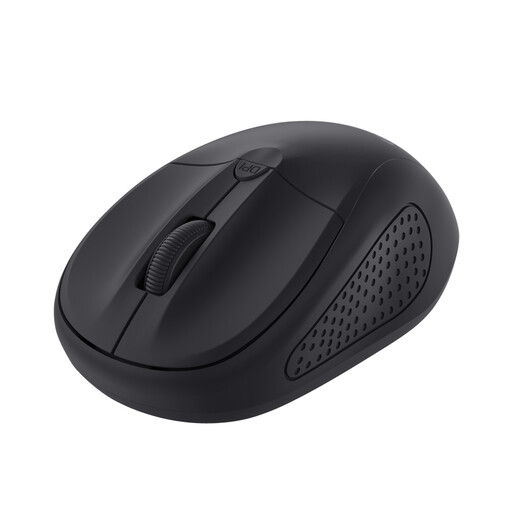
Why it suits this profile: This compact wireless mouse is designed for everyday essentials, with a USB receiver, three buttons and an adjustable speed of 1000 to 1600 DPI. Its ambidextrous shape suits both left- and right-handed users.
The specifications clearly state the connection, DPI range and compact dimensions. However, check that your laptop has a free USB-A port.
Wireless range of up to 6 metres, optical sensor, on/off switch and suitable for both hands.
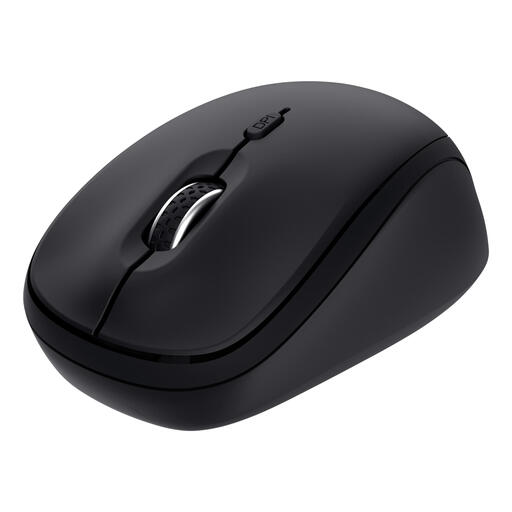
Why it suits this profile: The combination of a USB receiver and two Bluetooth channels is ideal for a flexible workspace with multiple devices. According to the product description, the silent buttons are designed for shared spaces.
You’re not dependent on just one connection type. However, check in advance that your devices support Bluetooth 3.0, Bluetooth 5.0 or USB-A.
Connection to up to three devices, 800 or 1600 DPI, optical sensor and a stated battery life of up to 12 months.

Why it suits this profile: This model is primarily a wireless gaming mouse for users who value extensive customisation and a rechargeable battery more than silent buttons.
The rechargeable battery means you don’t have to rely on AA batteries. This mouse isn’t the obvious choice if quiet clicking is your top priority.
2.4GHz connection, sensor up to 4800 DPI, six programmable buttons and up to 80 hours of battery life according to the product specification.
We’ve put together a complete, up-to-date list of products that fully meet these strict selection criteria and the applicable European safety regulations.
Yes, provided the buttons demonstrably reduce clicking noise. Also check the sound made by the scroll wheel and consider the connection. Bluetooth can be useful in an office with multiple devices; for a straightforward PC setup, a USB receiver is often sufficient.
It varies by model and usage. The Trust Yvi+ states a battery life of up to 12 months on one AA battery. This is a stated maximum, not a fixed guarantee for every user. Switch the mouse off when you’ve finished and remove the battery if you won’t be using the device for an extended period.
Not automatically. A model with a USB receiver requires a suitable USB port or adapter. A Bluetooth mouse requires Bluetooth support and may need to be paired initially through the system settings. Also check the operating system: according to the product specification, the Trust Yvi+ is supported by Windows, macOS, ChromeOS, Android, iOS and iPadOS.
