
Vandaag of morgen in huis

Kwaliteit gegarandeerd

Welkomstaanbiedingen ontgrendelen: GRATIS bezorging | Tot 80% korting | Gratis 30 dagen JoyPlus-proefperiode
Download de app
A quiet wireless mouse is useful in a shared office, during online lessons or when you work from home alongside other people. But quiet clicks alone don’t tell you everything. A mouse may make very little noise but still be impractical because of an unreliable connection, an unsuitable size or high battery costs.
As a Joybuy Product Recommendation Officer, I filter the most important product specifications and highlight common pitfalls alongside practical choices. This makes it easier to find the wireless mouse for the office, laptop or desktop that suits the way you use it.
Brands use terms such as silent, quiet or noise reduction. These don’t necessarily refer to comparable measurements. According to Logitech’s product information, the M330 Silent Plus makes up to 90% less clicking noise than traditional mice. Other models simply state that they have quiet buttons.
So check whether the manufacturer provides a measurement or just uses a general description. The scroll wheel and movement across your desk can also make noise. If you’re looking for a quiet mouse for working from home, consider both the buttons and the scrolling mechanism.
A wireless RF mouse usually uses a 2.4GHz USB receiver. It often works as soon as you plug in the receiver, but your laptop or PC needs a suitable USB port. Bluetooth models don’t need a dongle, but they must first be paired and rely on your device supporting Bluetooth.
Also think about where you place the receiver. In some situations, a USB receiver plugged in behind a metal computer case or surrounded by lots of other wireless devices may be less practical. A stated range of 8 to 10 metres is a product specification, not a guarantee that the connection will be the same at every workstation in all conditions.
A compact mouse fits easily into a laptop bag, but gives your hand less room. A larger model may be more comfortable for long hours at a desk, while a smaller one may suit students and people who are often on the move.
As well as the external dimensions, consider the weight, shape and handedness. An ergonomic wireless mouse won’t automatically suit every hand. Check whether the model is designed for right-handed, left-handed or ambidextrous use.
Choose a mouse with a USB receiver if plug-and-play convenience is important to you. The Trust Yvi+ uses 2.4GHz RF, has a range of up to 8 metres according to the product information, and is compatible with Windows 10, Windows 11, Mac OS X 10.11 and later, and ChromeOS.
Bluetooth is useful for laptops without a spare USB port. The HP 240 Pike Silver uses Bluetooth 5.1 and, according to its product specifications, works with Windows, macOS and ChromeOS. A model with both connection types gives you more flexibility, for example if you switch between a laptop and desktop.
Most office mice use an optical sensor. DPI indicates how sensitively the cursor responds to movement. For documents, email and spreadsheets, 1000 to 1600 DPI is often enough. A higher figure doesn’t automatically mean greater accuracy for everyday office work.
An optical mouse with 1600 DPI is a practical middle ground. With the Trust Yvi+, you can adjust the sensitivity from 800 to 1600 DPI. According to the product information, the Trust Ozaa+ goes up to 3200 DPI, making it more flexible for large screens or wide spreadsheets. For best results, use the mouse on a clean, flat surface; reflective surfaces can affect tracking.
Don’t compare only the purchase price. A mouse that uses AA or AAA batteries will need new ones from time to time. The stated battery life depends on usage, settings and battery type.
The Trust Yvi+ lists a battery life of up to 12 months. The Logitech M330 Silent Plus states up to 24 months, and the Dell Pro Compact Silent Mouse MS355 up to 36 months. These are claims from the respective brands’ product information; actual battery life may vary. A rechargeable mouse means you don’t need loose batteries, but you will need to connect it to a cable regularly.
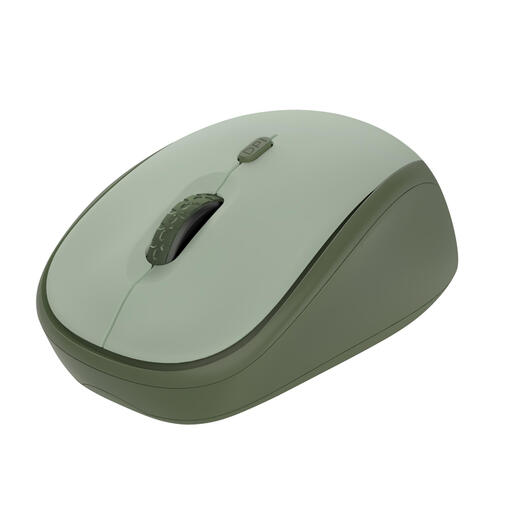
Why it suits this user: This compact wireless mouse is designed for office and home use. It connects via a USB receiver, with no extra software or drivers required.
The product details specify quiet buttons, adjustable DPI from 800 to 1600 and a 2.4GHz RF connection. This makes its key office features clear.
Made with 83% recycled material according to Trust, compact dimensions of 95 × 57 × 40 mm and a stated battery life of up to 12 months.
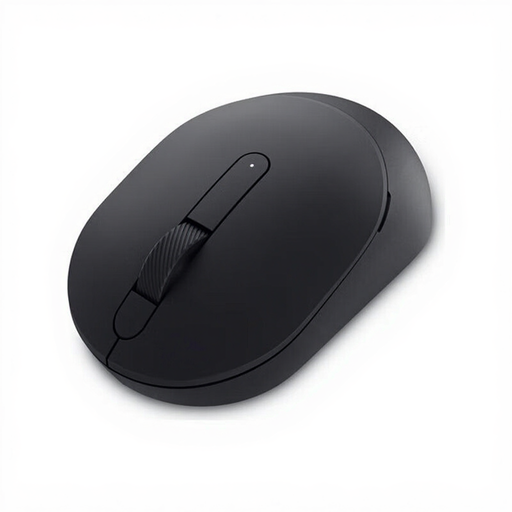
Why it suits this user: This model combines a compact design with RF and Bluetooth connectivity for use with multiple devices.
You’re not limited to Bluetooth or a dongle alone. According to the product information, the mouse supports both connection types.
Adjustable sensor up to 4020 DPI, suitable for both left- and right-handed use, and up to 36 months of battery life according to Dell.

Why it suits this user: The larger body, three device connections and extra side scroll wheel are designed for users working with wide spreadsheets and multiple screens.
The product description specifies both quiet buttons and the available connection options: one 2.4GHz receiver and two Bluetooth channels.
Connects to up to three devices, rechargeable battery, six buttons and optical tracking up to 3200 DPI according to the product specifications.
We’ve put together a complete, up-to-date list of products that meet these strict selection criteria and current European safety requirements.
It’s a wireless mouse whose product information describes its buttons as quiet or low-noise. Also check the connection, size and battery life. An RF model with a USB receiver is practical for a fixed workstation; Bluetooth is useful for laptops without a spare USB port.
That depends on the connection. An RF mouse needs an available USB port and the right receiver. Bluetooth models work when your laptop or PC supports Bluetooth. Before ordering, also check the stated compatibility with Windows, macOS and ChromeOS.
Battery life varies by model and how intensively you use it. Manufacturers state, for example, 12, 18, 24 or 36 months for certain models. Treat these figures as estimates from the product description. Switch the mouse off when you’re not using it for a while, and remove loose batteries before long-term storage.
