
Vandaag of morgen in huis

Kwaliteit gegarandeerd

Welkomstaanbiedingen ontgrendelen: GRATIS bezorging | Tot 80% korting | Gratis 30 dagen JoyPlus-proefperiode
Download de app
A quiet wireless mouse is useful in a shared office, during lectures, in the library or when working from home alongside others. However, “silent click” does not automatically mean that every mouse is comfortable to use. Some models are quiet but have an awkward shape, short battery life or only a USB receiver, even though your laptop requires Bluetooth.
Pay particular attention to these three common pitfalls:
Look for terms such as silent click, quiet buttons or quiet buttons. Also check whether the manufacturer states a specific percentage or certification. A quiet office mouse should not only have quieter main buttons; the scroll wheel and movement across the desk can also create noise.
A soft mouse mat often helps to reduce contact noise. If in doubt, also check whether the buttons feel too stiff. A click that is quiet but requires a lot of pressure may be less comfortable during prolonged use.
A wireless mouse with a USB receiver is usually straightforward: plug in the receiver, switch on the mouse and start working. This is practical for a fixed office PC. Do check that your device has a USB-A port. If your laptop only has USB-C, you may need an adapter.
Bluetooth eliminates the need for a separate receiver and is suitable for laptops, tablets and some smartphones. A model with both 2.4GHz and Bluetooth offers greater flexibility. Also consider how many devices you can switch between. This is useful if you use, for example, a work laptop, personal PC and tablet.
DPI determines how far the cursor moves with the same physical mouse movement. An adjustable setting, such as 800 to 1600 DPI, is practical for office work. For gaming, a higher sensor resolution and polling rate may be relevant, but that does not automatically make a model suitable for a quiet working environment.
Also consider:

Why it suits this profile: A straightforward choice for students, home workers and laptop users looking for a compact quiet mouse with a USB micro receiver.
The product information mentions quiet buttons, adjustable DPI from 800 to 1600 and a range of up to 8 metres. The receiver can be stored inside the mouse.
Compact dimensions of 95 × 57 × 40 mm, three buttons and one AA battery with a stated battery life of up to 12 months.

Why it suits this profile: Suitable for users who want a quiet, compact mouse with both Bluetooth and RF connectivity for use with different types of device.
The product information lists a combination of Bluetooth and RF, so you are not solely dependent on a USB-A receiver.
Ambidextrous design, 4,020 DPI according to the product specifications and a stated battery life of up to 36 months.
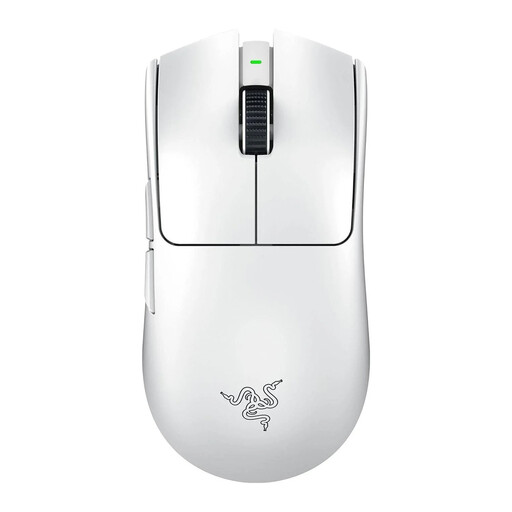
Why it suits this profile: Designed for users who value low response times, light weight and adjustable gaming performance alongside wireless convenience.
The specifications mention both wired and wireless use, an optical sensor and a rechargeable battery. Do check that the gaming-focused design suits your everyday office work.
54 grams, a Focus Pro 35K optical sensor, a polling rate of up to 8,000 Hz and a stated battery life of up to 95 hours.
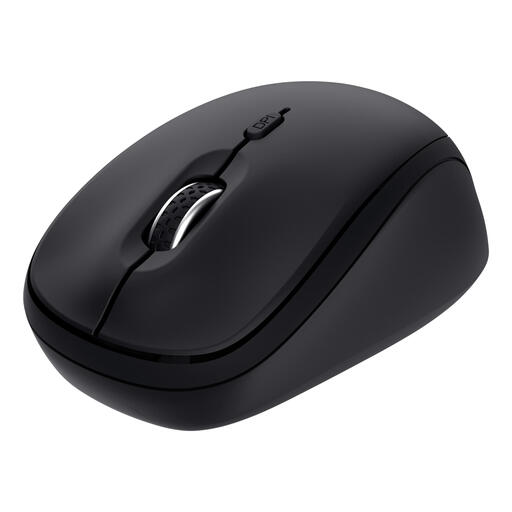
Why it suits this profile: Handy for anyone switching between a laptop, desktop and tablet who wants to carry a compact mouse with quiet buttons.
The product description mentions connection via 2.4GHz USB and two Bluetooth channels. This means you do not have to pair it again every time you switch devices.
Support for up to three devices, 800/1600 DPI, a micro receiver and a stated battery life of up to 12 months.
We have put together a complete, up-to-date list of products that fully meet these strict selection criteria and the applicable European safety regulations.
Yes, as long as the laptop has a suitable USB port. If your laptop only has USB-C, you may need an adapter. If you do not want to use a receiver, a Bluetooth mouse may be a better choice. Always check which operating systems are supported, such as Windows, macOS or ChromeOS.
This varies depending on the model, battery type and usage. The product specifications for the models mentioned state battery lives of approximately 12 to 36 months for mice with replaceable batteries. Manufacturers base these figures on their own usage scenarios. An automatic sleep mode and an on/off switch can help to reduce power consumption.
That depends on your requirements. An ordinary quiet mouse with 800 to 1600 DPI is suitable for office work and light gaming. For competitive games, sensor resolution, polling rate, weight and wireless response time are more important. A wireless gaming mouse such as the Razer Viper V3 Pro is designed for that specific use, but may offer more features than you need for straightforward office work.
