
Vandaag of morgen in huis

Kwaliteit gegarandeerd

Welkomstaanbiedingen ontgrendelen: GRATIS bezorging | Tot 80% korting | Gratis 30 dagen JoyPlus-proefperiode
Download de app
A quiet wireless mouse is useful in a shared office, during online meetings or when you are working from home while others are asleep. However, a term such as “silent mouse” does not tell you everything. The click noise can vary from one button to another, the connection may be less practical than expected and a compact design will not suit every hand.
Joybuy Product Recommendation Officer therefore filters the most important product specifications and common purchasing pitfalls. This allows you to compare a wireless computer mouse based on practical features rather than marketing claims alone.
Brands use terms such as silent click, “quiet buttons” or “up to 90% less noise”. These percentages are generally based on a comparison with a traditional model, rather than a single fixed European measurement method used for all mice. According to Logitech, the M330 Silent Plus is more than 90% quieter than regular mice; according to HP, the HP 285 can offer up to 90% noise reduction. So check whether the product information specifically refers to the left and right mouse buttons.
The scroll wheel and casing can also make a noise. For a library or quiet meeting room, it is worth checking user experiences and the full product description.
A mouse with a USB receiver usually works straight away once you plug in the receiver. This is practical with a desktop computer or laptop with USB-A. If your laptop only has USB-C ports, you may need an adapter.
A Bluetooth mouse connects without a separate dongle. This frees up a USB port, but the pairing process varies from one device to another. Some models combine both options. Also check whether “multi-device” really means that you can switch between several paired devices.
DPI determines how far the cursor moves with the same hand movement. For word processing, spreadsheets and web pages, settings of around 800 to 1600 DPI are sufficient for many users. A higher setting can be useful with large screens or for specific workflows, but it may take some getting used to.
Pay particular attention to adjustable DPI. This allows you to change the cursor speed without immediately having to buy another mouse. For example, the Trust Yvi+ offers a choice between 800 and 1600 DPI. The Logitech MX Master 4 for Business lists an adjustable range of up to 8000 DPI.
Choose according to your workspace:
Check compatibility with Windows, macOS, ChromeOS, Android and iPadOS separately. A model that works with Windows will not automatically work with every tablet.
A mouse powered by a single AA battery requires little maintenance if the stated battery life suits the way you use it. The Trust Yvi+ specifies up to 12 months; the Logitech M330 Silent Plus up to 24 months and the HP 285 up to 18 months. These figures come from the product information and may vary depending on usage, connection and power-saving features.
A built-in rechargeable battery eliminates the need for loose batteries, but you will need to charge the mouse regularly. So look for:
A compact mouse is easy to carry around, but gives your hand less room. The Trust Yvi+ measures 95 × 57 × 40 mm and weighs 84 grams according to the specifications. This makes it suitable for a small desk space or bag.
For prolonged use, the shape is more important than a general claim such as “ergonomic”. Consider the hand orientation, width, height, thumb rest and button placement. A vertical mouse, such as the Logitech MX Vertical, has a different grip from a standard mouse and is particularly suitable for users who deliberately choose this type of design. Comfort information comes from the brand; personal fit remains individual.
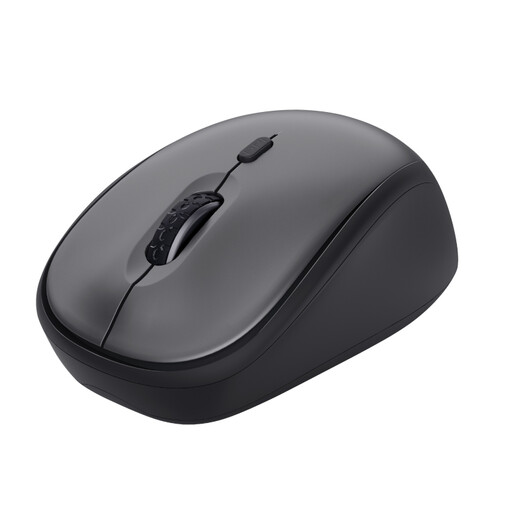
Why it suits this profile: This compact mouse for the office and working from home uses a USB micro receiver, comes with an AA battery and, according to the product information, works straight away with Windows, macOS and ChromeOS.
The product specifications mention quiet buttons, a range of up to 8 metres and a DPI switch between 800 and 1600. The receiver can be stored inside the mouse.
Compact size, quiet clicking, adjustable DPI and an on/off switch for battery management.
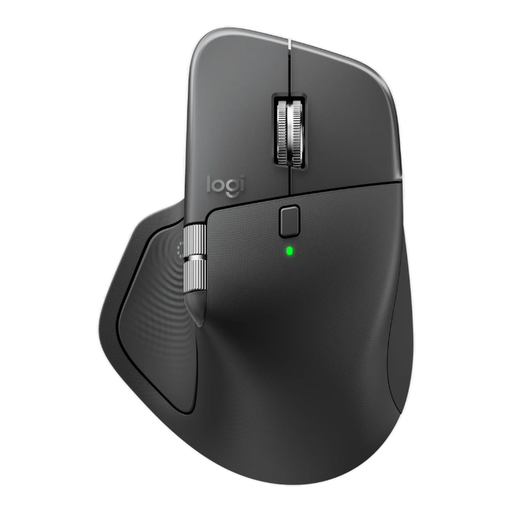
Why it suits this profile: This ergonomic wireless mouse is designed for business users who need to work with several devices, programmable buttons and precise settings.
The product details list both Bluetooth and a Logi Bolt receiver, adjustable DPI up to 8000 and pairing with up to three devices.
USB-C rechargeable battery, eight programmable buttons, horizontal scrolling and quiet clicking according to the brand’s product information.

Why it suits this profile: The MS355 combines a compact size with Bluetooth and RF. This suits users who switch between an office PC, laptop and mobile device.
According to Dell, the clicks, scrolling and movement are designed to be quiet. The product specifications also mention automatic switching between RF and Bluetooth.
Suitable for left- and right-handed use, up to 4020 DPI according to the product details, and compatible with Windows, macOS, Android and ChromeOS, among others.
We have compiled a complete, up-to-date list of products that fully meet these strict selection criteria and the applicable European safety regulations.
With a model that uses a USB receiver, installation is usually straightforward: insert the battery, switch on the mouse and plug the receiver into a free USB port. Bluetooth models must first be paired through your computer or tablet’s Bluetooth settings. Check which connections your device has before you buy.
This varies by model and usage. In the stated product specifications, battery life ranges from approximately 12 to 24 months for mice powered by an AA battery. Automatic sleep mode and an on/off switch can help reduce power consumption. With a built-in rechargeable battery, pay particular attention to the usage time per charge and charging time.
A quiet click mouse for office use or working from home is primarily designed for everyday computer use. Models with limited DPI settings and a basic wireless receiver are not automatically suitable for competitive gaming. If you need low latency, lots of programmable buttons or a high polling rate, you would be better off looking specifically for a gaming mouse.
First decide whether you need Bluetooth, a USB receiver or both. Then check the hand orientation, dimensions, battery solution and adjustable DPI. For mobile use, a compact mouse is an obvious choice; for long working days, a larger or ergonomic model may be more suitable. Finally, focus on specific product specifications rather than terms such as “silent” or “ergonomic” alone.
