
Vandaag of morgen in huis

Kwaliteit gegarandeerd

Welkomstaanbiedingen ontgrendelen: GRATIS bezorging | Tot 80% korting | Gratis 30 dagen JoyPlus-proefperiode
Download de app
A quiet wireless mouse is useful in a shared office, during lectures, in the library or when working from home alongside housemates. Yet many models look very similar. A low price says little about click noise, while “multi-device” does not always mean you can easily switch between three devices.
Pay particular attention to the connection, size, battery and how well the mouse suits your hand and workspace. Below, you’ll find the key points to check, along with some popular options based on verifiable product specifications.
Manufacturers use various terms, such as silent click, quiet buttons and noise reduction. These are not standardised measurements. According to Logitech’s own information, the M330 can reduce click noise by more than 90% compared with traditional mice. For other models, the specifications may only state that the buttons are quieter.
So don’t expect completely silent operation. Check whether both the left and right mouse buttons, as well as the scroll wheel, are mentioned. The wheel in particular may still be audible in a quiet room.
A mouse with a USB receiver will generally work straight away once you plug the receiver into a USB-A port. This is practical for a desktop PC or laptop with a suitable port. However, USB-A ports are becoming less common on tablets and slim laptops.
A wireless mouse with Bluetooth may be more convenient in that case. Do check how many Bluetooth channels it supports. Some mice connect to just one device, while a multi-device mouse can keep several devices paired. Also check how you switch between them: using a physical button, a switch or by pairing again through the operating system.
A compact wireless mouse measuring around 9 to 10 centimetres is easy to carry around, but offers less room for your palm. That is usually not a problem for short sessions on the go. If you work long days at a desk, however, you may benefit more from a larger model with a rubber grip or an ergonomic design.
A compact mouse is also not automatically an ergonomic mouse for working from home. A vertical model changes your wrist position, but is often larger and less suitable for mobile use.
A 2.4 GHz connection via a receiver is usually straightforward: plug it in and use it. Many models specify a range of 8 to 10 metres, but walls, metal surfaces and other wireless devices can affect performance in practice.
Bluetooth saves a USB port and is suitable for laptops and tablets. Check the supported version and operating systems. According to its product specifications, the Trust Yvi+ with multi-device functionality supports a 2.4 GHz receiver, Bluetooth 3.0 and Bluetooth 5.0, and can connect to up to three devices.
DPI indicates the sensor’s movement resolution. At a higher value, the pointer travels further with the same hand movement. For word processing, spreadsheets and browsing, settings between 800 and 1600 DPI are often practical. A 1600 DPI mouse offers sufficient speed for everyday work on a laptop or desktop screen.
An adjustable DPI button is particularly useful when switching between a large screen and a compact tablet. More DPI does not automatically mean greater accuracy or better suitability. For office work, hand comfort, tracking and the right surface are at least as important.
Check whether the mouse uses an AA or AAA battery, is rechargeable or has a built-in battery. A stated battery life of, for example, 12 months depends on usage, sleep mode and battery type. For models with replaceable batteries, it is sensible to switch the mouse off when you will not be using it for an extended period.
A low weight is convenient when you’re on the move. According to the product specifications, the Trust Yvi+ weighs 55 grams and measures 95 × 57 × 40 millimetres. Trust states that the black version is made from 75% RCS-certified recycled ABS plastic and comes in plastic-free packaging. These are material and packaging claims made by the brand, so always check the latest product information.
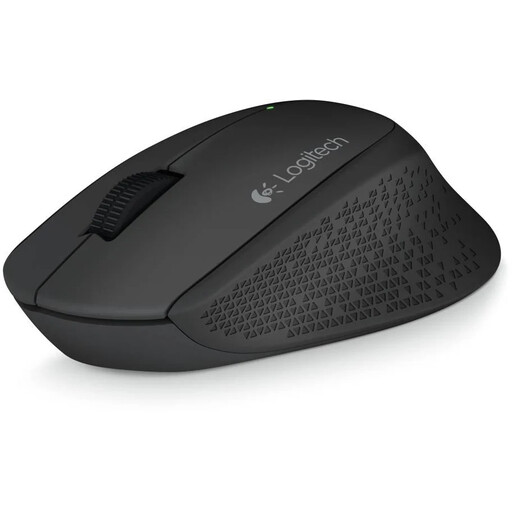
Why it suits this profile: This mouse uses a 2.4 GHz nano receiver and is suitable for straightforward everyday use at home or in the office.
The specifications state that it has a 1000 DPI optical sensor, a range of up to 10 metres and one AA battery. This makes the basic functions clear.
Right-handed design, rubber grip, three buttons and a wireless range of up to 10 metres.
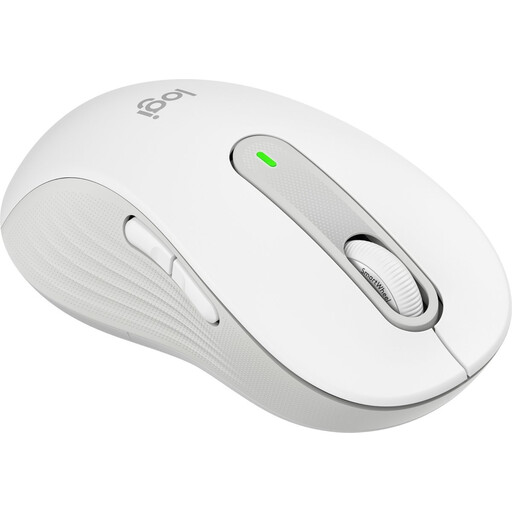
Why it suits this profile: The left-handed design and larger dimensions are ideal for users who want more room for their hand and additional features.
The connection, hand orientation and number of buttons are clearly specified. Logitech refers to SilentTouch technology; the claim about noise reduction comes from the brand.
Bluetooth Low Energy and Logi Bolt, five buttons, 2000 DPI and a stated battery life of up to two years.
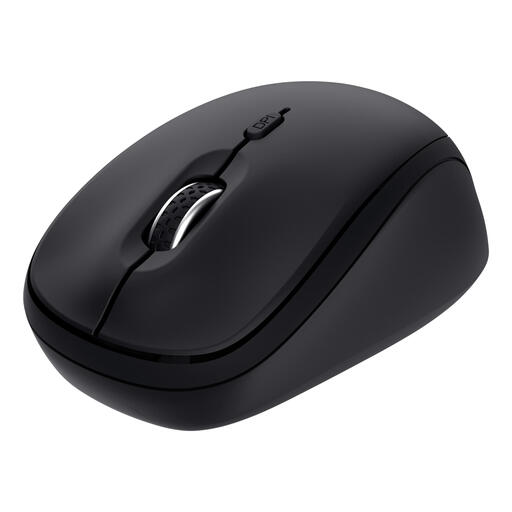
Why it suits this profile: People working from home and mobile users can pair a laptop, PC and tablet at the same time and switch between them at the touch of a button.
The product specifications list three connection options: one 2.4 GHz USB receiver and two Bluetooth channels. The quiet buttons and DPI switch are also explicitly mentioned.
800/1600 DPI, 55 grams, support for Windows, macOS, Android, iOS, iPadOS and ChromeOS, plus a stated battery life of up to 12 months.
We’ve put together a complete, up-to-date list of products that fully meet these strict selection criteria and the applicable European safety regulations.
Yes, provided the model supports Bluetooth and your devices are compatible. A mouse with only a 2.4 GHz receiver will generally work with devices that have a suitable USB port. For switching between a laptop, PC and tablet, a multi-device model is more practical.
This varies by model and usage. The product specifications for the models mentioned give expected battery lives of approximately 12 to 24 months. This remains a stated operating time: frequent movement, long working days and disabling sleep mode can drain the battery more quickly.
For most office programs, browsers and study activities, 1600 DPI is a useful upper limit. An adjustable mouse allows you to switch back to 800 DPI when you want more control. For normal work, a higher DPI setting is not automatically the better choice.
