
Vandaag of morgen in huis

Kwaliteit gegarandeerd

Welkomstaanbiedingen ontgrendelen: GRATIS bezorging | Tot 80% korting | Gratis 30 dagen JoyPlus-proefperiode
Download de app
A quiet wireless mouse may seem easy to choose: look for “silent click”, check the price and place your order. However, there are a few pitfalls that can make a mouse less comfortable to use than expected. For example, a receiver that takes up a USB port, a compact shape that is too small for everyday use or a battery life that is only achieved under ideal conditions.
In this buying guide, compiled by the Joybuy Product Recommendation Officer, we compare practical specifications. That way, you can find a quiet computer mouse to suit your laptop, workspace and working routine.
Brands use terms such as silent click or quiet buttons for buttons that produce less clicking noise. This does not mean that the scroll wheel, casing or every mouse click is completely silent. According to Trust’s product description, the Yvi+ has quiet buttons for use in shared or quiet spaces. Think of this as low-noise operation, not a guarantee of complete silence.
A wireless mouse with a USB receiver usually uses a 2.4GHz radio connection. It is simple to use: plug in the receiver, switch on the mouse and get to work. If your laptop only has USB-C ports, you may need an adapter.
Bluetooth eliminates the need for a separate receiver, but it requires pairing and is not supported by every model. Before buying, check whether you have a USB-A port or whether Bluetooth is essential for you.
A compact wireless mouse fits easily into a laptop bag. The downside is that it provides less support for your hand. This can be practical for short sessions, studying and travelling. If you work for several hours every day, it is better to consider the mouse’s width, height and shape. An ergonomic or vertical mouse often has a larger design and requires a short adjustment period.
Check that the model works with your operating system and connection type. According to the product information, the Trust Yvi+ works with Windows, macOS and ChromeOS and uses plug-and-play via a USB micro receiver. No additional software or driver is required for the basic installation.
A Bluetooth model such as the HP 240 works without a dongle and uses Bluetooth 5.1. This is useful for a slim laptop or tablet, as long as Bluetooth is available.
DPI indicates how sensitive the optical sensor is. A 1600 DPI mouse moves the cursor further with the same hand movement than a mouse set to 800 or 1000 DPI. For word processing, spreadsheets and browsing, settings between 800 and 1600 DPI are generally useful.
A higher DPI is not automatically more useful. Gaming models with 18,000 or 24,000 DPI are designed for specific settings and additional features. For a quiet office mouse, an adjustable setting between 800 and 1600 DPI is often easier to manage.
A mouse with one AA or AAA battery is ready to use straight away, but you will need to replace the battery over time. According to the product specifications, the Trust Yvi+ uses one AA battery and has a stated battery life of up to 12 months with average use. An on/off switch can help reduce unnecessary power consumption.
A rechargeable mouse eliminates the need for loose batteries, but it needs to be connected to a cable regularly. The Trust Ozaa Compact, for example, has a built-in battery and charges via USB-C. So do not just look for “long battery life”; also consider the power source and whether you prefer charging or replacing batteries.
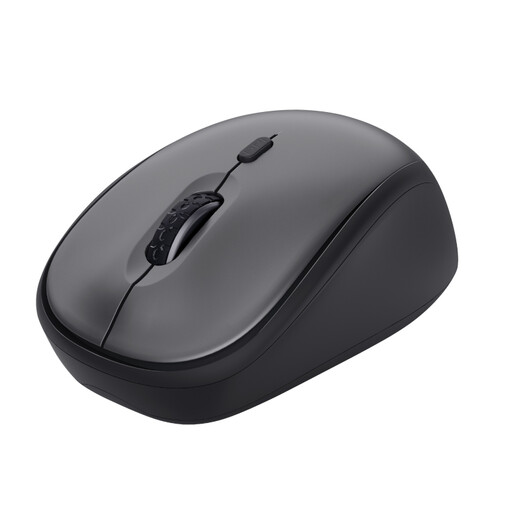
Why it suits this profile: This quiet wireless mouse is compact, works via plug-and-play and has an adjustable DPI range of 800 to 1600. This makes it suitable for students, homeworkers and everyday office work without complicated installation.
The USB micro receiver can be stored inside the mouse, making it less likely to get lost while travelling. According to Trust, the quiet buttons are intended for peaceful workspaces.
Dimensions of 95 × 57 × 40 mm, weight of 84 grams, 8 metres of wireless range and one AA battery with a stated battery life of up to 12 months with average use.

Why it suits this profile: This model is designed for users who switch between a laptop, desktop and tablet. The combination of a USB receiver and Bluetooth offers more connection options than a basic office mouse.
You are not limited to Bluetooth or a dongle alone. According to the product information, the mouse supports up to three paired devices and has a rechargeable battery.
Up to 3200 DPI, six buttons, quiet buttons, USB-C charging and an additional horizontal scroll wheel for wide spreadsheets.
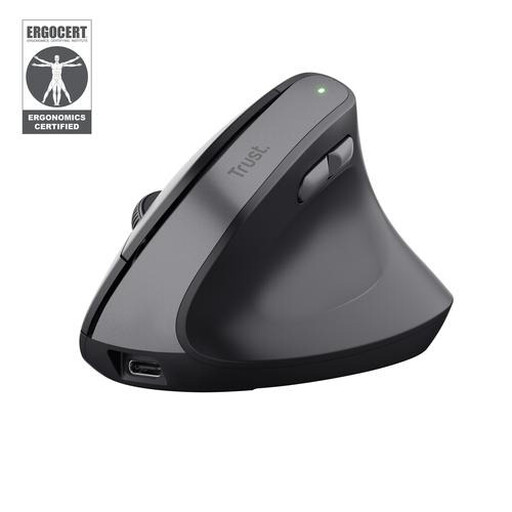
Why it suits this profile: The vertical shape is designed for right-handed users who want to try a different hand position during long working days. This model is larger than a compact travel mouse and therefore requires more space on your desk.
The shape means you do not have to work with a small, flat model. According to the product description, the mouse has a 57-degree angle, quiet buttons and a USB receiver that can be stored inside the mouse.
Adjustable from 800 to 2400 DPI, two quiet main buttons, two thumb buttons and a built-in rechargeable battery.
We have put together a complete, up-to-date list of products that fully meet these strict selection criteria and the applicable European safety regulations.
That depends on the connection type. A model with a USB receiver will usually work as soon as you plug the receiver into an available USB port and switch on the mouse. If your laptop does not have a USB-A port, you may need a USB-C adapter. A Bluetooth mouse needs to be paired via your laptop’s Bluetooth settings.
Battery life varies depending on the model, battery type and usage. Trust states that the Yvi+ lasts up to 12 months with one AA battery under average use. This is a stated maximum, not a fixed guarantee for every user. An on/off switch helps limit power consumption during transport or longer breaks.
For browsing, word processing, video calls and spreadsheets, 1600 DPI is often sufficient. A lower setting, such as 800 or 1000 DPI, may feel more comfortable when you want greater pointing precision. Above all, check for a DPI switch so that you can adjust the speed to suit your screen and working style.
