
If keeping noise down matters to you
You work on tables and relationships while others are using the study or an adjoining room. Factor in the sound of the keys, but don’t treat manufacturers’ descriptions as sound measurements.


For working on database schemas in a quiet study, a flat scissor-switch keyboard is a sensible choice if quiet typing and a familiar layout come first. An adjustable mechanical model suits anyone who wants to change key functions or switches. Manufacturers’ claims about quietness aren’t comparable sound measurements, so check the exact version, keyboard layout and noise level of the complete keyboard.
You work on tables and relationships while others are using the study or an adjoining room. Factor in the sound of the keys, but don’t treat manufacturers’ descriptions as sound measurements.
You use programming characters, arrow keys and keyboard shortcuts. A familiar physical layout and the configured keyboard layout may matter more than a compact size.
You rarely use the numeric keypad and want more room beside your keyboard. A TKL model is worth comparing, as long as you can work without the numeric keypad.
A good fit for: anyone looking for a familiar layout and a low-profile feel. CHERRY describes the keystroke on its STREAM models as quiet.
Bear in mind: the TKL version has no numeric keypad and is wired. CHERRY’s description isn’t a comparative sound measurement.
A good fit for: anyone who values a tidy desk or switching between devices. Trust lists a USB receiver for the Ody II 25011, while Logitech describes device switching for the MX Keys S.
Bear in mind: check that your computer supports the required connection and that you can use the software for any extra features you want. Manufacturers’ descriptions of sound aren’t comparative tests.
A good fit for: anyone who wants to customise key functions or replace switches. Keychron lists these options for the V6 Max.
Bear in mind: check which switches come with the version you choose. The Gateron Jupiter variants aren’t the same as the separately sold Keychron Silent Switch.
| What to consider | What to check before buying | Who is this important for? |
|---|---|---|
| Quiet typing | Check the exact switch variant and, where possible, assess the sound of the complete keyboard in a similar room. | If I type while others are working in or next to the study, I want to factor in the sound of the keys without treating a claim of quietness as a measurement. Around 36% of consumers say quiet typing is their top priority. |
| Programming characters and navigation | Compare the key labels and navigation keys with those on your current keyboard, and check the configured input layout too. | If I use lots of characters, arrow keys and keyboard shortcuts in an editor, I want to know where they are on the layout I choose. Around 29% of consumers prioritise a familiar editor layout. |
| Desk space and numeric keypad | Consider how often you enter numbers using a separate numeric keypad and check the dimensions of the version you’re considering. | If I want to free up space for my mouse or notes and rarely use the numeric keypad, TKL could work for me. Around 21% of consumers say available desk space is their top priority. |
| Customisable functions and connection | Check which features the exact version supports, and whether your computer supports the required connection and any configuration software. | If I want to customise keys or switch between devices, I want to know in advance which options suit my computer and the way I work. Around 14% of consumers prioritise customisability or their preferred connection. |
CHERRY and Trust describe specific keyboards as quiet, but that doesn’t tell you how those models compare with each other or how they’ll sound in your study.
Check the exact version and, if possible, assess the complete keyboard in a similar room.
The CHERRY STREAM KEYBOARD TKL doesn’t have a numeric keypad. This could be an issue if you often enter numerical data.
Consider how often you use the numeric keypad and compare that with the space you’d free up with a TKL model.
The Gateron Jupiter variants listed by Keychron for the V6 Max don’t have the same product name as the separately sold Keychron Silent Switch.
Check which switch is fitted to the version you choose and whether any replacement switch is compatible.
The STREAM KEYBOARD and STREAM KEYBOARD TKL are worth considering if you want to compare low-profile keys in a full-size or TKL layout.
The MX Keys S is worth considering if you want to switch wirelessly between devices or set up supported shortcut actions.
The Ody II 25011 is a full-size wireless keyboard for anyone who wants to use a USB receiver.
The V6 Max is worth considering if you’re looking for a mechanical keyboard with customisable keys and replaceable switches.
This selection includes TKL and full-size keyboards with a numeric keypad, with both mechanical and low-profile options. Above all, compare the layout, connection and switch configuration with your own workspace.
 No image available
A TKL option for anyone looking for adjustable keys and a US ANSI QWERTY layout.
The product information lists adjustable magnetic switches, programmable keys, sound-dampening foam layers and a wired USB-C connection. TKL models don’t have a separate numeric keypad, and foam layers aren’t a comparative sound measurement.
 No image available
A compact option if you’re considering a TKL layout and linear switches.
The product information lists linear TITAN switches, a wired USB-C connection and an AZERTY layout. The description says the keystroke is quiet; this isn’t a comparative sound measurement.
 No image available
A mechanical TKL option if you want programmable keys and use a BE AZERTY layout.
The product information lists linear MLX Red switches, programmable keys, a rotary dial and a wired USB-C connection. The description mentions two sound-dampening foam layers; this isn’t a comparative sound measurement. There’s no separate numeric keypad.
 No image available
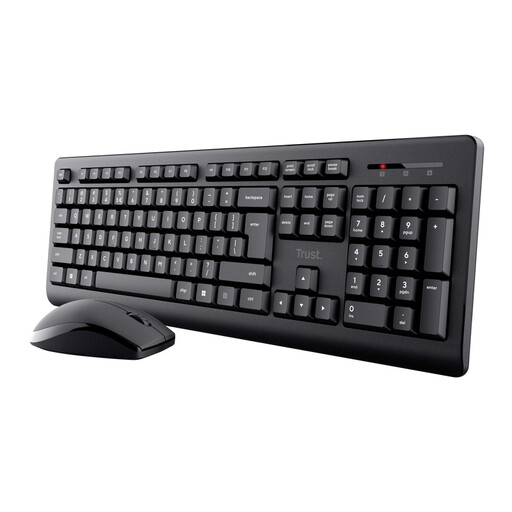
An option if you’re looking for a full-size wireless keyboard with a numeric keypad.
The product information lists low-profile keys, a USB receiver and a US QWERTY layout. The keys are described as quiet; this isn’t a comparative sound measurement. You’ll need a compatible USB port for the receiver.
 No image available
An option if you’re looking for a Dutch QWERTY layout, a numeric keypad and navigation keys.
The product information lists Bluetooth, a rechargeable battery and keys for document navigation. This version is designed for Mac models with Apple silicon.
Before buying, compare the labels and physical layout of the exact version with the keyboard you’re used to. If your input layout differs, check the keyboard layout configured in Windows too; Microsoft Support points out that it can change when you change language settings.
Yes, but the CHERRY STREAM KEYBOARD TKL doesn’t have a separate numeric keypad. If you use one often, compare it with a full-size version, and check that the TKL model’s connection is compatible with your computer.
It depends on the feature you want and the version you choose. Trust describes the Ody II 25011 as connecting through a USB receiver; Logitech specifically lists Logi Options+ for Smart Actions on the MX Keys S. Check which features are available without additional software.
According to the Dutch government, many distance purchases from businesses come with a 14-day cooling-off period, although there are exceptions. If a product is faulty, the Dutch government says you’re entitled to a free repair or replacement.
According to Ondernemersplein, keyboards with Bluetooth or a radio-frequency module are covered by the rules for radio equipment. The government outlines manufacturers’ obligations for electrical equipment, including CE marking and an EU declaration of conformity. Check the product and conformity information for the specific version; a statement on a sales page doesn’t, by itself, prove compliance.