What should you look for when buying?
One wired USB headset
Choose this if: you mainly want to listen back to your own voice on a computer with a compatible USB connection.
Bear in mind: having the microphone boom close to you doesn’t guarantee that a quiet conversation partner further away will also be picked up clearly.
A microphone close to each speaker
Choose this if: you both speak quietly and want to assess both voices separately.
Bear in mind: recording both at the same time requires compatible hardware, drivers and software; two USB headsets won’t automatically give you two tracks.
One shared microphone
Choose this if: you want one shared conversation track and a test recording shows that both voices are clear from the distance you normally sit apart.
Bear in mind: the greater distance from both speakers can affect the balance between direct voices, room noise and reverberation.
First decide which voices you need on the file. Then check the connection and microphone settings, and listen back to a saved test recording.
| What to consider |
What should you check? |
Who is this important for? |
| Recording your own voice |
Check that the microphone boom can sit close to your mouth, and make a test recording using the input you’ve selected. |
If I want to hear my own quiet pronunciation without speaking more loudly, I’ll focus on how close the microphone sits to my mouth. Around 36% of consumers prioritise clearly recording their own voice. |
| Recording both voices |
Check that each speaker has a nearby microphone and that the hardware and software can capture both signals. |
When we both speak quietly, I want to be able to assess whether both voices are clear. Around 36% of consumers prioritise recording both voices. |
| Connection and recording |
Compare the connection on the exact model with the port on your device, and check which input is selected in the app. |
If I want my headset, device and recording app to work together, I’ll check the connection and the saved file first. Around 18% of consumers prioritise a working connection and recording. |
| Comfort and controls |
Check the fit and position of the mute control, and whether the microphone is active after reconnecting. |
For repeated practice sessions, I want a headset that’s comfortable to wear and makes it easy to check the microphone status. Around 10% of consumers prioritise comfort and ease of use. |
Joybuy products
These are wired USB headsets for use with a computer, aimed at recording the wearer’s voice. A product listing doesn’t prove that a quiet conversation partner will also be recorded clearly.
 No image available
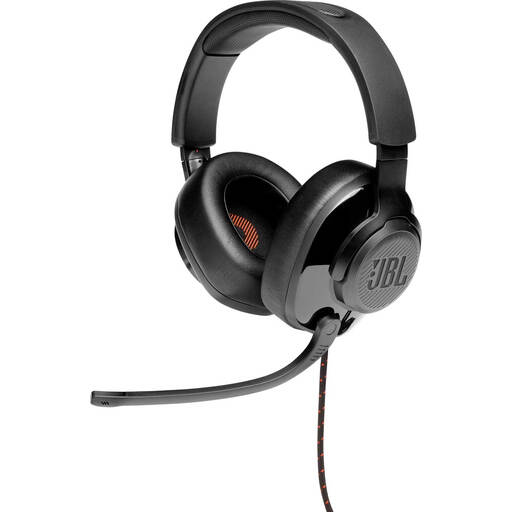
JBL Quantum 300 Hybrid wired over-ear gaming headset
An option for practising your own voice on a computer; the product information lists a directional microphone boom and an included USB audio adapter.
The microphone flips up to mute. The stated features don’t prove that both quiet voices will be recorded clearly.
View at Joybuy
 No image available
Logitech PC 960 USB headset
For anyone who wants to record their own voice and position the microphone boom as needed.
The product information lists in-line volume and mute controls, a mute indicator and a lightweight design with soft ear cushions. Check that the microphone is active before you record.
View at Joybuy
 No image available
Logitech H340 USB headset, black
A wired USB option for anyone who wants to practise their own voice on a computer and adjust the microphone position.
The product description lists an adjustable microphone, a lightweight adjustable headband and plug-and-play USB. Check that your recording app is using the headset as its input.
View at Joybuy
 No image available
Kingston USB Hi-Fi headset with microphone
For anyone looking for a USB headset with an adjustable microphone boom to record their own voice.
The product description lists a microphone boom that rotates through 270 degrees, a 1.8 m USB cable and an adjustable, padded headband. Check compatibility with your device and recording app.
View at Joybuy
 No image available
Trust Ayda USB headset, USB-A with USB-C adapter cable
An option for computer use if you want to record your own voice and can connect the headset to a compatible USB port.
The product description lists USB-A with a USB-C adapter cable, volume and mute controls, and a flip-up microphone. The stated noise cancellation doesn’t prove the recording quality for two quiet speakers.
View at Joybuy
Frequently asked questions
Can one headset clearly record the quiet voices of both conversation partners?
Not necessarily: the microphone boom sits close to the wearer but further away from the other speaker. Shure explains why microphone distance and placement matter, so make a test recording at the distance you normally speak from. If both voices matter, look into microphones placed closer to both speakers.
How can I check whether the headset is recording my practice session?
Select the headset as the input in your recording app, check the mute setting and listen back to a saved test recording. If you’re using several microphones, also check that your chosen hardware and software can capture all the signals.
Can I connect two USB headsets and automatically record two separate tracks?
Don’t assume so. According to the Audacity manual, multichannel recording, particularly on standard Windows systems, requires compatible hardware and drivers, as well as software that can work with them.
Can I record and share a practice conversation in the Netherlands?
Published guidance from the Municipality of Enschede states that recording a conversation you’re taking part in isn’t a criminal offence, and recommends informing the other person beforehand. The Dutch Data Protection Authority says that processing data purely for personal or household use falls outside the GDPR. Don’t take this as general permission to publish a recording in which someone can be identified; discuss the purpose and any plans to share it with the other person in advance.
What can I do if a headset I bought online doesn’t work properly?
According to ACM ConsuWijzer, online purchases generally come with a 14-day cooling-off period after delivery, although exceptions may apply. The seller must also remedy, free of charge, any product that doesn’t meet what you could reasonably expect under normal use, in line with the statutory guarantee. Check the applicable returns policy and distinguish between the cooling-off period and a problem with the product.


