
Student sharing a room
If you’re organising recipes while someone else studies or sleeps in the same room, quiet clicks can be helpful. Compare the connections available on quiet Bluetooth, receiver and wired mice too: they’re not all the same.


Start with the connection type: Bluetooth keeps a USB port free, a USB receiver needs a compatible port, and a wired mouse won’t need a battery to be charged or replaced. Quiet buttons are useful in a shared room. For longer sessions, fit and hand preference matter, but an ergonomic claim doesn’t guarantee a pain-free workspace.
If you’re organising recipes while someone else studies or sleeps in the same room, quiet clicks can be helpful. Compare the connections available on quiet Bluetooth, receiver and wired mice too: they’re not all the same.
If you want to browse recipes without a cable or an extra USB receiver on your desk, check that your laptop supports Bluetooth. Logitech and Trust describe Bluetooth mice that don’t need a USB receiver.
For longer sessions involving lots of scrolling and clicking, how the mouse feels in your hand and varying your working posture may be worth considering. Arboportaal identifies repetitive movements and static postures as things to be aware of when working at a screen.
Start with the connection available on your laptop or computer. Then weigh up click noise, fit and battery use in relation to your workspace.
| What to consider | What to look for when buying | Who is this important for? |
|---|---|---|
| Click noise in a shared room | Check whether the buttons on this exact version are described as quiet; don’t assume they are just because the mouse is ‘wireless’. | If I’m browsing recipes next to someone who’s studying or sleeping, I want to keep click noise down. Around 31% of consumers make quiet clicks their top buying priority. |
| Connection and available ports | Check whether the mouse uses Bluetooth, a USB-A receiver or a USB cable, and whether your device supports it. | If I have few free ports, I want to know whether my laptop supports Bluetooth before choosing a mouse. Around 31% of consumers prioritise the connection type and port use. |
| Hand comfort during longer sessions | Consider the size, your hand preference and how easy the buttons are to reach. If possible, try the shape to see whether it suits your hand. | When I’m doing lots of scrolling and data entry, I want a mouse that feels comfortable in my hand, without assuming one shape works for everyone. Around 23% of consumers put hand comfort first. |
| Use without changing or charging a battery | Compare a wired connection with the battery type used by wireless models, and check that the cable will reach your workspace. | If I work in one place and don’t want to change or charge a battery, a wired mouse could be a good fit. Around 15% of consumers prioritise simple use without battery maintenance. |
The standard Logitech M240 Silent Bluetooth is a different version from the separately sold M240 for Business with Logi Bolt.
Before buying, compare the full model name, connection type and what’s included in the box.
According to HP, the HP 280 Silent uses a dongle and needs a free USB-A port. That’s different from the Bluetooth mice reviewed that don’t need a receiver.
Check your device’s ports and the connection type of the exact mouse version.
A product claim doesn’t prove that a mouse prevents discomfort. Arboportaal also identifies repetitive movements and static postures as things to be aware of when working at a screen.
Consider the fit and your hand preference, and pay attention to your workspace setup and varying your posture.
According to Logitech, the Logitech M240 uses one AA battery; Trust says the wireless Trust Bayo II has a rechargeable battery. A wired mouse works without a wireless power source.
Choose a battery, rechargeable battery or cable that suits how often you move and use your mouse.
The M240 Silent Bluetooth is one option for a small workspace where quiet clicks and a free USB port matter. Don’t confuse the standard Bluetooth version with the separate M240 for Business.
The models reviewed offer different connections and shapes: the Primo Bluetooth, the wired Basi and the wireless vertical Bayo II.
The HP 280 Silent Wireless Mouse uses a receiver, making it an option if you want quiet clicks and have a free USB-A port.
These Joybuy picks focus on quiet mice for browsing and organising recipes, with a range of connection types and shapes.
 No image available
An option if you want quiet clicks and your computer has a free USB-A port for the receiver.
The product information lists a 2.4GHz connection via dongle, one AA battery and a range of up to 10 metres. It also describes the mouse as having a symmetrical shape.
 No image available
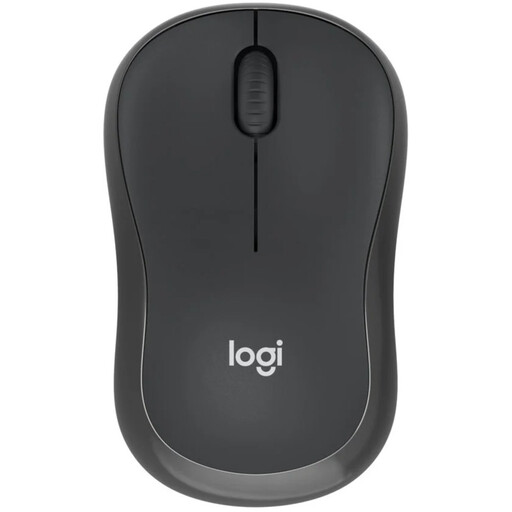
A Bluetooth option if you want quiet clicks without using a USB port for a receiver; check that your device supports Bluetooth.
Logitech describes the standard M240 Silent Bluetooth as receiver-free and powered by one AA battery. The product information describes it as compact and suitable for left- and right-handed users.
 No image available
The title describes a quiet mouse with 2.4G+BT; check which connection works with your computer before choosing how to connect.
The product name specifies an AA battery. The product information lists adjustable DPI settings.
 No image available
A compact quiet mouse to consider if you have limited desk space. Before buying, check which connection is suitable for your device.
The product information says it’s suitable for left- and right-handed users and has adjustable DPI up to 4020. RF requires a receiver; Bluetooth is the other connection option listed.
 No image available
A compact option if you want quiet buttons and your computer can use a USB micro receiver. According to the product information, this version doesn’t have Bluetooth.
The product name specifies 1600 DPI. The product information lists an AA battery and a receiver that can be stored inside the mouse.
Yes, if your laptop supports the Bluetooth connection used by your chosen mouse. According to their manufacturers, the standard Logitech M240 Silent Bluetooth and Trust Primo Bluetooth don’t need a USB receiver. The HP 280 Silent, on the other hand, uses a dongle and needs a free USB-A port.
No, there’s no general guarantee that any one mouse will prevent discomfort. Arboportaal identifies repetitive movements and static postures as things to be aware of when working at a screen. Consider whether the shape suits your hand and workspace, and vary your posture. Trust’s claim that the Bayo II reduces strain is a product claim.
Start by choosing the connection: use Bluetooth if your device supports it, plug a receiver into the required port, or connect a wired mouse to USB. Also check whether a wireless model uses a replaceable battery or rechargeable battery, and follow the manufacturer’s cleaning instructions.
For a purchase made by a consumer in the Netherlands, the retailer is responsible for the statutory guarantee. If a product doesn’t do what you could reasonably expect during normal use, you may be entitled to a free repair, replacement or, in some cases, a refund. ACM ConsuWijzer explains that a manufacturer’s guarantee doesn’t replace this statutory right.
Take an old electric mouse to a separate collection point and don’t put flat batteries in general waste. The Dutch government describes free take-back of a similar old device when buying a new one as a private consumer. Flat batteries can also be taken to shops that sell batteries.