
The quiet writer
You write or edit alongside other people and mainly want to reduce audible clicks. Check which buttons are quiet; this doesn’t mean the entire mouse is silent.


Choose a mouse with quiet main buttons, a connection type and a shape that suit your shared workspace. Bluetooth keeps a USB port free, while a USB receiver needs a compatible port. A vertical mouse is worth considering only if its shape feels right for your hand.
You write or edit alongside other people and mainly want to reduce audible clicks. Check which buttons are quiet; this doesn’t mean the entire mouse is silent.
You take your mouse with you or use different computers. Check whether Bluetooth, a USB receiver or both will connect to the devices you use.
You spend longer working at a screen and want a mouse shape that suits your hand. The Arboportaal also recommends setting up a new workspace again and varying your posture.
Start with the connection options on the computer you write on, then consider click noise and fit. That way, you can avoid choosing a quiet mouse that isn’t practical for your workspace.
| What to consider | What to look for when buying | Who is this important for? |
|---|---|---|
| Click noise around others | Check whether the left and right buttons are quiet. If possible, also assess the sound of the scroll wheel and the mouse moving across your desk. | If I write alongside others, I mainly want to reduce audible clicks. Around 36% of consumers name quiet operation as their top buying priority. |
| Connection to the computer | Check which ports are available and whether the exact mouse model uses Bluetooth, a USB receiver or both. | When I switch between computers, I want to know in advance which connection I can use. Around 29% of consumers put connectivity at the top of their list. |
| Fit and working posture | Consider your hand size and whether the mouse is designed for left- or right-handed use. Also reset the shared desk to suit you. | If I write for longer, I want a shape that suits my hand and a properly set-up workspace. Around 21% of consumers prioritise fit. |
| Portability and battery | Check the size, battery type, whether a battery is included and whether the receiver can be stored inside the mouse. | I want to take my own mouse with me easily and know what battery maintenance it needs. Around 14% of consumers give portability and maintenance top priority. |
Manufacturers may describe clicks or buttons as quiet. That doesn’t tell you how much noise the scroll wheel makes or how loud the mouse is on your desk.
Check which buttons are quiet and, if possible, try the mouse on the surface you plan to use it on.
Models with similar names may have different connection options. For example, Trust says the Yvi+ Multi-device has both Bluetooth and 2.4 GHz, while another Yvi+ listing mentions only RF via USB.
Compare the full model name, connection specifications and box contents.
The Logitech Lift is designed for small to medium-sized hands and is also available in a left-handed version. A different mouse shape also doesn’t replace setting up your workspace again or varying your posture.
Check that you’re choosing the right-handed version for you, assess the fit and reset the shared desk to suit you.
The M240 Silent is a compact Bluetooth option with no receiver, while the Lift is a separate vertical model for anyone deliberately looking for a different shape.
The Yvi+ Multi-device is an option for switching between devices, while the Mydo is a separate model with quiet buttons and a USB receiver.
The HP 280 Silent is an example of a mouse with quiet clicks and a receiver.
The M100 Silent is an example of a mouse with quiet clicks and several stated connection options.
These mice are suited to quiet writing at a shared desk, with options for Bluetooth, a USB receiver or a vertical shape. Check that the connection type and fit of each version suit your workspace.
 No image available
An option for anyone looking for quiet clicks and able to use a USB receiver. Check that your computer has a compatible USB port.
 No image available
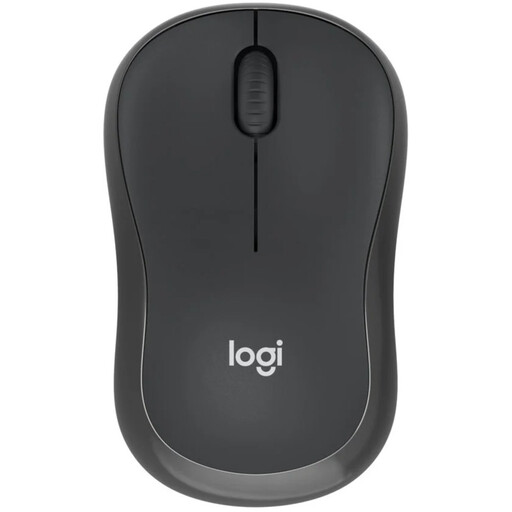
For anyone who wants to work without a receiver, the M240 Silent connects via Bluetooth. The computer you use must support Bluetooth.
 No image available
A good fit for anyone who wants to work quietly and choose between RF and Bluetooth. Check which connection is available on the computer you use; RF requires the dongle.
 No image available
For anyone who wants to switch between devices and needs Bluetooth or a USB receiver. Check which connection is available on your computer; the receiver needs a spare USB-A port.
 No image available
A vertical option for anyone who wants to try a different hand position. Check that this right-handed version suits you and your small to medium-sized hands.
Choose based on the computer you actually use. According to Logitech, the Logitech M240 Silent connects via Bluetooth without a receiver, while Trust describes the Yvi+ Multi-device as having Bluetooth and 2.4 GHz. Check which connection your computer supports and which version you’re choosing.
No. A claim about quiet clicks or buttons doesn’t automatically tell you anything about the scroll wheel or the noise the mouse makes on your desk. Check which parts the manufacturer describes as quiet and, if possible, try the mouse on your surface.
First, review your workspace set-up and vary your posture. If you’re considering a vertical mouse, check the hand size it’s designed for and whether it’s made for left- or right-handed use. Logitech positions the Lift for small to medium-sized hands.
Check the battery type and what’s included with the version you choose, and store the receiver with the mouse when you’re not using it. Logitech’s stated 18-month battery life for the M240 isn’t a guarantee of how long it will last for you.
According to ACM ConsuWijzer, online purchases generally come with a statutory cooling-off period of up to 14 days after delivery; check whether an exception applies. You may also be covered by the statutory guarantee if the product doesn’t perform as you could reasonably expect under normal use.