Who is this mouse for?

Quietly selecting photos

You organise images in a quiet space and mainly want to reduce audible clicks, without paying for features you won't use. Logitech, Trust and CHERRY describe specific mice as having quiet buttons; these are manufacturers' claims, not comparative sound measurements.

Working with large folders or timelines

You often browse large photo folders or use software with a horizontal timeline. In that case, a thumb or side scroll wheel may be useful. Also check whether your software supports the controls you want.

Long study sessions

You use your mouse for extended periods and want a shape that suits your hand. Fit is personal. Arboportaal notes that prolonged computer work involves repetitive hand movements and static strain; changing your mouse alone won't prevent discomfort.

What should you look for when choosing?

Simple, quiet operation

Choose this if: you mainly click and organise photos, and quiet main buttons are important to you.

Bear in mind: a claim about quiet main buttons doesn't necessarily apply to the scroll wheel; also check the size and hand orientation.

Extra controls for timelines

Choose this if: you regularly scroll horizontally through a timeline or want to customise extra buttons.

Bear in mind: a side or thumb scroll wheel isn't necessary for every gallery; check the specific model and whether your software supports it.

Wired, with no battery management

Choose this if: your computer has a spare USB-A port and you don't want to manage a wireless connection or batteries.

Bear in mind: a cable will be part of your workspace; also check that the mouse has the controls you need.

Point to consider What should you check? Who is this important for?
Noise level Check which buttons the manufacturer describes as quiet, and assess the scroll wheel too if possible. If I'm selecting lots of photos in a quiet room, I mainly want to reduce the clicking noise. Around 36% of consumers put click noise first.
Scrolling and navigation Check whether your gallery supports horizontal scrolling and whether you can customise extra controls. When I'm navigating large folders or a wide timeline, I want the controls to suit the task. Around 29% of consumers prioritise navigation controls.
Fit for your hand Check the hand orientation, size and shape of the specific model. If you work for long periods, vary your posture and movements too. During longer sessions, I want a mouse that suits my hand, without assuming one shape works for everyone. Around 21% of consumers consider hand fit the most important factor.
Connection and power Check your computer's ports, Bluetooth support and the power requirements of the model you've chosen. If I don't want a separate receiver or battery management, I want to know in advance how the mouse connects to my computer. Around 14% of consumers put connection and power first.

Things to watch out for when buying

  • ‘Quiet clicks’ doesn't automatically mean the whole mouse is silent

    A manufacturer's claim about clicks doesn't tell you how much noise the scroll wheel or contact with the desk makes. For the MX Master 3S, Logitech compares the sound of left and right clicks with the MX Master 3, measured at 1 metre. This isn't a comparison with other brands or of the whole mouse.

    Check which parts the noise claim applies to and, if possible, try the mouse as a whole.

  • Don't buy based on the model name alone

    A series can include different sizes and hand orientations. Models with the same name may also differ in their connection or the receiver included in the box.

    Compare the full model name, hand orientation and box contents on the product page for the version you're choosing.

  • Check the connection and power as well as the features

    A wired mouse may require USB-A; a wireless model may need a receiver, Bluetooth, or battery and charging management.

    Check your computer's ports and connection options, and see how the specific model is powered.

Brands to compare

Logitech

The Signature M650 series and MX Master 3S offer different control options. This applies to the models mentioned, not necessarily to every Logitech mouse.

  • Logitech describes the M650 series as having different hand sizes and a SmartWheel; according to the manufacturer, the MX Master 3S has a thumb wheel.
  • For the M650, check the size; for the MX Master 3S, check the exact model and box contents. Logitech's sound comparison for the MX Master 3S is against the MX Master 3 and was measured at 1 metre.

Trust

The Trust Mydo is a simple wireless option; according to Trust, the larger Ozaa+ offers extra controls and connection options.

  • Trust describes the Mydo as having two quiet main buttons and adjustable cursor speed. According to Trust, the Ozaa+ has a side scroll wheel.
  • With the Mydo, check that you have a suitable port for the receiver; with the Ozaa+, see whether the larger size suits your hand. Claims about quietness and comfort are made by the manufacturer.

CHERRY

According to CHERRY, the GENTIX Silent is a wired option with quiet buttons, so there's no need for wireless pairing or battery management.

  • CHERRY specifies a 1.8 m USB-A cable and three buttons.
  • The manufacturer doesn't list thumb buttons. Check that USB-A and the system requirements are compatible with your computer; the quiet-button claim isn't an independent sound comparison.

Joybuy products

This selection includes mice described as having quiet-click or scrolling features, as well as models with extra navigation controls or design features. Check the features, connection and power requirements for each version.
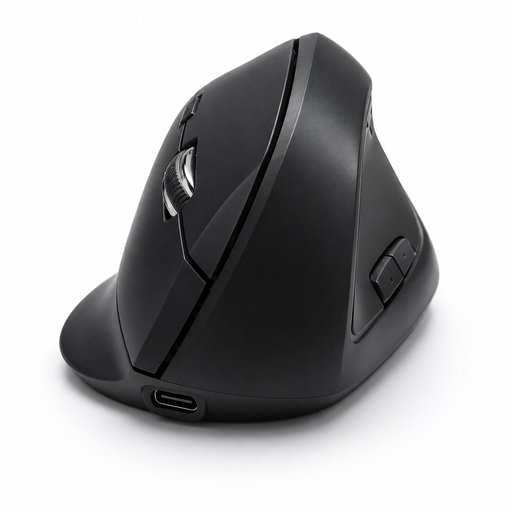
Vertical wireless mouse with USB-C, Bluetooth and 2.4 GHz

Vertical wireless mouse with USB-C

Suited to anyone looking for a vertical mouse with adjustable cursor speed.

The title specifies USB-C charging and connection via Bluetooth or 2.4 GHz. Three DPI settings are listed: 800, 1200 and 1600. The product description mentions six programmable buttons and forward and back buttons.

View at Joybuy
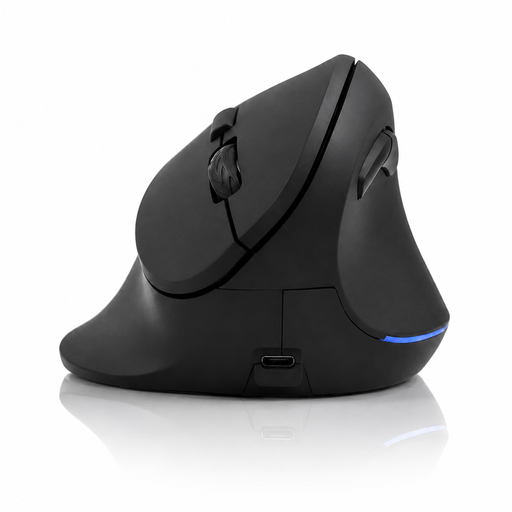
Vertical wireless mouse with six buttons and four-way scroll wheel

Vertical wireless mouse with six buttons

Suited to anyone who wants extra navigation in multiple directions; check that the controls work with the software you use.

The product description mentions a four-way scroll wheel and quiet scrolling; this is a product claim. It also lists DPI settings of 800, 1200 and 1600, and USB-C charging. The title specifies a 2.4 GHz connection.

View at Joybuy
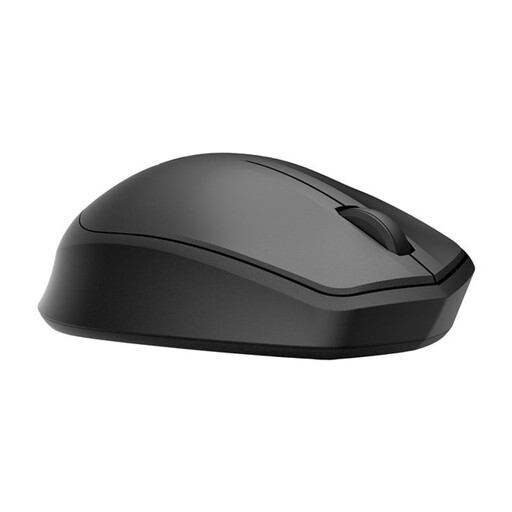
HP 285 Silent Wireless Mouse

HP 285 Silent Wireless Mouse

Suited to anyone looking for a wireless mouse with a symmetrical shape; check which connection option your computer supports.

The product description lists a symmetrical shape, adjustable DPI up to 4020, and Bluetooth or a dongle. According to the description, the noise claim applies to the main buttons and isn't based on an independent measurement. The RF connection via dongle requires a USB port.

View at Joybuy
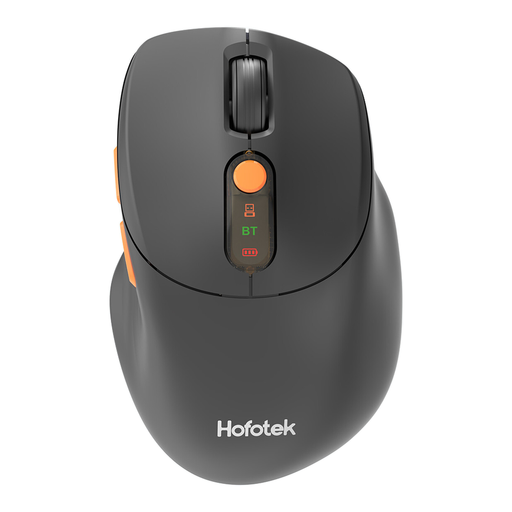
HOFOTEK M311 wireless mouse

HOFOTEK M311 wireless mouse

Suited to anyone who wants to work wirelessly and adjust cursor speed or connection to suit their needs.

The description claims quiet clicks, lists DPI settings from 800 to 4000, and specifies a 2.4 GHz or Bluetooth connection. It also mentions use with up to three devices, a weight of 62 g and one AA battery.

View at Joybuy

DELL Pro Compact Silent Mouse MS355

DELL Pro Compact Silent Mouse MS355

Suited to anyone looking for a compact mouse with a symmetrical shape; the description says it's suitable for left- and right-handed users.

The product description claims quiet operation when clicking, scrolling and gliding. It also specifies RF and Bluetooth connectivity, and optical tracking up to 4020 dpi. The noise description isn't based on an independent measurement.

View at Joybuy

Frequently asked questions

Do you need a high DPI setting for a photo gallery?

Don't choose based on DPI alone. Also consider whether you can set the cursor speed to a comfortable level and whether the scroll wheel suits the way you select photos. Logitech lists adjustable sensitivity for the MX Master 3S, while Trust lists adjustable cursor speed for the Mydo. The highest setting won't necessarily feel best for everyone.

How do I connect a mouse and keep it ready to use?

Choose a connection your computer supports. Logitech lists Bluetooth Low Energy or Logi Bolt for the M650; the CHERRY GENTIX Silent uses USB-A. For a wireless model, check the power and connection requirements of the specific version. Trust says you can use the Ozaa+ while it's charging.

What if a mouse bought online isn't right for me or develops a fault?

According to the Dutch government, many distance purchases from a business come with a 14-day cooling-off period; check whether this applies to your purchase. You are also entitled to a product that works properly, and the seller is your point of contact if you need a solution. In the Netherlands, the legal guarantee doesn't have a fixed two-year term.

Where can I recycle an old mouse and used batteries?

Milieu Centraal lists a mouse as a small electrical appliance that you can take to suitable collection points. If possible, remove any removable battery and take it separately to a battery collection point.
