
Map-maker in a quiet study space
You want to type labels and notes without loud keystrokes. Trust, CHERRY and Logitech describe certain models as having quiet keys; these claims shouldn’t be compared as if they were measured sound rankings.


Start with a keyboard whose keystrokes are suited to a quiet study space. Then choose between a full-size model with a number pad for regular number entry and a more compact model that leaves extra room beside your mouse. Check the connection and key layout too. Descriptions such as ‘quiet’ are manufacturers’ claims, not directly comparable sound measurements.
You want to type labels and notes without loud keystrokes. Trust, CHERRY and Logitech describe certain models as having quiet keys; these claims shouldn’t be compared as if they were measured sound rankings.
You regularly work with numbers and are weighing up whether a full-size keyboard with a number pad is worth the extra desk space.
You want to leave room for your mouse and may be able to manage without an integrated number pad.
For map-making in a quiet space, your choice mainly comes down to the feel and sound of the keys, number entry, desk space and connection. A ‘quiet’ label on a product page doesn’t make models directly comparable.
| What to consider | What to look for when buying | Who might find this more important? |
|---|---|---|
| Typing noise | Check the description of the keys and, if possible, try them out in a similar environment. | If I’m typing labels while others are studying, I don’t want loud keystrokes. Around 33% of consumers say quiet keystrokes are their top priority. |
| Number entry | Check whether your mapping work often involves entering numbers and whether an integrated number pad is worth the extra width. | If my project involves lots of numbers, I want to enter them easily. Number entry is the top priority for around 27% of consumers. |
| Desk space | Measure your work surface and decide whether you can do without a number pad to leave more room beside the keyboard. | I want to move my mouse precisely and may be able to manage without a number pad. Desk space is the top priority for around 20% of consumers. |
| Connection and switching | Check the available ports, Bluetooth support, any receiver included and the key layout of the exact version. | If I switch between devices, I want a keyboard that works with my connection. Around 20% of consumers prioritise connectivity or switching between devices. |
Manufacturers describe individual models as quiet, but these descriptions don’t provide comparable sound measurements.
Use quietness as a selection criterion and, if possible, try the keys yourself in a suitable environment.
According to CHERRY, the CHERRY STREAM KEYBOARD TKL has no numeric keypad. Its more compact design means you won’t have an integrated number pad.
Review the requirements of your mapping work and choose this format mainly if a number pad would add little value.
The connection and key layout can vary between versions, and determine whether the keyboard suits your computer and typing style.
Before buying, check the layout, connection method and box contents for the exact version.
The Trust Primo and Ody II are two different models to compare in terms of size and connection.
The STREAM KEYBOARD TKL is a compact wired version; according to CHERRY, the STREAM KEYBOARD WIRELESS is full-size.
According to Logitech, the Pebble Keys 2 K380s is designed for compact typing and switching between devices; the MX Keys S has backlighting and programmable keys.
The E9500M is a slim wireless model for which Rapoo lists Bluetooth and a 2.4GHz receiver.
These Joybuy picks are aimed at map-making where a full-size keyboard or number entry is important. Check the key layout and connection for each version.
 No image available
This full-size model may suit you if you’re looking for a full-size keyboard for map-making. The description mentions silent tactile switches, but that isn’t a comparative sound measurement.
The product name specifies tri-mode, 108 keys and a US layout. Check that the layout suits the way you type.
 No image available
This wireless keyboard may be worth considering if you’re looking for programmable keys and enter numbers as part of your mapping work.
Check that the USB receiver mentioned is compatible with your computer’s available connections.
 No image available
This wireless model may be an option if you want a full-size keyboard with a number pad for map-making.
Check that the USB dongle mentioned is compatible with your computer’s available connections.
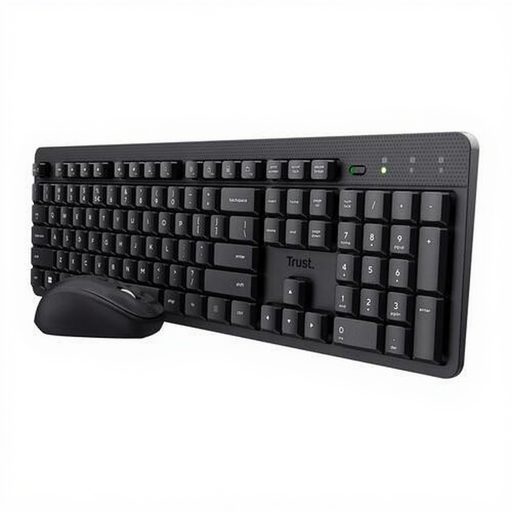 No image available
This set may suit you if you’re looking for a keyboard and mouse together. The product description mentions quiet keys, not an independently measured sound level.
Check the US QWERTY layout of this version before ordering.
 No image available
This model may suit map-making where you want a full-size keyboard with a number pad. Trust describes the keystrokes as quiet, but they haven’t been independently measured.
The product name specifies scissor keys and a US QWERTY layout. Check that the layout works for you.
No, they aren’t a general requirement. If you use QGIS, you can set up keyboard shortcuts in the software, according to the QGIS documentation. First work out which actions you perform frequently before choosing programmable keys as a reason to buy.
It varies by model. Trust lists a USB receiver for the Ody II; Logitech lists Bluetooth and switching between three devices for the Pebble Keys 2 K380s. Before buying, check your computer’s connection options and the exact version of the keyboard.
For screen-based work, Arboportaal recommends varying your posture, taking micro-breaks and adjusting your workstation to suit you, among other things. This advice doesn’t mean that one particular keyboard will prevent discomfort.
For an online consumer purchase in the Netherlands, ACM ConsuWijzer says you generally have a 14-day cooling-off period from delivery. Check the applicable exceptions and returns policy. Statutory guarantees also apply: if a product breaks sooner than you could reasonably expect under normal use, the seller must offer a solution, according to ACM ConsuWijzer.
According to Arboportaal, for an employee who does more than 2 hours of screen-based work a day, the screen and keyboard must not be attached to each other. If they use a laptop, they must therefore be able to use a separate screen or keyboard. This isn’t automatically a legal requirement for a personal study project.