
Writers in shared quiet spaces
Want to type long pieces without disturbing others? Assess the sound of the exact model rather than relying solely on a label such as ‘quiet’ in the product name. CHERRY and Trust describe some models as quiet.


Start by choosing a layout and key feel that you find comfortable for typing, then assess the sound of the exact model. CHERRY and Trust describe some keyboards as quiet, but these manufacturer claims are not comparative sound measurements. A compact TKL model saves space if you don’t need a number pad, while a full-size model keeps those keys.
Want to type long pieces without disturbing others? Assess the sound of the exact model rather than relying solely on a label such as ‘quiet’ in the product name. CHERRY and Trust describe some models as quiet.
When you write for long periods, your hands may make repeated movements, while your neck, shoulders and arms remain under static strain. Arboportaal highlights these considerations for computer work; a keyboard is just one part of your workstation.
Want to leave room for notes or a mouse, and hardly ever use the number pad? Compare a TKL layout with a full-size keyboard. CHERRY states that its TKL model omits the number pad.
| What to consider | What to look for | Who is it important for? |
|---|---|---|
| Key noise | Assess the exact model and, if possible, try it in a quiet room. | If I write while others are reading or working, I want to know what the keys actually sound like. Around 36% of consumers put key noise first. |
| Typing comfort | Consider the key feel, keyboard height, distance to the mouse and your posture during a writing session. | For longer writing sessions, I want a key feel and hand position that suit me. Around 29% of consumers prioritise typing comfort. |
| Layout and space | Check the position of the arrow, editing and punctuation keys, and decide whether you use a number pad. | If I have limited space and rarely use the number pad, a narrower keyboard may suit me; if I need those keys, I want to keep them. Around 21% of consumers start with layout and desk space. |
| Connectivity | Check that your device supports the cable, USB receiver or Bluetooth connection used by the model. | If I switch between devices or need specific ports, I want to know in advance how the keyboard connects. Around 14% of consumers put connectivity or switching devices first. |
Manufacturers describe their own models as quiet, but these claims are not comparable sound measurements.
Compare the exact model and, if possible, try it in a quiet environment.
The CHERRY STREAM KEYBOARD TKL omits the number pad to save space. If you still need those keys, a separate number pad could take up extra room.
Think through your usual writing and editing tasks before prioritising a compact design.
Trust lists a USB receiver for the Ody II, while Perixx lists both Bluetooth and a USB receiver for the PERIBOARD-817. Connectivity therefore varies by model.
Check how the exact model connects and compare this with your device’s ports and wireless capabilities. If a receiver won’t plug in directly, you may need a suitable adapter.
For this kind of writing, CHERRY offers a compact, wired TKL model as well as a full-size wireless model.
The Logitech MX Keys S is worth considering if you want a low-profile design, backlit keys or the ability to switch between devices.
Trust offers the Ody II as a standalone keyboard and as a keyboard-and-mouse set; be sure to distinguish between the two when comparing.
The PERIBOARD-817 is a full-size keyboard with scissor switches and a choice of Bluetooth or a USB receiver.
This selection ranges from compact foldable keyboards to full-size wired and wireless models. Check the layout, connectivity and any claims about key noise for each model.
 No image available
A compact model to consider if you’re looking for a foldable keyboard for a mobile device.
The product name mentions quiet keys, and the product description refers to quiet scissor keys. This is not a comparative sound measurement.
Foldable, rechargeable design with a magnetic stand and aluminium body. The product information says it works with mobile phones and tablets and supports Windows, iOS and Android.
 No image available
A full-size layout to consider if you’re looking for a mechanical keyboard with several connectivity options.
The product name mentions Silent Tactile Switches; this is not a comparative sound measurement.
The product information lists 108 keys, a US layout and connectivity via 2.4 GHz, Bluetooth or USB-C. It also mentions an aluminium body, hot-swappable keys and an 8000 mAh battery.
 No image available
A wired option to consider if you want a full-size keyboard with a number pad.
The product description mentions quiet, low-profile keys; this is not a comparative sound measurement.
The product information lists a number pad, a QWERTY US International layout, a USB cable and adjustable feet.
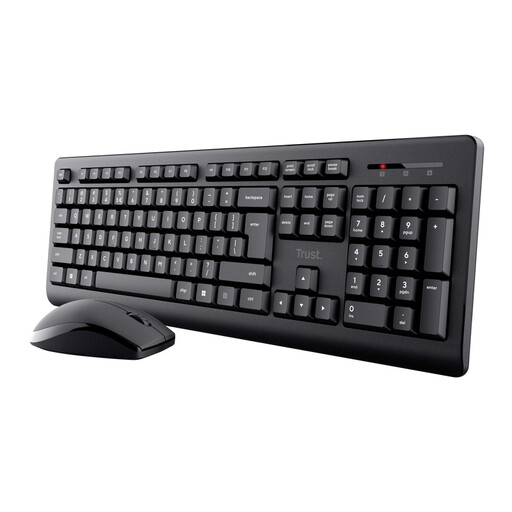 No image available
A set to consider if you need a mouse as well as a keyboard.
The product information mentions quiet, low-profile keys; this is not a comparative sound measurement.
The product description lists a USB receiver, adjustable feet and a mouse suitable for left- and right-handed use. The product name describes it as spill-resistant.
 No image available
A full-size layout to consider if you want to keep the number pad and type wirelessly.
The product information mentions quiet, low-profile scissor keys; this is not a comparative sound measurement.
The product description lists connectivity via USB receiver or Bluetooth, switching between up to four devices and a rechargeable battery.
No. The name of the key mechanism alone doesn’t determine whether a keyboard is right for you. Consider the key feel, layout and sound of the exact model too; for example, CHERRY describes the scissor mechanism on the STREAM KEYBOARD TKL as quiet. Try the keyboard if key feel is a deciding factor for you.
First, check which connection the exact model uses: Trust lists a USB receiver for the standalone Ody II keyboard. For a Logitech keyboard, Logitech recommends switching it off or disconnecting it, then cleaning it with a soft, slightly damp cloth; don’t pour water onto the keyboard. For other models, follow the manufacturer’s instructions.
According to ACM ConsuWijzer, online purchases generally come with a statutory cooling-off period of up to 14 days after delivery, subject to applicable exceptions. You also have a statutory warranty: if a fault occurs that you could not reasonably have expected with normal use, the seller is responsible for providing an appropriate solution. There is no fixed statutory two-year warranty period for every keyboard.
Not simply because you’re writing a travel article at home. Arboportaal states that, for employees who work at a screen for more than two hours a day, the workstation requirement is that the screen and keyboard must not be attached to each other. Whether this applies to you depends on your working arrangements.