Who is this relevant to?

Designer working in a shared quiet space

This designer wants to disturb others as little as possible while typing. So, check how noisy the exact key version is, rather than relying on labels such as mechanical or quiet. RTINGS specifically describes the Logitech MX Keys S as very quiet to type on.

Designer who uses lots of shortcuts

This designer wants frequently used actions close to hand, and compares programmable keys with the physical keys on a compact layout. Keychron lists remappable keys for the K3 Max, while Logitech lists Smart Actions for the MX Keys S.

Designer with limited desk space

This designer wants to leave room beside the keyboard for pointing and navigation, but first checks that a compact layout still includes the keys they use every day. Keychron lists the K3 Max as having a 75% layout.

What should you look for?

Slim scissor-switch keyboard

A good fit if: you type in a shared study space and want a familiar, slim key layout.

Bear in mind: a full-size model takes up more desk space, and a scissor-switch mechanism alone does not prove that every model is quiet.

Compact programmable mechanical keyboard

A good fit if: you want to remap keys and a 75% layout suits the way you work.

Bear in mind: mechanical switches are not automatically quiet. Check the noise level and physical layout of the exact version.

Apple Magic Keyboard with Touch ID

A good fit if: you use a compatible Mac and value Touch ID and Mac-specific keys.

Bear in mind: check the system requirements for the exact version and whether you need a numeric keypad.

Simple keyboard with USB receiver

A good fit if: straightforward connectivity and quiet keys matter more than extensive customisation.

Bear in mind: check that your computer has a suitable port and that the available key layout works with your shortcuts.

What matters What to look for when buying Who might prioritise this?
Quiet typing Look for a noise assessment of the exact version and switch. Listen out for rattling too, not just a possible dBA measurement. If I work in a shared quiet space, I want to disturb my colleagues as little as possible when I type. Around 36% of consumers put typing noise first.
Accessible, customisable shortcuts Check which keys are included and programmable, and whether any configuration software works with your operating system. When I repeat lots of design tasks, I want to carry them out quickly without losing access to keys I use every day. Around 29% of consumers give accessible, customisable shortcuts top priority.
Desk space Compare the keyboard’s physical width and key layout with the keys you use every day. If I need room beside my keyboard for pointing and navigation, I only want a compact layout if it still has the keys I need. Saving space is the main concern for around 21% of consumers.
Connectivity and features Check the ports, Bluetooth support, operating system and features of the exact version. When I want to use a keyboard with my own computer, the connection and features I need must be right. Around 14% of consumers prioritise connectivity and compatibility.

Common mistakes when choosing

  • Assuming every mechanical switch is equally quiet

    Noise varies by switch and version. RTINGS notes that clicky switches can be loud, while internal dampening can reduce the noise of quiet mechanical switches.

    Look for noise assessments of the exact switch and version on offer.

  • Choosing a compact layout without checking your shortcuts

    According to Keychron, the K3 Max has a 75% layout, with a different arrangement of keys from a full-size keyboard.

    Before you choose, compare the layout of the exact version with the shortcuts you use most often.

  • Expecting Touch ID to work with every Mac

    For the USB-C version consulted, Apple lists a Mac with Apple Silicon and macOS 15.1 or later as system requirements.

    Before buying, check that your Mac and version of macOS meet the requirements for the version on offer.

  • Confusing an extended warranty with your statutory rights

    The Dutch government distinguishes between statutory rights for faulty products and additional cover offered separately.

    Check the cover and exclusions of any additional plan separately from your statutory rights.

Brands to consider

Logitech

The MX Keys S is a slim, full-size wireless model for those who want a spacious layout and customisable actions.

  • RTINGS specifically rates the MX Keys S as very quiet to type on; Logitech lists Smart Actions.
  • The full-size layout takes up more room than a compact model. These findings do not automatically apply to other Logitech keyboards.

Keychron

The K3 Max offers a compact mechanical option for those who want to remap keys.

  • Keychron lists a 75% layout and support for remapping keys.
  • A mechanical version is not automatically quiet. Check the switch and physical layout; the ISO collection consulted does not list a Dutch ISO layout.

CHERRY

The KC 6000 SLIM is a slim model with a scissor-switch mechanism.

  • CHERRY lists the scissor-switch mechanism as a model specification.
  • This specification is not an independent noise measurement and does not mean every model from the brand is equally quiet.

Apple

The Magic Keyboard with Touch ID and numeric keypad is an option for those using a compatible Mac who need these features.

  • Apple lists Touch ID and the system requirements for the USB-C version consulted.
  • Check compatibility and whether you need the wider model with a numeric keypad. The product information does not compare typing noise.

Trust

The Ody II is a straightforward wireless option with a USB receiver.

  • Trust describes the keys as quiet and says the USB receiver can be stored inside the keyboard.
  • The quietness claim comes from the manufacturer, not an independent measurement. Also check the physical US layout of the version on offer.

Joybuy products

The products below relate to choices around typing noise, desk space, key layout and Mac features. Check the physical layout and the connection you need for each model.

Corsair K55 CORE TKL gaming keyboard, US QWERTY

Corsair K55 CORE TKL, US QWERTY

A TKL layout may suit you if you want to leave space beside your keyboard. Check that the US QWERTY layout works with your shortcuts.

Joybuy
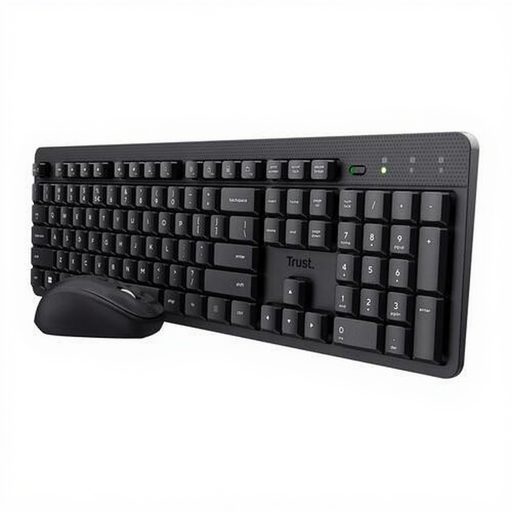
Trust Ody II wireless keyboard and mouse set

Trust Ody II wireless keyboard and mouse set

Trust describes the Ody II as quiet. Check that the US QWERTY layout suits the shortcuts you use every day.

This product version is a keyboard and mouse set.

Joybuy

Trust Vaiya wireless keyboard, full-size, numeric keypad, scissor-switch mechanism, US QWERTY

Trust Vaiya, full-size with numeric keypad, US QWERTY

This full-size model may suit you if you want a numeric keypad; bear in mind the space a full-size layout takes up.

The product name lists a scissor-switch mechanism and US QWERTY layout. Check that this layout suits the way you work.

Joybuy

Apple Magic Keyboard with Touch ID and numeric keypad, Dutch layout, white keys

Apple Magic Keyboard with Touch ID and numeric keypad, Dutch layout

This may suit you if you use a Mac and want Touch ID and a numeric keypad; check the system requirements for the exact version.

The product name lists a Dutch version with white keys and compatibility with Mac models with Apple Silicon.

Joybuy

Apple Magic Keyboard with Touch ID for Mac models with Apple Silicon, Dutch layout

Apple Magic Keyboard with Touch ID for Mac models with Apple Silicon, Dutch layout

This is an option if you want to use Touch ID with a Mac; check that the version on offer is compatible with your computer.

The product name lists a Dutch version for Mac models with Apple Silicon.

Joybuy

Frequently asked questions

Is a mechanical keyboard automatically too loud for a quiet study space?

No, noise varies by switch and version. RTINGS notes that clicky switches can be loud, while internal dampening can reduce the noise of quiet mechanical switches. So, assess the exact version rather than relying on the word ‘mechanical’ alone.

How can I check whether the connection will work with my computer?

Compare the keyboard’s connection options with your computer’s ports and Bluetooth support. Trust lists a USB receiver for the Ody II, while Keychron lists a wired connection, Bluetooth and 2.4 GHz for the K3 Max. Always check the features of the version you intend to buy.

How can I clean the keys without damaging them?

Follow the cleaning instructions for the exact model. For an Apple Magic Keyboard, the Joybuy product information consulted recommends a soft, dry, lint-free cloth and warns against liquids and sprays. Don’t apply this advice to other models without checking their instructions.

What returns and warranty rights apply to online purchases in the Netherlands?

For eligible online consumer purchases, the Dutch government generally lists a 14-day cooling-off period; purchases from a private seller are not covered by the same distance-selling rules. Your statutory rights for a faulty product are separate from any optional extended warranty. Check who the seller is and which returns terms apply to your purchase.
