
Student who needs to type quietly
If a housemate is sleeping or studying while you write tests, key noise may be your main concern. Logitech and Trust describe specific models as quiet, but these claims are not comparable sound measurements.


If you type in a student room with housemates nearby, start by considering key noise, then check whether the keys you need are easy to reach in your editor. A compact keyboard saves desk space, while a larger or customisable model may offer more direct-access keys. The right balance depends on your workspace, layout and computer.
If a housemate is sleeping or studying while you write tests, key noise may be your main concern. Logitech and Trust describe specific models as quiet, but these claims are not comparable sound measurements.
If you often switch between tests, code and the terminal, look for arrow and function keys that are easy to reach, or the option to customise keys. RTINGS notes that access to these keys is one factor to consider when choosing a programming keyboard.
A compact keyboard leaves more room beside your laptop, while a full-size model may put more keys within easy reach. The compact Pebble Keys 2 K380s and full-size CHERRY KC 6000 SLIM illustrate these different layouts.
Choose this option if: you type in a shared room and want a compact model. Logitech describes the Pebble Keys 2 K380s as compact, with quiet keys; Trust describes the Ody II as having quiet keys.
Bear in mind: check that the layout includes the keys you use often. Manufacturer descriptions are not comparative sound measurements.
Choose this option if: you have a permanent desk setup and prefer keys to be within easy reach. CHERRY describes the KC 6000 SLIM as a full-size keyboard with a USB-A connection.
Bear in mind: a full-size keyboard takes up more desk width. Check that your computer has a suitable connection.
Choose this option if: you want to remap keys to suit your workflow. Keychron lists remapping as a feature of the K3 Max.
Bear in mind: layouts and versions vary, and a mechanical keyboard is not automatically quiet. According to Keychron, hot-swap is available only on the specified RGB hot-swappable version of the K3 Max.
| What to consider | What should you check? | Who is this important to? |
|---|---|---|
| Key noise | Check the specific version and, if possible, try it out in a similar room. | If I type while a housemate is resting, I want to assess the key noise first; around 31% of consumers prioritise quiet keys. |
| Keyboard layout for coding | Check the arrow, function and symbol keys you use most often, and make sure remapping works with your computer and version. | If you often switch between code and tests, you’ll want frequently used keys within easy reach; around 25% of consumers prioritise a coding-friendly layout. |
| Choosing the right version | Check the physical layout, connection and any receiver before you order. | As a student, I want to stick to my budget and avoid choosing a version that isn’t right for my computer; around 25% of consumers put this concern first. |
| Desk space | Measure the available width and decide whether you want a number pad or other keys within easy reach. | At a small desk, I want to keep space beside my laptop without losing access to the keys I use often; around 19% of consumers start by considering how much desk space they need. |
On a smaller layout, keys you expect to reach directly may require a key combination.
Before you buy, check the arrow, function and symbol keys you use often, and compare them with the exact layout.
Logitech and Trust describe specific keyboards as quiet, but these manufacturer descriptions do not rank the models using comparable measurements.
Use the description as a first filter and, if possible, assess the sound for yourself.
CHERRY lists USB-A for the KC 6000 SLIM. If your laptop doesn’t have a suitable port, you may need an adapter.
Check your laptop’s ports and whether you’ll need an adapter for the connection you choose.
The Pebble Keys 2 K380s and MX Keys Mini offer different compact keyboard options.
The Ody II is designed with quiet keys, while the Lyra is a compact option with a scissor mechanism.
The KC 6000 SLIM is a slim, full-size keyboard for a permanent workspace.
The K3 Max is a mechanical option with a 75% layout and customisable keys.
This selection includes full-size keyboards, compact 75% layouts and models with features for quiet typing or customisable keys.
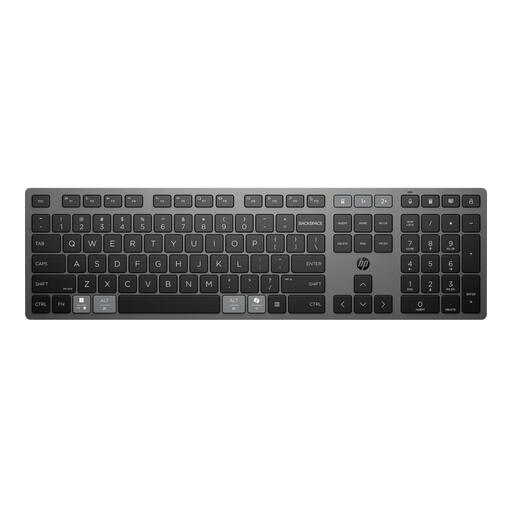 No image available
An option if you want to combine a full-size layout and programmable keys with multi-device connectivity.
The product information lists a full-size layout, low-profile keys and switching between up to three devices.
 No image available
The 75% layout may suit you if you want to save space while keeping the arrow and function keys.
The product information lists linear Flying Fish switches, sound-dampening layers and a US QWERTY layout. Sound dampening is a product description, not a comparative sound measurement.
 No image available
An option if you’re looking for a full-size keyboard with a number pad and want to connect multiple devices.
Trust describes its low-profile scissor keys as quiet and lists connectivity via USB receiver or Bluetooth with up to four devices. The title specifies a US QWERTY layout; check that it suits the characters you need.
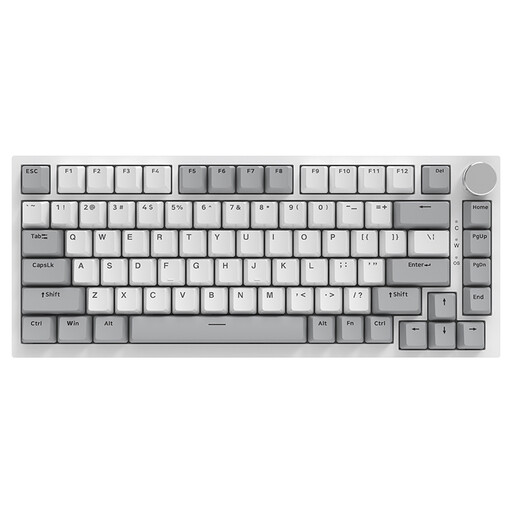 No image available
The compact layout may suit you if you want to save desk space and prefer a wired connection.
The product title lists 83 keys, hot-swappable linear switches and a US QWERTY layout. The product description mentions sound-dampening layers; this is not a comparative sound measurement.
 No image available
A compact layout with arrow and function keys may suit you if you want those keys within easy reach.
The product information lists 82 keys and connectivity via Bluetooth, 2.4 GHz or USB-C. The title specifies a US QWERTY layout; check the layout and functions for your computer.
No, a mechanical keyboard isn’t essential for unit tests. Start with the keys you use in your editor and the noise level that suits your room. RTINGS lists key access and quiet switches as considerations that depend on your situation.
Check both the physical keyboard layout and the input language set on your computer. Trust notes that an incorrectly set input language can cause the characters you type to differ from the ones you expect.
Also consider your screen setup and posture, and take breaks from prolonged screen work. Arboportaal describes possible strain on the hands, arms, neck and shoulders; simply switching keyboards has not been shown to remove that strain. Specific workplace duties for employees do not automatically apply as legal obligations to a student working in their own room.
According to the Dutch government, many online consumer purchases come with a 14-day cooling-off period. The Netherlands has no fixed statutory guarantee period, but you are entitled to a product that works as it should and can contact the seller if there’s a problem. Check the terms that apply to your purchase.
European product requirements apply to radio equipment placed on the market in the Netherlands. The Dutch Authority for Digital Infrastructure states that compliant equipment receives a CE mark; this requirement does not prove that a specific listing or individual item has already been checked.