If keeping the peace with your roommate is the priority, a mouse explicitly described as having quiet switches could be a good fit—but that doesn’t automatically make it suitable for gaming. A gaming mouse with extra buttons gives you more options for RTS commands, but it doesn’t prove that clicking or scrolling will be quiet. So also consider the fit, scroll noise and whether the buttons are usable in your game.
Who should consider this trade-off?
Night-time gamer with a roommate
You play when someone else in the bedroom needs to rest and want to know how much noise clicking and scrolling make—even if that means having fewer gaming controls. Logitech lists SilentTouch for the Signature M650; Razer describes the Pro Click Mini as having quiet mechanical switches.
RTS player who uses lots of shortcuts
You want individual commands within thumb’s reach and need to decide whether a few extra buttons will do or whether a larger side panel would suit you better. Razer and SteelSeries describe models with twelve side buttons.
Player with long sessions
You prioritise a mouse that suits your hand and grip, with enough room to move and a connection or power source that works with your setup.
What should you look for when choosing?
Mouse with explicitly quiet clicks
A good fit if: your main aim is to avoid disturbing a sleeping or working roommate with clicks. Logitech lists SilentTouch for the Signature M650, while Razer lists quiet mechanical switches for the Pro Click Mini.
Trade-off: these examples are productivity mice. Their quietness claims don’t, on their own, tell you anything about scroll noise, gaming latency or whether the button layout suits your hand.
Gaming mouse with a few extra buttons
A good fit if: you want to control a few custom RTS shortcuts with your mouse and don’t need an extensive thumb panel.
Trade-off: Logitech says the G305 uses one AA battery; the wired SteelSeries Aerox 3 (2022) has a cable. Neither feature proves that the mouse clicks quietly.
Gaming mouse with an extensive button panel
A good fit if: you genuinely want to assign lots of individual, permitted in-game commands to your thumb. Razer and SteelSeries each list twelve side buttons for the Naga V2 HyperSpeed and Aerox 9 Wireless.
Trade-off: lots of buttons take time to get used to and are no guarantee of quieter operation or better RTS performance.
Use the table to help you make the key choice for playing RTS games in a shared bedroom.
| What to consider |
What should you check? |
Who should pay most attention? |
| Click and scroll noise |
Look for an explicit claim about the exact model, and assess the main buttons, side buttons and scroll wheel separately. |
If I play while my roommate is resting, I mainly want to know how much noise my mouse makes. Around 33% of consumers put quiet operation first. |
| RTS commands |
Decide how many commands you really want to assign to the mouse; check that you can reach the buttons, and review the configuration software and game rules. |
If I often use individual shortcuts, I want to reach them easily without pressing the wrong button. Around 27% of consumers give easy access to RTS commands top priority. |
| Movement and connection |
Check the connection type, connector, available mouse space and adjustable sensitivity of the version you’re considering. |
If a cable or receiver restricts my movement, I want a connection that suits my setup. For around 20% of consumers, movement control and connection matter most. |
| Fit and battery life |
Consider your hand size, grip and reach to the side buttons; for a wireless mouse, also check its power source or charging method. |
If I play for a long time, I want a mouse that feels comfortable in my hand and is easy to use. Fit and battery life come first for around 20% of consumers. |
Common mistakes
-
Assuming a gaming mouse will automatically be quiet
Gaming-focused specifications don’t tell you how much clicking or scrolling noise you’ll hear in a shared bedroom.
Look for an explicit quiet-switches claim for the exact model, and assess the scroll wheel and side buttons separately.
-
Assuming more programmable buttons mean better RTS gaming
A twelve-button panel gives you options, but only if you find the layout comfortable and can reach the buttons without triggering the wrong input.
First decide how many commands you actually want to control with your mouse, then try out the button placement.
Allow time to learn and set up an extensive layout.
-
Assuming similar model names mean identical versions
A wired Aerox 3 (2022) is a different version from an Aerox 3 Wireless. The Basilisk V3 Pro and Basilisk V3 Pro 35K aren’t necessarily the same model variant either.
Compare the full model name, connection type and specifications of the version you’re considering.
Brands worth considering
Logitech
The Signature M650 and G305 offer different strengths: productivity with an explicit claim about quieter clicks, compared with a gaming mouse.
- Logitech lists SilentTouch for the Signature M650, which comes in different sizes.
- The M650 is positioned as a productivity mouse. Logitech says the G305 has a gaming sensor and runs on one AA battery; neither feature proves that it clicks quietly.
Razer
The Pro Click Mini illustrates the quiet-switches option, while the Naga V2 HyperSpeed is designed for control using lots of thumb buttons.
- Razer lists quiet mechanical switches and seven programmable buttons for the Pro Click Mini. For the Naga V2 HyperSpeed, Razer lists a twelve-button thumb grid.
- The Pro Click Mini is described as a productivity mouse; the Naga V2 HyperSpeed’s specifications aren’t a claim that it’s quiet.
SteelSeries
The wired Aerox 3 (2022) and wireless Aerox 9 Wireless offer different connection types and button layouts.
- SteelSeries lists a weight of 59 g for the wired Aerox 3 (2022), and eighteen programmable buttons, including twelve side buttons, for the Aerox 9 Wireless.
- These model specifications aren’t independent measurements of comfort or noise.
CORSAIR
The SCIMITAR ELITE WIRELESS is an option for players who want lots of controls under their thumb.
- For the US model code CH-9314311-NA, CORSAIR lists sixteen programmable buttons and wired, Bluetooth and 2.4GHz connections.
- This model information doesn’t prove that an identical version is available in the Netherlands or that it clicks quietly.
Joybuy gaming mice for wireless RTS gaming
The Joybuy options below are wireless gaming mice for players who want to control RTS commands using their mouse. If quiet operation is essential, also check the click and scroll noise of the exact version.
 No image available
AULA SC620 Wireless Gaming Mouse, White
The seven programmable buttons could suit you if you want a few RTS commands close to hand.
The product name lists Bluetooth 5.0, 2.4G and USB-C, a PAW3311 sensor, 12000DPI, 8KHz, 67g and a 400 mAh battery.
View at Joybuy
 No image available
Logitech G G309 LIGHTSPEED Wireless Gaming Mouse
This wireless gaming mouse could suit you if you want to play without a mouse cable; check that its controls work for the RTS commands you want to use.
The stated limitation is that it runs on one AA battery, so remember to manage the battery.
View at Joybuy
 No image available
RAPOO VT9Pro 4K Wireless Gaming Mouse, BlackPurple
The ten programmable buttons could suit you if you want to assign several custom RTS commands to your mouse.
The product name lists a PAW 3398 sensor, 4K polling, 180h battery life and ten programmable buttons.
View at Joybuy
 No image available
Razer Basilisk V3 Pro 35K Ergonomic Wireless Gaming Mouse, Black
This wireless gaming mouse could suit you if you’re considering a wireless version; check that its shape and button layout work for your hand and the way you play.
View at Joybuy
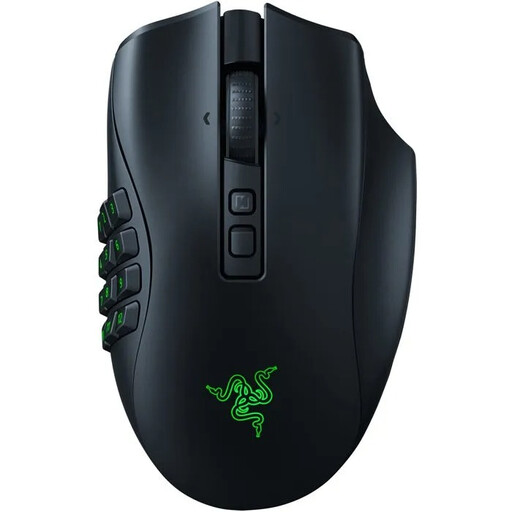 No image available
Razer Naga V2 Pro Wireless MMO Gaming Mouse
This wireless MMO gaming mouse could suit you if you’re looking for a gaming mouse; check that the exact button layout and reach work for your RTS shortcuts.
View at Joybuy
Frequently asked questions
Is a quiet productivity mouse automatically suitable for an RTS game?
No. A quietness claim doesn’t prove that the mouse is right for your game. Razer lists quiet switches for the Pro Click Mini and Logitech lists SilentTouch for the M650; also check that the connection and button layout meet your needs.
How can you make good use of extra mouse buttons?
Start with individual commands you use often, and see if you can reach the buttons without pressing the wrong one. Whether a particular macro is allowed depends on your game or competition rules; check them before setting up automation.
What maintenance does a wireless mouse need?
Check which power source the exact version uses. Logitech lists one AA battery for the G305 and a stated battery life of up to 250 hours; actual battery life depends on usage. Recycle a used battery separately.
What warranty applies if a mouse develops a fault in the Netherlands?
If a product develops a fault, contact the seller to find a solution. According to the Dutch government, the Netherlands has no fixed statutory warranty period; a manufacturer’s warranty is in addition to your statutory rights.
Where can you take an old mouse?
Milieu Centraal lists mice among small electrical appliances that you can take to suitable collection points. If possible, remove any removable battery and recycle it separately.


