If click noise is your main concern, start with a gaming mouse whose clicks are described as quiet or soft for the exact model. be quiet! describes the Dark Perk Ergo this way, and a Dutch review by Glitching calls its clicks very quiet. That doesn’t guarantee the mouse will be inaudible in every bedroom. If you need plenty of actions under your thumb, compare how easy the extra buttons are to reach and how well they fit your hand, as well as how noisy they are. RTINGS describes the Naga V3 Pro’s clicks as quiet, while the 12-button Aerox 9 Wireless is primarily an option to explore for its controls and fit.
Who is this mouse guide for?
Night-time gamer sharing a room
You play while someone else is resting in the same room, so you mainly want to know how loud the main buttons are. be quiet! describes the Dark Perk Ergo’s switches as quiet; a Dutch review by Glitching calls its clicks very quiet, but also notes that its small shape may not suit larger hands using a palm grip.
Gamer with lots of spells or abilities
You want to assign several actions to your thumb, but extra buttons are only useful if you can reach them comfortably. RTINGS describes the Razer Naga V3 Pro as having interchangeable side panels with 2, 6 or 12 buttons; SteelSeries lists a 12-button side panel for the Aerox 9 Wireless.
Long-session adventurer
You consider hand size, grip and room to move before choosing extra buttons or wireless connectivity. Glitching’s Dutch review says the Dark Perk Ergo may not suit larger hands using a palm grip; RTINGS notes that the wider Naga V3 Pro may feel less comfortable for smaller hands.
What should you look for when buying?
Start with what matters most in your room: click noise, easy-to-reach action buttons, fit or how the mouse connects to your setup.
Gaming mouse with quieter-sounding clicks
Choose this when: audible clicks are your main concern. be quiet! describes the Dark Perk Ergo’s main buttons as quiet, and Glitching calls its clicks very quiet.
Trade-off: Glitching notes that its small shape may not suit larger hands using a palm grip. And even a quiet main click doesn’t rule out noise from the scroll wheel or contact with your desk.
MMO mouse with plenty of thumb buttons
Choose this when: you want to control lots of individual abilities with your thumb. RTINGS describes the Naga V3 Pro as having interchangeable panels with 2, 6 or 12 buttons; SteelSeries lists a 12-button side panel for the Aerox 9 Wireless.
Trade-off: lots of buttons take getting used to and need to fit your hand. Check the click noise of the exact model separately; the number of buttons won’t tell you how loud it is.
Versatile wired gaming mouse
Choose this when: you want to assign commands without a large MMO side panel. Logitech G says you can programme commands for the G502 HERO’s 11 buttons using G HUB.
Trade-off: you’ll need to find a suitable route for the cable on your desk. Check the click noise separately before using this model in a shared bedroom.
Quiet productivity mouse as a compromise
Choose this when: reducing click noise matters more than having a specific MMO button layout. Razer describes the Pro Click Mini as a productivity mouse with quiet switches and seven programmable buttons.
Trade-off: the Pro Click Mini isn’t an equivalent choice for a specialist MMO layout. Check that its shape, buttons and connection suit your game.
| Consideration |
What to check when buying |
Who is this important to? |
| Click noise in a shared room |
Look for a description of the exact model’s click noise; also consider the scroll wheel and noise against your desk. |
If someone is resting next to me, I want to know how loud the main buttons are and whether the scroll wheel or contact with the desk is audible too. Around 36% of consumers say click noise is their main buying concern. |
| Buttons for abilities |
Count the actions you really want to assign and check that you can reach the thumb buttons comfortably. |
If I want to control several abilities with my thumb, ease of reach matters more than a high button count on paper. Around 29% of consumers prioritise easy-to-reach action buttons. |
| Fit during long sessions |
Compare your hand size and usual grip with the mouse’s shape; try reaching the outer buttons if possible. |
For long gaming sessions, I want a grip that suits my hand and buttons I can operate without constantly repositioning it. Around 21% of consumers put fit first. |
| Desk, connection and power |
Check the cable route or connection, and find out how the wireless mouse is powered. |
If my desk has limited space, I want to know in advance how a cable, receiver or charging session will fit into my setup. Around 14% of consumers first weigh up their desk setup, connection and power. |
Common buying mistakes
-
Assuming gaming features or a high DPI mean quiet clicks
Sensor specifications and button counts don’t tell you how loud a click is. And a main click described as quieter doesn’t automatically mean the scroll wheel or noise against your desk will be quiet too.
Check descriptions of the exact model and, if possible, assess the sound of its other controls in a similar setup too.
-
Choosing a 12-button side panel without checking your thumb’s reach
Lots of buttons are only useful if you can reliably tell them apart and reach them. RTINGS notes that the Naga V3 Pro’s wide shape may be less comfortable for smaller hands.
First decide which actions you want to assign, then check that you can reach the buttons using your usual grip.
Brands to consider
be quiet!
The Dark Perk Ergo is a wireless gaming mouse for anyone looking for clicks described as quieter and a modest number of programmable buttons.
- be quiet! describes the main switches as quiet; Glitching calls the clicks very quiet in a Dutch review.
- Glitching notes that its small shape may not suit larger hands using a palm grip. The description of the clicks doesn’t guarantee that other parts of the mouse are quiet.
Razer
The Naga V3 Pro is designed for different MMO button layouts; the Pro Click Mini is a separate productivity mouse.
- RTINGS describes the Naga V3 Pro as having interchangeable panels with 2, 6 or 12 buttons and quiet clicks. Razer describes the Pro Click Mini as having quiet switches and seven programmable buttons.
- RTINGS notes that the Naga V3 Pro’s shape is wide for smaller hands. The Pro Click Mini doesn’t have the same specialist MMO layout.
SteelSeries
The Aerox 9 Wireless is designed for players who want plenty of thumb buttons.
- SteelSeries lists 18 programmable buttons, including a 12-button side panel.
- Check the click noise of the exact model separately; its button count won’t tell you how loud it is.
Logitech G
The wired G502 HERO lets you assign commands without a specialist 12-button side panel.
- Logitech G says you can programme the G502 HERO’s 11 buttons using G HUB.
- Bear the cable route on your desk in mind and check the click noise of the exact model separately.
Corsair
The SCIMITAR ELITE WIRELESS is an MMO mouse for anyone looking for an adjustable panel of thumb buttons.
- Corsair lists 16 programmable buttons, a sliding 12-button panel, and wireless or wired use.
- These features alone don’t tell you anything about click noise. Also check that the specifications and version match the model you’re looking at.
Gaming mice on Joybuy
This Joybuy selection includes wired and wireless gaming mice with different controls and connection options. Check the click noise of the exact model separately; its buttons and connection features won’t tell you how quiet it sounds.
 No image available
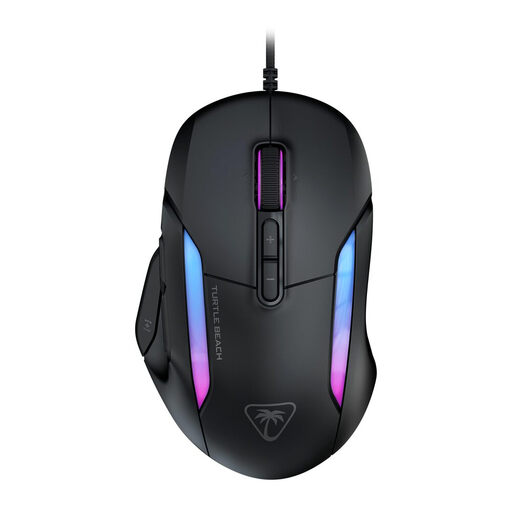
Turtle Beach Kone II wired gaming mouse
Suitable for anyone who wants to assign lots of functions and is looking for a wired mouse for medium or large hands.
The product name lists 23 buttons and 26000 DPI. The product information mentions Easy-Shift[+] and Swarm II software for customisable functions; bear the cable route on your desk in mind.
Joybuy
 No image available
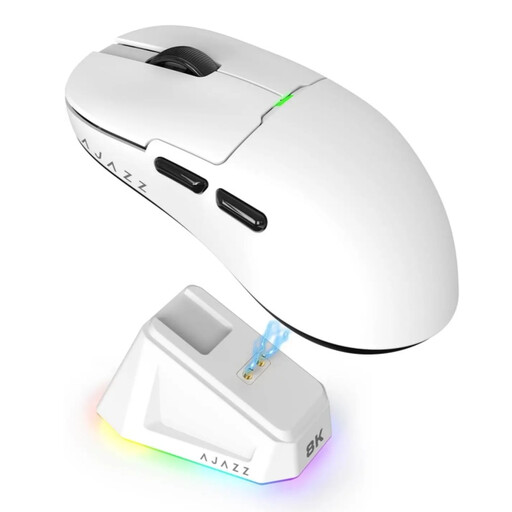
AJAZZ AJ159 PRO wireless gaming mouse
Suitable for anyone looking for a wireless setup with several connection options and who has small to medium-sized hands.
The product name lists a PAW3395 sensor, 26K DPI, 2.4G, USB-C and BT, a 400 mAh battery and a weight of 56 g. The product information says the magnetic charging dock should be kept away from pacemakers, medical implants and payment cards.
Joybuy
 No image available
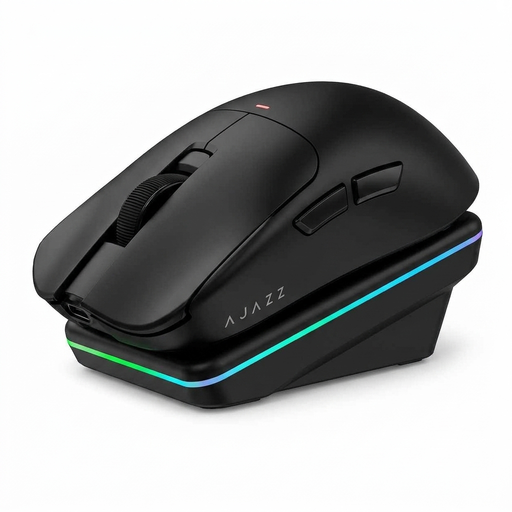
AJAZZ AJ200 AI MC wireless gaming mouse
Suitable for anyone who wants to combine customisable actions with different connection options for their desk setup.
The product name lists a PAW3311 sensor, 24000 DPI, BT, 2.4G and USB-C, a weight of 63 g and a charging dock. The product information also mentions software for assigning buttons and recording macros.
Joybuy
 No image available
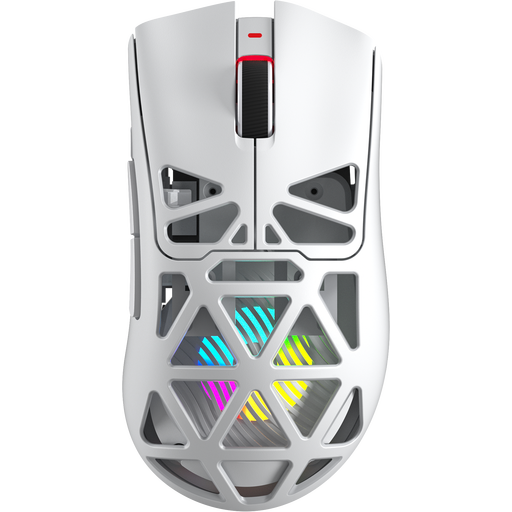
AULA SC620 wireless gaming mouse
Suitable for anyone looking for seven programmable buttons and a choice of several connections.
The product name lists Bluetooth 5.0, 2.4G and USB-C, a PAW3311 sensor, 12000 DPI, 8KHz, a weight of 67 g and a 400 mAh battery.
Joybuy
 No image available
Logitech G G502 X right-handed gaming mouse
Suitable for anyone looking for a wired mouse with programmable buttons for a permanent desk setup.
The product name lists USB Type-A, an optical sensor and 25600 DPI. The product information mentions 13 programmable buttons; bear the cable route and availability of a USB Type-A port in mind.
Joybuy
Frequently asked questions
How can I tell whether I need an MMO mouse for my fantasy game?
First count how many actions you want to control with your thumb and check that you can reach those buttons comfortably. RTINGS describes the Naga V3 Pro as having panels with 2, 6 or 12 buttons; SteelSeries lists a 12-button side panel for the Aerox 9 Wireless. More buttons are only useful if the layout suits your hand and your game.
How do I set up extra buttons?
Check the software for the exact model and the controls available in your game. Logitech G lists G HUB for assigning commands on the G502 HERO; Corsair describes iCUE for the SCIMITAR ELITE WIRELESS. Don’t assume every game allows every macro or button setting.
What should I consider when powering a wireless mouse?
Check whether the model uses replaceable batteries or a built-in rechargeable battery, and how to charge it. Razer says the Pro Click Mini works with one or two AA batteries; be quiet! says the Dark Perk Ergo can be used with its USB cable while charging.
What are my rights when buying online in the Netherlands?
When you buy online from a business, you generally have a 14-day cooling-off period. According to the Dutch government, a purchase from a private individual isn’t covered by the same distance-selling rules. This is separate from a faulty product: you’re entitled to a product that works properly. There is no fixed statutory warranty period in the Netherlands, and if something goes wrong, the seller must provide a solution.


