What should you look for when choosing?
Membrane keyboard designed to be quiet
A good fit if: you mainly want to reduce keyboard noise in the room and like the soft feel of membrane keys.
Bear in mind: membrane keys feel different from mechanical switches. Manufacturers’ descriptions of noise aren’t comparable measurements of complete keyboards.
Mechanical keyboard with quiet or hot-swappable switches
A good fit if: you value the feel of mechanical keys and want to choose the exact switch type.
Bear in mind: a quiet individual switch doesn’t automatically make the whole keyboard quiet. Check which switches are included.
Headphones don’t change how much noise the keys make in the room. Consider how the whole keyboard feels and sounds, and compare its physical layout with the keys you use in your game.
| What to consider |
What should you check? |
Who should pay particular attention? |
| Keyboard noise |
Check the exact switch type and, if possible, listen to the whole keyboard while using your usual typing style. |
If I play with headphones but don’t want to disturb others in the room, I pay particular attention to how the whole keyboard sounds. Around 36% of consumers rank keyboard noise as their top priority. |
| Layout and mouse space |
Compare the physical keys with your in-game bindings, and check the language and keyboard layout. |
If I want more room for my mouse, I don’t want to find out that a key I use in my game is missing or in a different place. Around 29% of consumers prioritise accessible keys and layout. |
| Key feel and input |
Check the switch type and the information on simultaneous key presses or anti-ghosting for the exact model. |
If I press several keys at once, I want both a feel that suits me and those key presses to register. Around 21% of consumers consider key feel and input to be most important. |
| Connection and settings |
Check whether the model connects via a cable, wireless receiver or Bluetooth, and whether the settings you want require software. |
If I want to connect the keyboard my way or customise keys, I check in advance which connection options and settings the model offers. Around 14% of consumers prioritise connectivity and customisation. |
Joybuy products to consider
These Joybuy products include both membrane models and mechanical keyboards, with compact and full-size layouts.
 No image available
Corsair K55 CORE TKL, US QWERTY
The product description lists quiet membrane switches. Consider this model if you’re looking for a membrane feel and a TKL layout.
The listed features include a TKL/80% layout, 12-key rollover and a wired USB connection. The layout has no number pad.
Joybuy
 No image available
Ticktype DP104 Tri-Mode, 108 keys, Silent Tactile, US
The product description calls the pre-installed Silent Tactile switches quiet. Check that the feel suits your preferences.
The title lists 108 keys, hot-swappable switches and a US layout. The listed connections are 2.4 GHz, Bluetooth 5.0 and USB-C.
Joybuy
 No image available
Corsair K70 CORE TKL, BE AZERTY ISO, MLX Red
This is a TKL mechanical keyboard with MLX Red switches. In particular, check that the stated BE AZERTY ISO layout suits the way you play.
The product description lists two layers of sound-dampening foam, lubricated stabilisers, full N-key rollover and a wired USB-C connection.
Joybuy
 No image available
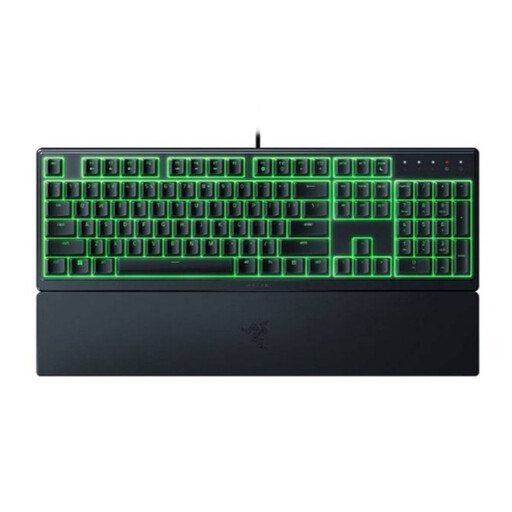
Razer Ornata V3 X, US International
Razer describes the Ornata V3 X’s membrane keys as cushioned. This model has a full-size layout with a number pad.
The product information lists 104 keys and an integrated wrist rest. Check that the US International layout suits your preferences.
Joybuy
 No image available
RK ROYAL KLUDGE RK61 60%, Quiet Red, 61 keys
The product information lists Quiet Red switches. Consider this model if you want a compact mechanical keyboard and the missing keys won’t affect your in-game bindings.
The title lists a 60% layout and 61 keys. The product description mentions hot-swappable switches and pre-lubricated quiet red switches.
Joybuy
Frequently asked questions
Is a mechanical keyboard always louder than a membrane keyboard?
You can’t tell from the mechanism alone. CHERRY describes the MX Silent Red switch as having dampening, while Razer describes the Ornata V3 X’s membrane keys as cushioned. Without comparable measurements of complete keyboards, you can’t rank these models by noise level.
What should I check when connecting and setting up a keyboard?
Check the connection options for the exact model and whether the key functions you want require software. The CHERRY MX BOARD 3.0S is wired; Logitech lists a cable, Bluetooth and LIGHTSPEED for the G915 X LIGHTSPEED. Also check that the physical layout suits the way you use it.
Does spill resistance mean I can clean a keyboard with liquid?
No. A spill-resistance claim doesn’t mean you can submerge a keyboard or clean it with liquid. SteelSeries lists IP32 for the Apex 3 TKL model shown, while Logitech states that the G213 can withstand up to 60 ml. Follow the care instructions for the exact model.
What are my rights in the Netherlands when buying online or if a product is faulty?
When you buy online from a business, you generally have 14 days to change your mind, although some exceptions may apply. According to the Dutch government, there is no fixed term for the legal guarantee: a product must meet what you could reasonably expect, and the seller is your point of contact if it’s faulty. A manufacturer’s warranty doesn’t replace these rights.


