What should you look for when choosing?
First, assess how the complete keyboard sounds in your bedroom. Then consider whether you need dedicated macro keys, how much desk space you have and which key height suits you.
| What to consider |
What to look for |
Who is this important for? |
| Key noise |
Check the exact switch type and, if possible, assess the sound of the complete keyboard as you type normally. |
If my roommate is resting while I play, I don’t want to rely on the word ‘quiet’ to describe a switch. Around 36% of consumers put noise at the top of their list when buying. |
| Shortcuts |
First, check your game’s controls and decide whether you need dedicated macro keys or want to assign functions to existing keys. |
If I use the same commands often, I want to access them easily without paying for features I don’t need. Around 29% of consumers prioritise configurable shortcuts. |
| Desk space and layout |
Check whether you use the numeric keypad and how much room you need for your mouse. |
If I share my desk, I want enough room for my keyboard and mouse without losing keys I use. Around 21% of consumers prioritise a compact desk-friendly size. |
| Key feel and everyday use |
Compare low-profile and taller keys, and check the exact variant and whether a wrist rest is included. |
If I play for long periods, I want a key height and feel that suit my preferences, and a keyboard that’s practical to use every day. Around 14% of consumers prioritise key feel and ease of use. |
Joybuy products for this situation
This selection includes compact keyboards and models whose product name mentions a quiet switch. For each variant, check the layout, exact switch type and sound of the complete keyboard.
 No image available
Trust GXT 833 Thado TKL, QWERTY
The TKL layout may suit you if you want to free up desk space and don’t need a numeric keypad.
The product name lists a wired keyboard with a QWERTY layout, compatible with PC and PS5.
Joybuy
 No image available
Corsair K55 CORE TKL, US QWERTY
The compact TKL layout may suit you if you want to free up desk space and don’t need a numeric keypad.
The product name specifies a US QWERTY layout. Check that it matches your preference.
Joybuy
 No image available
Ticktype DP104 Full-Size 108-Key, Silent Tactile Switches, US Layout
The product name specifies Silent Tactile Switches, for anyone looking for a mechanical keyboard with this type of switch. Also assess the sound of the complete keyboard.
The product name lists a full-size layout with 108 keys and a US layout.
Joybuy
 No image available
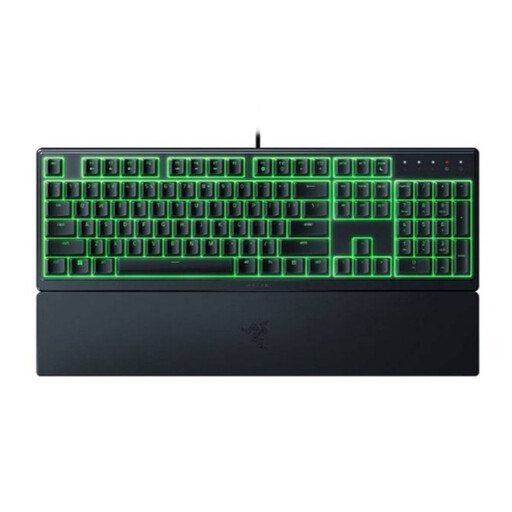
Razer Ornata V3 X Low Profile, US Layout
The low-profile design may suit you if you’re looking for a keyboard with a low profile. Razer describes this model’s membrane keys as quiet; this is a manufacturer claim, not an independent comparison.
The product name specifies a US layout. Check that it suits your preference.
Joybuy
 No image available
RK Royal Kludge RK61 60%, Quiet Red Switch
The 60% layout may suit you if desk space is limited and you don’t need the keys it leaves out. The product name specifies a Quiet Red Switch; also assess the sound of the whole keyboard.
The product name lists 61 keys, tri-mode, RGB and hot-swappable switches.
Joybuy
Frequently asked questions
Is a quiet mechanical switch the same as a quiet keyboard?
No. CHERRY describes the MX Silent Red switch as dampened, but the casing and construction also affect the sound of a complete keyboard. So check the exact switch type and assess the whole keyboard during normal use.
Do I need dedicated macro keys for grand strategy games?
Not necessarily. The Corsair K55 RGB PRO has six dedicated macro keys, while the SteelSeries Apex 3 TKL supports macro configuration through software. First, check which shortcuts your game already offers, and only choose extra controls if you want to configure and use them yourself.
What should I check when connecting and setting it up?
Check the connection, layout and software features of the exact variant. For the US Corsair K55 RGB PRO variant reviewed, Corsair lists a wired USB-A connection and iCUE for more advanced macro settings; SteelSeries lists Engine for configuring the Apex 3 TKL.
How do I care for a spill-resistant keyboard?
Follow the care instructions for the exact variant, and don’t treat spill resistance as permission to submerge the keyboard. A product-specific protection rating, such as IP42 on the Corsair K55 RGB PRO, doesn’t replace those instructions.
What are my rights when buying online in the Netherlands?
For online purchases from a business, you’ll usually have a 14-day cooling-off period, according to the Dutch government. You’re also entitled to a product that meets legal requirements; the Dutch government states that the Netherlands has no fixed statutory warranty period. If something is faulty, contact the seller.


