
Gamer with a sleeping roommate
You play while someone else is using the bedroom and want to prioritise keystroke noise over a pronounced mechanical click. RTINGS.com explains how switches and dampening can affect the sound.


If your main concern is not disturbing your roommate, a membrane keyboard or a mechanical model with clearly stated sound dampening is a more sensible place to start than one with clicky switches. RTINGS.com explains that both the switch type and the case and dampening affect the sound. Then choose a size based on the keys you need: TKL removes the number pad, while more compact layouts may also lack other keys you can access directly.
You play while someone else is using the bedroom and want to prioritise keystroke noise over a pronounced mechanical click. RTINGS.com explains how switches and dampening can affect the sound.
You share limited desk space with your mouse and want to know in advance which keys are missing from a more compact layout. RTINGS.com points out that smaller layouts can free up space, but may also omit keys.
You want direct access to the keys you need while building and using your computer, so you pay attention to the layout and how simultaneous keypresses are registered. RTINGS.com discusses the trade-off between a compact layout and having keys readily available.
First consider noise and the space available; then check whether the layout and any wrist rest suit the way you use your keyboard.
| What to consider | What should you look for? | Who is this important for? |
|---|---|---|
| Keystroke noise | Check the exact switch type and, if possible, look for a noise assessment of that specific version. ‘Linear’ doesn’t automatically mean quiet. | If someone else is sleeping in the room, I want to reduce keyboard noise without relying on a marketing term. Around 36% of consumers put limiting noise first in this situation. |
| Size and desk space | Check whether you use the number pad; with extra-compact models, also check for a function row and arrow keys. | When I have little room to move my mouse, I want a smaller keyboard without giving up keys I often need. Around 29% of consumers prioritise the desk space available. |
| Direct access to keys | Check the physical layout, the key combinations you need, and the model’s stated anti-ghosting or key rollover features. | If I use several keys at once while building, I want to know which inputs the version I choose supports. Around 21% of consumers prioritise direct access to the keys they need and simultaneous input. |
| Comfort and wrist rest | Check the key height and whether the wrist rest is fixed or detachable; factor in the overall dimensions and the space available on your desk. | For longer gaming sessions, I want a key height and hand position that feel comfortable, without a wrist rest taking up too much space. Around 14% of consumers prioritise comfort during extended use. |
Keystroke noise also depends on the case, dampening and stabilisers. A linear switch isn’t automatically a dampened, quiet option.
Assess the exact model and complete switch configuration rather than relying only on the type stated on the packaging.
TKL removes the number pad; smaller layouts may also limit direct access to other keys.
Check which keys you need for your game and everyday use before you buy. Bear in mind that you may need extra key combinations if functions aren’t available on dedicated keys.
A layout with function layers may require extra steps during use.
A product description mentioning spill resistance doesn’t replace taking precautions if liquid gets onto the keyboard.
Disconnect a wet keyboard straight away and follow the manufacturer’s instructions for that model.
The Dutch government explains that there is no fixed statutory period for the legal guarantee in the Netherlands. An additional guarantee is a separate offer.
Compare the terms of any additional cover with your existing rights before deciding whether it offers you any extra value.
The Apex 3 TKL is a compact, wired option to compare if mouse space and noise matter to you.
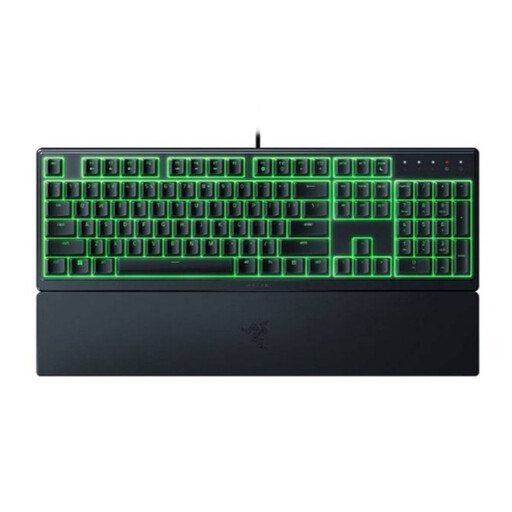
The Ornata V3 X is a low-profile model to compare if quiet membrane keys and a wrist rest suit your needs.
According to Logitech G, the G213 Prodigy combines Mech-Dome keys, media controls and an integrated wrist rest.
The Alloy Core RGB is a membrane model to consider if you’re looking for quiet keystrokes and anti-ghosting.
According to Corsair, the K55 RGB PRO has quiet rubber dome keys and dedicated macro and media keys.
This selection includes compact wired gaming keyboards, with both TKL and 60% layouts, and membrane and mechanical options.
 No image available
The TKL layout may suit you if you want to free up desk space for your mouse and don’t need a number pad.
Wired; membrane keys; anti-ghosting for up to 10 simultaneous keypresses; PC/PS5. The layout has no number pad.
 No image available
This compact model may suit you if you want to save desk space and are looking for membrane keys described as quiet.
Wired via USB; quiet membrane switches; four media keys; 12-key rollover. The stated layout is US ANSI QWERTY, and TKL has no number pad.
 No image available
This TKL version may suit you if you want mechanical keys and can manage without a number pad.
Linear MLX Red v2 switches; two layers of dampening; lubricated stabilisers; N-key rollover with anti-ghosting; detachable USB-C cable. The stated layout is BE AZERTY, and TKL has no number pad.
 No image available
The Ornata V3 X may suit you if you’re looking for a low-profile model with membrane keys and a wrist rest; Razer describes its switches as quiet.
Low profile; integrated wrist rest; programmable keys; RGB lighting. The stated version has a US layout.
 No image available
The 60% layout may suit a small desk, but check in advance whether you need the keys that aren’t directly available.
Wired; membrane keys; 61 keys; RGB lighting; US QWERTY. The USB connector isn’t waterproof; the product description mentions an IPX4 circuit board.
No, the sound varies depending on the switches and the specific version. RTINGS.com explains that the case and dampening matter too; clicky switches can be loud, while mechanically switched keyboards with internal dampening can be quieter. Check the exact model, and don’t assume that ‘quiet’ means silent.
TKL removes the number pad. Extra-compact layouts may also lack dedicated function keys or arrow keys. Check the controls you use in your game and for everyday tasks before choosing a size.
Unplug the keyboard before cleaning it. SteelSeries recommends gently removing dirt and, if using a slightly damp cloth, wringing out any excess moisture. Keep moisture away from the switches and follow the instructions for your specific model when removing parts.
According to the Dutch government, in many cases online purchases from a business in the Netherlands come with a statutory 14-day cooling-off period. Check the seller’s returns information; any more generous returns policy offered by a shop is separate from the statutory cooling-off period.
Not to get your statutory rights in the Netherlands. According to the Dutch government, there’s no fixed statutory warranty period; you’re entitled to a product that meets the terms of the contract. Check whether an extended warranty offers anything beyond your existing rights.