If someone is sleeping or working beside you, start by thinking about key noise and which keys you need. A quiet membrane keyboard is a sensible first choice for relaxed gaming, while a mechanical model with clearly specified dampening is worth considering if the feel of the keys matters more to you. RTINGS describes the membrane and rubber dome models mentioned here as suitable for casual gaming; if you choose a mechanical keyboard, check the dampening on the exact version. Then consider the layout and connection: a compact keyboard can free up desk space, but may leave out some keys, and lighting won’t make typing quieter.
Who is this keyboard for?
Gaming beside a sleeping flatmate
You want to cause as little disturbance as possible with your keystrokes during quieter gaming sessions. RTINGS discusses the difference between clicky and dampened switches, while SteelSeries and Razer describe quiet features on specific models.
Gaming with limited desk space
You want to leave room for your mouse while keeping the keys you need to build your virtual home and for everyday use. RTINGS points out that smaller layouts can leave more room for your mouse, but may also leave out some keys.
Fans of the mechanical typing feel
You want mechanical switches without assuming they’ll have a pronounced click. Check the switches and dampening on the exact version; CHERRY specifically describes integrated dampening for its MX Silent Red switch.
What should you look for when choosing?
First, think about which key sound and feel will suit your shared room. Then check that the layout and connection work with your desk and the way you use your keyboard.
| What matters |
What to look for |
Who is it important for? |
| Key noise |
Check the switch type on the exact version. Don’t just look for the word ‘quiet’; check the dampening and construction too. |
If I’m gaming while someone else is asleep, I mainly want to reduce disturbance from keystrokes, even when I’m wearing a headset. Around 40% of consumers say key noise is their top priority. |
| Layout and mouse space |
Check that you can easily use the arrow, function and number keys you need. A TKL layout doesn’t have a number pad. |
With limited desk space, I want to move my mouse freely without losing keys I need in games or for other tasks. Around 25% of consumers prioritise layout and desk space. |
| Mechanical typing feel |
Look up the exact switch version and check whether the switches and construction are specifically dampened. |
If I prefer individual mechanical switches, I don’t want to assume that a mechanical keyboard will automatically be quiet. Around 18% of consumers prioritise the mechanical typing feel. |
| Connection and lighting |
Check whether the version is wired, wireless or both, and whether you can dim or switch off the lighting. |
I want to limit cables or avoid having to charge the keyboard, and be able to adjust the lighting for a shared room. Around 17% of consumers say connection and lighting are their top priorities. |
Common buying mistakes
-
Confusing the Ornata V3 with the Ornata V3 X
The Razer Ornata V3 is clicky; the Ornata V3 X is the version with quiet membrane keys. Similar model names don’t mean the keys feel or sound the same.
Read the full model name and check the switch type on the version you’re choosing.
-
Assuming every mechanical keyboard with linear switches is quiet
Noise also depends on the switches, dampening and construction. Linear switches alone don’t prove that the whole keyboard is quiet.
Check the exact switches and construction, not just the ‘linear’ label.
-
Choosing a compact keyboard without checking the layout
A smaller layout can free up space for your mouse, but may remove easy access to keys you need in games or for other computer tasks.
Before buying, check that it has the arrow, function and number keys you use.
-
Thinking an extended warranty replaces your statutory rights
According to the Dutch government, a manufacturer’s, retailer’s or extra warranty comes on top of your statutory right to a product that is fit for purpose.
Compare the terms of an extended warranty with your existing statutory rights before taking one out.
Relevant brands to compare
SteelSeries
The Apex 3 TKL is a compact option for casual gaming if you’re looking for quiet keys and room for your mouse.
- SteelSeries describes this model as having Whisper Quiet keys and an IP32 rating.
- RTINGS notes its rubber dome switches and says the latency makes it less suitable for competitive gaming; this assessment applies to the Apex 3 TKL.
Razer
The Ornata V3 X combines a full-size layout with membrane keys. Don’t confuse it with the clicky Ornata V3.
- Razer describes the V3 X switches as ‘Silent Membrane’; RTINGS says the model is very quiet when typing and suitable for casual gaming.
- Some users may find the keys feel soft. These features don’t apply to the clicky Ornata V3.
Logitech G
The G213 Prodigy is a full-size membrane keyboard, while the G515 LIGHTSPEED TKL is a more compact mechanical option with wireless connectivity.
- Logitech describes the G213 as whisper-quiet and spill-resistant up to 60 ml. For the G515, Logitech lists multiple connection options and a sound-dampening construction.
- These are model-specific claims from the manufacturer, not independent sound measurements that can be directly compared.
Trust
The wired GXT 833 Thado may be worth considering if a compact layout is important to you.
- Trust lists an 80% layout and anti-ghosting for up to 10 simultaneous keystrokes.
- These features alone don’t tell you how much noise the keyboard makes in a shared bedroom.
Gaming keyboards at Joybuy
This selection includes quiet membrane keyboards and mechanical models, from compact layouts to full-size options.
 No image available
Corsair K55 CORE TKL gaming keyboard, US QWERTY
A TKL model with membrane switches for anyone who values quieter typing and extra room for their mouse.
The product description lists quiet membrane switches, 12-key rollover and adjustable RGB lighting. The layout has no number pad.
View at Joybuy
 No image available
Ticktype DP104 wireless mechanical keyboard, 108 keys, quiet tactile switches
An option for anyone who wants tactile mechanical keys and needs a full-size layout with a number pad.
The product information lists quiet tactile switches, 108 keys and tri-mode connectivity via 2.4 GHz, Bluetooth or USB-C. The switches are hot-swappable; the full-size layout needs room for the number pad.
View at Joybuy
 No image available
Corsair K70 CORE TKL mechanical gaming keyboard, BE AZERTY, MLX Red
A compact mechanical option for anyone who wants to free up mouse space and is mindful of noise dampening.
The product description lists linear MLX Red v2 switches, two layers of sound-dampening foam and pre-lubricated stabilisers. The TKL layout has no number pad.
View at Joybuy
 No image available
AJAZZ AK820 75% wired mechanical keyboard, US QWERTY, Red Switch-Black
A compact, wired option for anyone who wants mechanical keys and more desk space.
The product description lists a 75% layout with 83 keys, linear hot-swappable switches, a gasket construction and five layers of sound-reducing pads. The stated dampening doesn’t guarantee silence.
View at Joybuy
 No image available
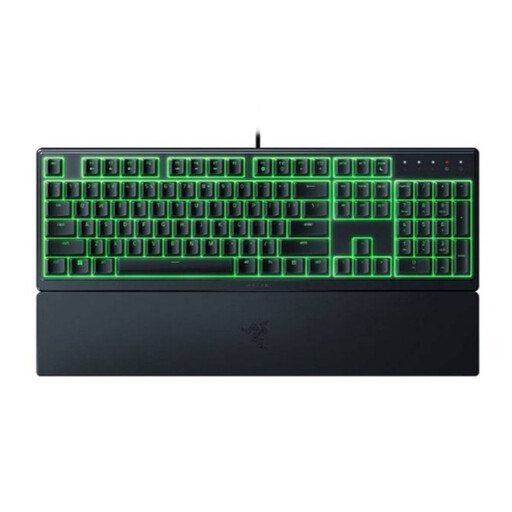
Razer Ornata V3 X Low Profile gaming keyboard, US layout
A full-size membrane keyboard for anyone who values quiet keys and wants to keep the number pad.
Razer describes the switches as ‘Silent Membrane’; RTINGS says the Ornata V3 X is very quiet when typing. The product information lists a USB connection, RGB lighting and a full-size layout.
View at Joybuy
Frequently asked questions
Does a gaming keyboard need to be mechanical for building a virtual home?
No, a mechanical keyboard isn’t essential. RTINGS describes the SteelSeries Apex 3 TKL and Razer Ornata V3 X as suitable for casual gaming. Choose a mechanical keyboard if you prefer that typing feel, and check the dampening on the exact version.
How do I connect the keyboard and keep the lighting subtle?
Check the connections available on the exact version. The Razer Ornata V3 X is wired; Logitech lists a wireless receiver, Bluetooth and wired data for the G515 LIGHTSPEED TKL. Dim or switch off the lighting if you want to keep things more subdued in a shared room.
Can I clean a spill-resistant keyboard with water?
Don’t assume that you can. SteelSeries lists IP32 for the Apex 3 TKL, and Logitech states that the G213 is spill-resistant up to 60 ml; neither rating means you should wash a keyboard under water. Check the instructions for your exact model before cleaning it.
What are my rights when buying online in the Netherlands?
When you buy online from a business, you’ll often have a 14-day cooling-off period, although there are exceptions. You’re also entitled to a product that is fit for purpose. The Dutch government says there’s no fixed statutory warranty period; if a product is faulty, contact the seller.


