
Beginners practising quarter-circle inputs
Want to see and repeat directional inputs, and choose between joystick movements, a D-pad or separate button presses.


If you want to practise quarter-circles using a physical joystick, choose an arcade stick. If you want to learn the directions as separate button presses, consider a leverless controller. A fightpad usually takes up less desk space, but uses a D-pad or analogue stick rather than an arcade joystick. Measure the space available, and if you’re using a console, check support and any adapter requirements for the exact model.
Want to see and repeat directional inputs, and choose between joystick movements, a D-pad or separate button presses.
Need to leave room for the controller, their hands and the connection. A compact fightpad has a different shape and footprint from a stick or leverless model.
If you play on PC and console, or might switch later, check which platforms and connection methods are supported for the exact model, and whether you’ll need an adapter.
| What to consider | What should you check? | Who is this important for? |
|---|---|---|
| Quarter-circle inputs | Choose the input method you want to practise, then check your directional inputs in your game’s training mode. | If I want to repeat the movement step by step, I want to be able to see which inputs I’m making. Around 31% of interested consumers prioritise learning the movement. |
| Desk and storage space | Measure the available width and depth, including room for your hands and cable, and compare this with the dimensions of the exact model. | On a small desk, the controller needs to fit without taking away the space I need for my hands. Around 25% of interested consumers consider space their main priority. |
| Platform support | Check the exact model name, console version and game. If you’re using an adapter, read the manufacturer’s requirements too. | If I play on a specific PC or console, I want to know in advance whether the connection I’ve chosen is suitable. Around 25% of interested consumers prioritise compatibility. |
| Total purchase cost and service | Factor in any accessories you need, and compare any additional warranty with your statutory rights. | I want to know whether I need an extra accessory for the connection I plan to use, and what additional cover offers. Around 19% of interested consumers prioritise the total cost. |
For the F500 FLAT Elite, MAYFLASH describes PS5 use with fighting games using a converter sold separately.
Before buying, check the exact model name, firmware, converter and game mode you want to use.
If the connection you’ve chosen requires a converter, factor in buying it separately.
According to 8BitDo, the Arcade Controller is 22 mm thick, but measures 301 × 201 mm. Its thickness alone doesn’t tell you how much desk space you’ll need.
Measure the space available and leave room for your hands and the cable too.
The Dutch government distinguishes between the statutory warranty and an extra warranty you buy. In the Netherlands, there is no fixed statutory warranty period.
Check what extra cover actually offers and what its terms and conditions are.
Offers both an arcade stick with a joystick and an all-button model; the versions differ in controls and size.
Offers models with different types of controls, including a compact joystick stick and a fightpad.
The F500 FLAT Elite is an all-button model for anyone who wants to use separate buttons and needs to consider console connections.
The Kitsune is a leverless model that Razer lists for PS5 and PC.
The Daija range includes separate PlayStation and Xbox versions.
These Joybuy products are game controllers for anyone who wants to practise quarter-circles using a D-pad or other directional input. Check the platforms and connections listed for each model.
 No image available
Could suit anyone who wants to practise using a D-pad or interchangeable controls.
The product name lists tool-free interchangeable joysticks, buttons, D-pads and vibration motors, with a customisable layout. Listed platforms include PC, Nintendo Switch, Switch 2, Steam and Android.
 No image available
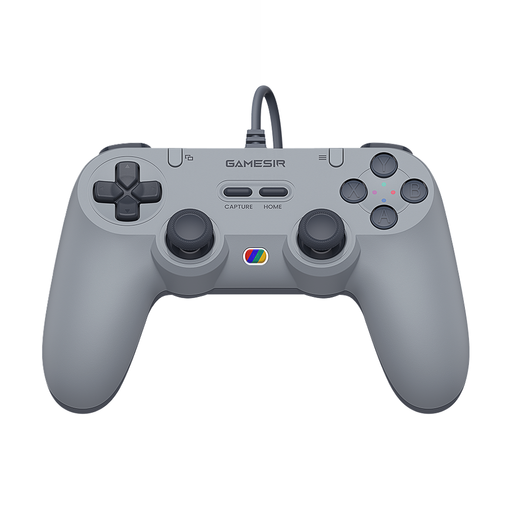
A wired controller option for anyone who doesn’t want a wireless connection while practising.
The product name lists a wired version in Retro Gray and support for Switch, Android, iOS, PC and Steam.
 No image available
A wireless gamepad option for anyone who wants to practise directional inputs with a controller.
The product name lists Bluetooth, seven-colour LED lighting, vibration feedback and a range of 10 m. The controller is described as suitable for Switch.
Press down, add forward while holding down, then release down. Practise on the other side of the screen too, and check your inputs in your game’s training mode.
According to the manual, set the mode to X and connect the controller using the USB cable. These instructions apply to this model only, not automatically to other arcade controllers.
No. For the F500 FLAT Elite, MAYFLASH describes PS5 use with fighting games using a converter sold separately. Before buying, check the exact controller, firmware, converter and game mode.
No. An additional warranty isn’t the same as the statutory warranty that applies to a purchase. According to the Dutch government, there is no fixed statutory warranty period in the Netherlands. Check the additional terms to see what extra cover offers.
For distance purchases from a business, the Dutch government says a 14-day cooling-off period applies in many cases. There are exceptions, and the rules also depend on who the seller is, so check whether you’re buying from a business or an individual.