
Writer who needs to refer to sources
You keep your draft alongside sources or comments and focus on having usable space for your windows. Microsoft Support explains how to arrange windows side by side or in a grid.


Choose an adjustable QHD monitor if you usually write one document and occasionally refer to a source or comment. An ultrawide screen is better suited to working with two documents side by side for extended periods, provided you have enough desk space. With either option, check that the text is the right size for you and that your laptop, monitor and cable are compatible.
You keep your draft alongside sources or comments and focus on having usable space for your windows. Microsoft Support explains how to arrange windows side by side or in a grid.
You mainly edit one long document, so text that’s easy to read at your preferred size matters more than maximum screen width. Arboportaal highlights height adjustment as something to consider when working at a screen.
You move between workspaces or laptops and want your screen, video connection and charging to work together. The USB Implementers Forum describes the different functions of USB-C, so the connector alone doesn’t tell you which features your devices support.
Best suited to: editing one document most of the time, with sources or comments close at hand.
The trade-off: at your preferred text size, two windows may not sit comfortably side by side; try out your layout first.
Best suited to: viewing your introductory pack and source material together for extended periods, with enough desk space to accommodate it.
The trade-off: the extra width matters less if you almost always use one window; also check that your laptop supports the resolution and connection.
| What to consider | What to look for when buying | Who is this important for? |
|---|---|---|
| Two documents side by side | Try your usual layout at a text size you find comfortable, then compare screen width and resolution. | When I read my draft and source material at the same time, I want both windows to be a usable size. Around 33% of consumers prioritise space for viewing documents side by side. |
| Easy reading while reviewing | View a document page at your usual zoom level and compare the resolution and physical screen size. | When I’m mainly editing one long document, I want to follow the text comfortably without an unnecessarily wide screen. Around 27% of consumers prioritise readability when writing and reviewing. |
| Adjusting your workspace | Check the height and tilt adjustments, and consider how much desk space the monitor will take up. | When I’m planning long writing sessions, I want to be able to adjust the screen to suit my workspace. Around 20% of consumers make adjustability their top priority. |
| Laptop connectivity | Check the exact laptop, monitor port and cable for video, resolution and, if needed, USB Power Delivery. | Before choosing a screen, I want to know whether it will work with my laptop and cable set-up. Around 20% of consumers start by checking laptop compatibility. |
A larger diagonal doesn’t guarantee that two documents will be easy to read side by side at your chosen scale. An ultrawide screen also needs plenty of desk space.
Compare the resolution and physical dimensions, and try your usual document layout.
Video, data transfer and power are separate functions. A USB-C connector on its own doesn’t confirm that your laptop and monitor will work together as you want them to.
Before buying, compare the laptop and monitor port specifications and check that the cable supports the features you need.
For consumer purchases in the Netherlands, statutory rights are separate from the manufacturer’s warranty or an additional cover package. The Dutch government advises that you should contact the seller if there’s a problem with the product.
Check what additional cover a package provides and report any fault to the seller.
The Dell Pro Plus P2725DE is a 27-inch QHD monitor with USB-C hub features.
The B Line 346B1C/00 is a 34-inch ultrawide model for viewing documents side by side.
The ThinkVision T27h-30 is a 27-inch QHD model with USB-C docking features.
The UltraWide 34WQ73A-B is a 34-inch 21:9 model for a wide document workspace.
The ViewFinity S6 S65TC, version LS34C650TAUXEN, is a 34-inch ultrawide model.
This product selection mainly features ultrawide monitors for viewing documents side by side, plus one 27-inch QHD model for anyone who usually edits one document.
 Image unavailable
A 34-inch model for anyone looking for an ultrawide workspace to view documents side by side.
 Image unavailable
This wide model may suit a workspace where you want to view several documents at once.
The listed product width is 121,49 cm; check that your desk has enough space for it.
 Image unavailable
A 34-inch model for anyone who wants to view documents side by side on a wide screen.
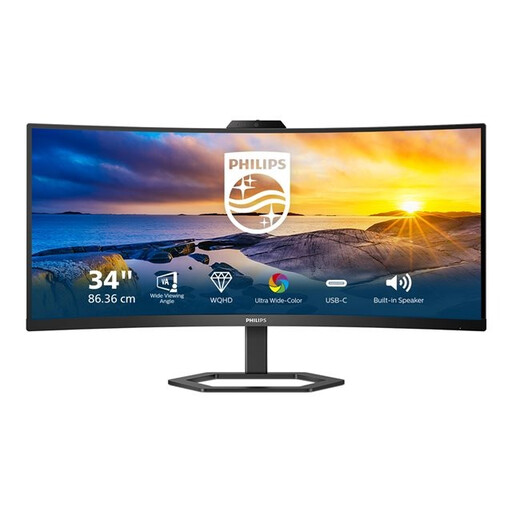 Image unavailable
The product name specifies a 21:9 screen with a resolution of 3440 × 1440 pixels for a wide window layout.
The product name also lists HDMI, USB and DisplayPort; check which connection is right for your laptop.
 Image unavailable
A 27-inch QHD model for anyone who mainly edits one document and occasionally needs to refer to a source.
The product name specifies a resolution of 2560 × 1440 pixels.
No, you don’t: Windows can arrange regular windows side by side. Whether the text remains large enough depends on your screen, scaling settings and window layout.
Position the screen to suit you, minimise distracting reflections and take regular breaks from screen work. Specific workplace health and safety rules apply to employees; they don’t necessarily apply to someone writing a club document in their own time as a volunteer.
No. Check whether the relevant monitor port supplies power, the stated power output and whether your laptop and cable support the video and charging features you need.
For a consumer purchase in the Netherlands, you’re entitled to a product that works properly and should contact the seller if there’s a fault, as advised by the Dutch government. Many online consumer purchases also come with a 14-day cooling-off period; check whether these rules apply if the club, rather than you, made the purchase.