
Vandaag of morgen in huis

Kwaliteit gegarandeerd

Welkomstaanbiedingen ontgrendelen: GRATIS bezorging | Tot 80% korting | Gratis 30 dagen JoyPlus-proefperiode
Download de app
If you're looking for a new monitor, upgrading from Full HD to a sharper display is a logical next step. A QHD monitor, also known as 2K or 1440p, offers noticeably more detail and screen real estate. But the market is flooded with models touting impressive specifications, which makes choosing difficult. Many buyers fall for marketing traps and pay for features they don't use, or worse, end up with a monitor that's a poor match for their work or laptop.
As a Joybuy Product Recommendation Officer, I'll help you cut through the noise. We'll focus on the specifications that truly matter and show you how to avoid the pitfalls of a bad purchase.
The 3 most common pitfalls when choosing a QHD monitor:
144hz QHD monitor sounds impressive, but if you primarily use the monitor for office work or photo editing, a refresh rate of 60-75 Hz is often sufficient. Those extra features for gamers unnecessarily drive up the price.To avoid a bad purchase, it's important to look beyond just the resolution. Pay close attention to the following three points that determine whether a monitor is right for your needs.
The type of panel largely determines the colour reproduction, contrast, and viewing angles.
professional monitor for photo editing will almost always have an IPS panel.OLED 2K monitor also has an extremely fast response time, which is ideal for high-end gaming. However, the price is typically higher.These specifications are especially important for gamers, but they also affect the overall smoothness of the user experience.
gaming monitor 2K with 144 Hz or higher.Always check which ports your computer or laptop has and match your monitor accordingly. A 1440p USB-C monitor is an excellent choice for a modern, clutter-free desk. With a single USB-C cable, you can often charge your laptop, transfer data, and transmit the video signal. This saves a lot of hassle with separate chargers and adapters. Pay attention to the power output (wattage) that the USB-C port can deliver; it must be sufficient to charge your laptop.
Below are some recommendations, tailored to specific user profiles and based on objective product specifications.
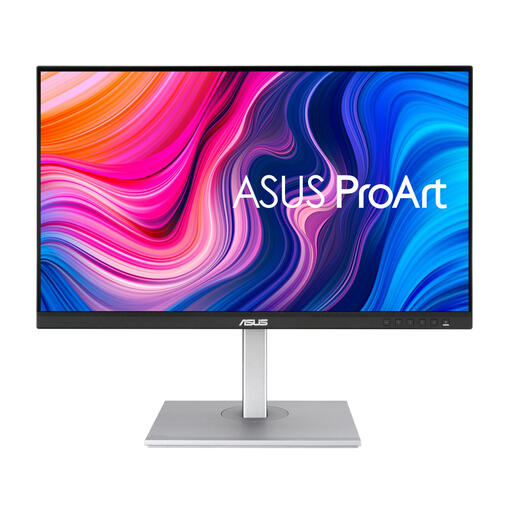
Why This Fits Their Persona: For graphic designers, photographers, and video editors, colour accuracy isn't a luxury—it's a requirement. This 27-inch QHD display is designed with this purpose in mind.
This monitor focuses on what truly matters for creative work: a colour-accurate IPS panel instead of superfluous gaming specs. The 75Hz refresh rate is smooth enough for video editing without inflating the price.
According to ASUS, this screen is Calman Verified and factory-calibrated for a colour deviation (Delta E) of less than 2. The USB-C port with 65W Power Delivery ensures a tidy workspace.
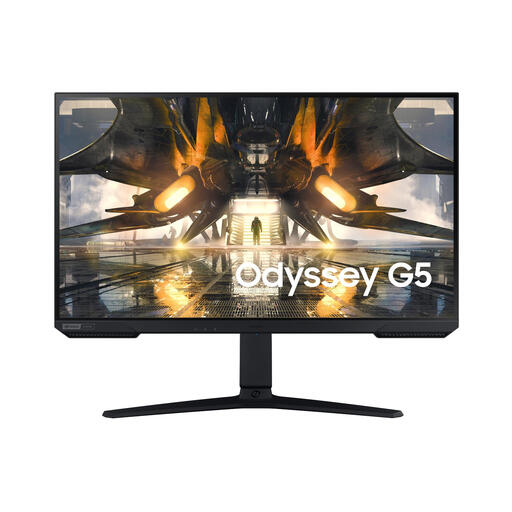
Why This Fits Their Persona: For gamers who play fast-paced shooters or racing games, every millisecond counts. A high refresh rate and fast response time are essential for staying ahead of the competition.
This model combines the sharpness of QHD with the specifications that gamers truly need. You're not paying for features you won't use, but getting the exact speed needed for a fluid experience.
The combination of a 165Hz refresh rate and 1ms response time on an IPS panel offers both speed and great colours. G-Sync compatibility prevents screen tearing for a stable image.
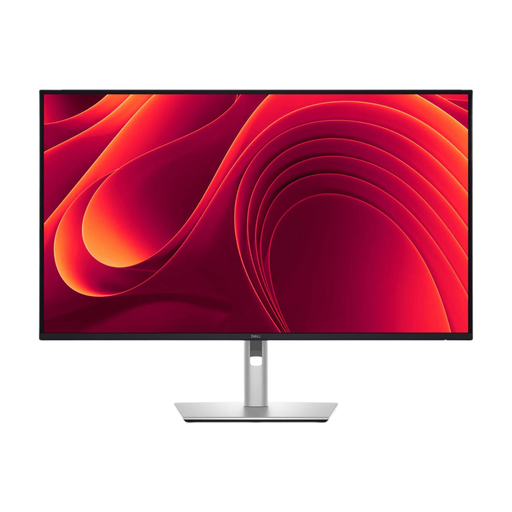
Why This Fits Their Persona: For those who multitask heavily, extra screen real estate and a clean desk are invaluable. This monitor functions as a complete docking station for a modern, efficient workspace.
This monitor solves the 'cable chaos' trap. Thanks to its extensive hub functionality with a powerful USB-C port and even a network connection, separate adapters and a messy desk are a thing of the past.
The USB-C hub with 90W Power Delivery charges most laptops. The built-in RJ45 Ethernet port ensures a stable internet connection. The large 31.5-inch screen provides ample space for multitasking.
We have compiled a complete, up-to-date list of products that meet these selection criteria.
Yes, absolutely. An external QHD monitor offers significantly more screen real estate and a sharper image than the built-in display of most laptops. It's ideal for multitasking, as you can open multiple windows side-by-side without text becoming too small. Just make sure your laptop can drive a 2560x1440 resolution, which is the case for most modern laptops.
The most popular size is a 27-inch QHD display. This combination offers a pixel density that many consider ideal: text is sharp and easily readable without needing to adjust interface scaling. Larger sizes like 32 inches are also available and offer even more screen real estate, but the pixels may be slightly more visible up close.
Not for office work and media consumption. Any modern integrated graphics chip can drive a QHD resolution at 60Hz. However, if you want to game at 144Hz or higher at QHD resolution, you'll need a powerful, dedicated graphics card (e.g., from the NVIDIA GeForce RTX 30 series / AMD Radeon RX 6000 series or newer) to achieve stable, high frame rates. Without such a card, you're paying for a refresh rate that you can't actually utilise.
