
Vandaag of morgen in huis

Kwaliteit gegarandeerd

Welkomstaanbiedingen ontgrendelen: GRATIS bezorging | Tot 80% korting | Gratis 30 dagen JoyPlus-proefperiode
Download de app
If you're looking for a monitor that brings images to life with deep blacks and vibrant colours, you've probably already heard of QD-OLED. This technology is a significant step forward for both avid gamers and professional content creators. The combination of perfect contrast and a wider colour spectrum creates a visual experience that is hard to match.
But with the growing popularity of the QD-OLED monitor, the selection is also expanding. How do you choose the model that fits your needs? In this overview, we'll help you get started. We'll discuss the most important specifications and highlight a few popular models to make your choice easier.
Before we look at the products, it's helpful to know which specifications matter. Here are a few key points.
A 4K QD-OLED monitor (3840x2160 pixels) delivers incredible sharpness and detail, which is ideal for editing photos and videos or for playing games with rich visual worlds. For competitive gamers, however, a high refresh rate is just as important. A 240Hz 4K monitor offers extremely smooth visuals, which can be an advantage in fast-paced games. To take advantage of these high resolutions and speeds, especially on the latest consoles and PCs, an HDMI 2.1 monitor is a requirement.
QD-OLED panels are known for their superior colour reproduction and a contrast ratio that leaves traditional LCD screens far behind. This makes them an excellent monitor for content creators. Look for specifications like 10-bit colour depth for smooth colour gradients and HDR certifications such as DisplayHDR True Black. This ensures you get the deepest blacks and brightest highlights, exactly as the creator intended.
Modern monitors offer more than just a DisplayPort or HDMI connection. A built-in USB hub, USB-C with Power Delivery to charge your laptop, or even a KVM switch can significantly simplify your workflow. Don't forget about ergonomics either. A height-adjustable, tiltable, and swivelling stand ensures you can always find a comfortable viewing angle.
Based on specifications and features, we've listed a few interesting models for you.
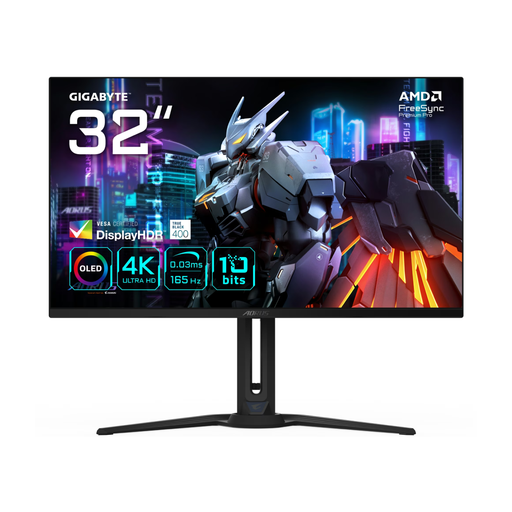
Why this model stands out: The Gigabyte AORUS FO32U is a versatile 4K QD-OLED monitor that offers a good balance between gaming performance and professional features. At 165Hz, it's fast enough for most gamers, while the 4K resolution on a spacious 31.5-inch screen provides plenty of workspace for creative tasks.
Advantages:
Who is it for? For the all-round user who wants to both game and be productive. It's a solid choice if you're looking for a large 4K screen with a high refresh rate without necessarily going for the absolute top speed.
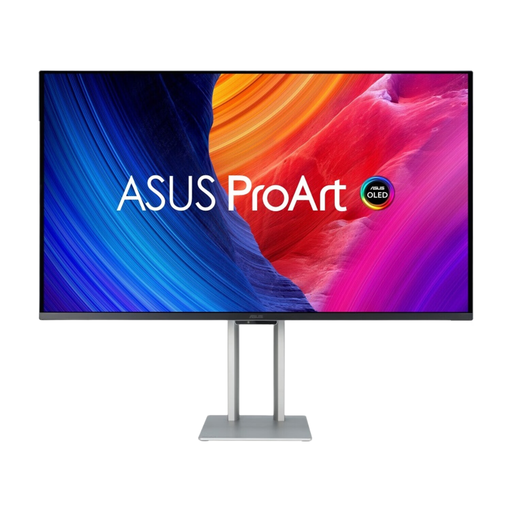
Why this model stands out: The ASUS ProArt PA32UCDM is primarily aimed at professionals in the creative sector, but it makes no compromises on speed. The combination of a 240Hz refresh rate with the colour accuracy of the ProArt series makes this a unique model.
Advantages:
Who is it for? The monitor for content creators par excellence. Perfect for video editors, graphic designers, and photographers who demand the highest standards for colour reproduction while also wanting to benefit from an extremely smooth picture.
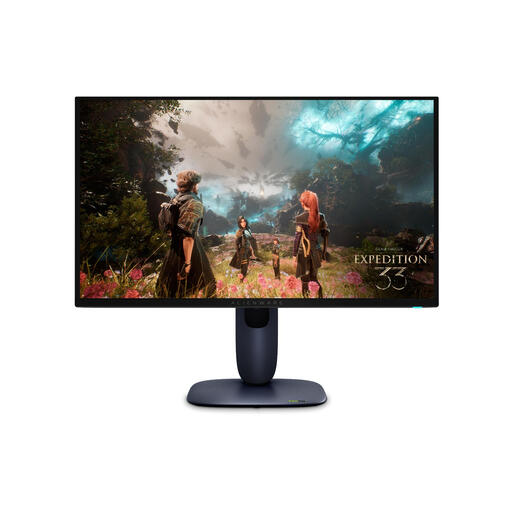
Why this model stands out: The Alienware AW2725Q is purely aimed at the serious gamer. It combines a 4K resolution with a blazing-fast 240Hz refresh rate on a more compact 26.7-inch screen. This size provides a high pixel density and makes it easier to survey the entire playing field.
Advantages:
Who is it for? The competitive gamer looking for a top-tier OLED gaming monitor. If you want the fastest response times and the smoothest visuals in 4K, without compromise, this is a model to consider.
The world of monitors is vast and diverse. QD-OLED is an impressive technology, but perhaps another type of 4K monitor would better suit your budget or specific needs. There are plenty of alternatives with different panel technologies and specifications.
Check out our full range of 4K Ultra HD computer monitors for more choices.
QD-OLED (Quantum Dot Organic Light Emitting Diode) combines a blue OLED light source with a layer of quantum dots to create red and green subpixels. According to manufacturers, this results in higher peak brightness and a wider, more vibrant colour gamut than traditional (W-OLED) panels, while retaining the perfect blacks and infinite contrast of OLED.
Burn-in is a known phenomenon with OLED technology, where static images can leave a permanent shadow over time. Manufacturers of modern QD-OLED monitors are aware of this and build in various protection mechanisms. These include pixel shifting, automatic dimming functions for static elements, and periodic 'pixel refresh' cycles. It is advisable to keep these features enabled and follow the manufacturer's guidelines to minimise the risk.
Yes. To get the most out of a 4K QD-OLED monitor, especially a model with a high refresh rate of 165Hz or 240Hz, a powerful computer is essential. For gaming at 4K with high frame rates, you will need a high-end graphics card (GPU). For demanding creative tasks like 4K video editing, a fast processor (CPU) and sufficient RAM are also required to work smoothly.
