
Switch host with extra players
You want to know whether you can hand out your existing or extra Joy-Cons individually for a puzzle game, and whether you have enough ways to charge them. Nintendo describes this style of play for supported games.


Start by considering your system, the game you’ve chosen and the number of players. Then decide whether split Joy-Cons, full gamepads or a wired controller are right for you. Nintendo explains that in supported games, each detached Joy-Con can control one player. However, system compatibility alone doesn’t guarantee that the game supports the way you want to play. With a wired controller, you’ll also need to consider the required docked setup and cable reach.
You want to know whether you can hand out your existing or extra Joy-Cons individually for a puzzle game, and whether you have enough ways to charge them. Nintendo describes this style of play for supported games.
You’re looking for an extra full-size controller that works with your console, and want to check in advance whether the game supports local co-op. Sony and Microsoft describe support for their respective systems.
You want to connect controllers for local multiplayer and need to check that both your PC and your chosen game support the controller. Sony mentions USB-C and Bluetooth for use with a PC, while Microsoft lists Windows support for the Xbox controller.
First, check that the controller works with your system, that the game supports your preferred way to play and that enough players can join in at once. Then consider charging, connections and how everything will fit around your seats.
| What to consider | What to look for | Who is this important for? |
|---|---|---|
| Compatibility | Check the exact console version and whether the game supports the controller and your preferred way to play. | I want to know before game night whether my controller works with both my system and this game. Around 36% of consumers say system and game compatibility is their top buying priority. |
| Controls for every player | Count the players and check whether the game accepts individual Joy-Cons as separate controls. | I want to avoid a guest having to watch because there aren’t enough controls. For around 29% of consumers, having enough separate controls for everyone comes first. |
| Use with multiple devices | Check which systems are listed for the exact model and which connection type the game supports. | I want to use the controller beyond this puzzle night too, for example with a PC. Around 21% of consumers make reusing a controller with a PC or another device their top buying priority. |
| Connecting and charging | Check whether you need a dock or charging solution, and whether any cable will reach the seats. | I don’t want to run into a flat battery, nowhere to charge or an awkward cable while playing together. Around 14% of consumers focus on having a charging and cable set-up that’s ready to use. |
A pair of Joy-Cons can be used separately or together as one controller. The game you choose determines which ways to play are available.
Check the game description and count the number of supported individual controls, not just the number of pairs you’ve bought.
Nintendo says Joy-Con 2 works only with Switch 2. Original Joy-Cons can be paired wirelessly with Switch 2, but you can’t charge them by attaching them to that system.
Before buying, check the full product name, your console version and how you’ll charge the controllers.
According to PowerA, the PowerA Advantage Wired Controller for Switch 2 is intended for use only when the system is docked. This model doesn’t support motion controls and isn’t designed for games that use Joy-Cons exclusively.
Check the game’s control requirements, the docked set-up and whether the cable will reach the seats without getting in the way.
The Dutch government distinguishes between an additional manufacturer’s warranty and your statutory right to a product that meets acceptable standards, which is the seller’s responsibility.
Keep your proof of purchase and contact the seller if your product is faulty.
Joy-Con for Switch and, wirelessly, Switch 2; Joy-Con 2 is for Switch 2 only. These are worth considering when a co-op puzzle game supports shared controls.
The DualSense is a full-size extra controller for PS5. Sony also lists connection options for use with a PC.
The Xbox Wireless Controller is designed for supported Xbox consoles and Windows PCs.
The Advantage Wired Controller is a wired option for Switch 2 in a fixed set-up with the console docked.
The Ultimate 2 Bluetooth Controller could be an option if you want to use a controller with both Switch and Windows.
This selection includes split Joy-Con controls for Switch and Switch 2, as well as full gamepads for PS5, Xbox and PC set-ups. Before game night, check that your chosen game supports your controller and the number of players you want.
 No image available
Worth considering for a PS5 set-up where each player uses a full gamepad.
The product name also lists PC, Mac, Android and iOS; check that your chosen game and device support the controls you need.
 No image available
Worth considering for an Xbox set-up where each player uses a full controller.
Microsoft lists Xbox and Windows PC support for the Xbox Wireless Controller; check the requirements of the specific game too.
 No image available
Worth considering for a Switch game that supports using Joy-Cons individually as separate controls.
Nintendo describes separate use in supported games; check that this way of playing works with your puzzle game.
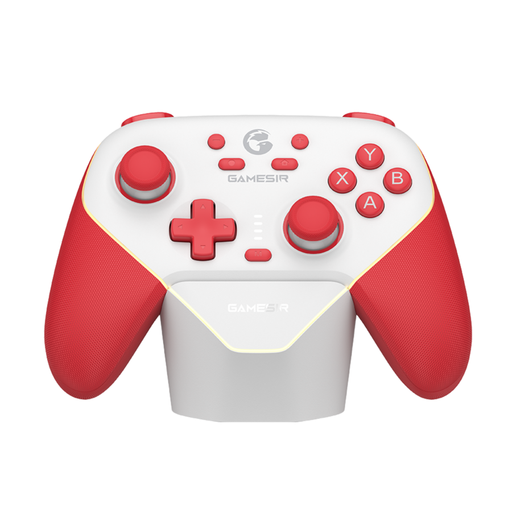 No image available
Worth considering for a PC or Switch set-up where players use a full gamepad.
The product information lists Switch and PC; check support for the exact game and the connection type you want to use.
 No image available
Worth considering for a Switch 2 game that supports separate Joy-Con 2 controls.
Nintendo says Joy-Con 2 works only with Switch 2; check that the game supports the way you want to play.
No, it depends on the game. Nintendo says that in Snipperclips on Switch, each player can use one separate Joy-Con. Check whether your game supports this way to play, as a pair of Joy-Cons can also work together as one controller.
Sync them using the controller menu on a powered-on Switch system, and check whether you want to use them together or separately. Nintendo says original Joy-Cons can be paired wirelessly with Switch 2, but charging them requires an original Switch or a suitable charging accessory.
Not necessarily. According to the Dutch government, the seller is responsible for putting things right if a product is faulty. The Netherlands has no fixed statutory warranty period, and an additional manufacturer’s warranty doesn’t replace your statutory rights.
The Dutch Authority for Digital Infrastructure outlines the legal requirements for radio equipment and the CE marking for equipment that meets those requirements. For a specific wireless product, check the required marking and product information; a statement of platform compatibility alone doesn’t establish compliance.