First, check whether the controller works with your console or PC and the game you want to play. Then decide whether you need to plug your headphones into the controller. A 3.5 mm jack alone doesn’t guarantee audio will work over every connection: PlayStation requires a wired connection to use a DualSense headset jack on PC, while Nintendo specifies that the Switch 2 Pro Controller is for Switch 2 only.
Who is this choice relevant to?
Players with wired headphones
If you want to hear audio through your controller, check not only the connection but also whether the chosen connection to your console or PC supports audio. PlayStation and Nintendo set out different requirements for their controllers.
Players on PS5, Xbox or Switch 2
Your controller needs to work with your platform and the game’s controls. Nintendo specifies the Switch 2 Pro Controller for Switch 2 only, so always check the full model name and which console it’s designed for.
PC players who want a straightforward setup
Choose a controller that suits your PC connection and the game. Don’t assume audio or gaming features will work automatically: PlayStation and Xbox set out separate requirements for using a headset with a PC.
What should you look for?
First, check that your platform and game are supported. Then see whether your headphones need to connect to the controller or directly to your gaming device.
| What to consider |
What should you look for? |
Who is this important for? |
| Headphone audio |
Check where the headphones connect and whether that connection supports audio. PlayStation requires USB for headset audio through a DualSense on PC; according to Nintendo, the Switch 2 Pro Controller has a 3.5 mm, 4-pole CTIA jack. |
If I want to plug wired headphones into the controller, I want to be sure audio will work over my chosen connection too. Around 36% of consumers prioritise headphone audio. |
| Platform and game |
Check the exact console model or PC connection, as well as whether the game is supported. Nintendo limits the Switch 2 Pro Controller to Switch 2; PlayStation notes that features such as haptics depend on game support. |
If I want to switch between platforms or games, the controller needs to work with my devices and the game needs to support the controls I want. Around 28% of consumers prioritise platform and game compatibility. |
| Controls and where you play |
Look at the button layout and choose a wired or wireless connection that suits where you play. Nintendo specifies customisable GL and GR buttons for the Switch 2 Pro Controller. |
For relaxed puzzle sessions, I want the buttons to be comfortable to reach and to use my controller where I play. Around 22% of consumers consider comfortable, straightforward controls the most important factor. |
| Costs and conditions of use |
Check what’s included, whether you need a cable and what conditions of use apply. An extra warranty package isn’t automatically necessary: the Dutch government also explains your rights if a product is faulty. |
If I want to stick to my budget, I look at what I need to use the controller and any additional items I might need. Around 14% of consumers prioritise the total purchase and running costs. |
Common buying mistakes
-
Assuming a 3.5 mm jack guarantees wireless PC audio
The jack won’t necessarily work in the same way with every controller connection. PlayStation requires a wired connection for headset audio through a DualSense on PC. Xbox notes that Xbox headsets aren’t supported when the controller is connected to a PC via Bluetooth.
Check the audio requirements for the exact controller model and the connection you plan to use.
You may need a USB connection to use a DualSense on PC, so check whether you already have the cable you need.
-
Treating Switch and Switch 2 as the same platform
Nintendo specifies that the Switch 2 Pro Controller is for use with Switch 2 only. A controller with ‘Switch 2’ in its name won’t necessarily work with another Switch console.
Check the full model name against the console you play on before ordering.
-
Choosing a wired Switch 2 controller for handheld play
PowerA states that the Advantage Wired with Lumectra can only be used when the Switch 2 is docked. This makes it unsuitable for playing with the console in your hands.
Choose this controller only if playing with your console docked suits the way you use it.
-
Confusing an additional warranty package with your statutory rights
An optional package is separate from your rights if a product is faulty. The Dutch government explains that there’s no fixed statutory warranty period in the Netherlands and that the retailer must provide a solution if something goes wrong.
Before buying extra cover, compare what it offers with the rights you already have.
Relevant brands for controllers and headphone audio
PlayStation
The DualSense is an option for PS5 and supported PC games, with separate requirements for headset audio on PC.
- PlayStation notes that haptic feedback and adaptive triggers depend on support from the game.
- According to PlayStation, a wired connection is required to use the headset jack on PC.
Xbox
The Xbox Wireless Controller is designed for Xbox consoles and Windows PCs; check headset audio separately from the controls.
- Microsoft specifies a 3.5 mm jack and Bluetooth controls.
- Xbox warns that Xbox headsets aren’t supported when the controller is connected to a PC via Bluetooth.
Nintendo
The Switch 2 Pro Controller is designed for Nintendo Switch 2 players who want to connect headphones to their controller.
- Nintendo specifies a 3.5 mm, 4-pole CTIA jack and customisable GL and GR buttons.
- Nintendo lists Switch 2 as the only supported platform; the stated battery life of around 40 hours is an estimate.
PowerA
The Advantage Wired with Lumectra is a wired option for Switch 2 when the console is docked.
- PowerA specifies a 3.5 mm stereo jack.
- According to PowerA, the controller can only be used with Switch 2 docked. Nintendo doesn’t list HD Rumble 2, motion controls or amiibo support for this model.
8BitDo
The Ultimate 2C Wired suits a Windows PC setup where you can connect your headphones directly to the PC.
- 8BitDo specifies Windows 10 or later and a wired USB connection for this version.
- The listed model specifications don’t confirm headset audio through the controller; also check that your game supports it.
Controllers on Joybuy
This selection on Joybuy includes wired controllers for Switch and Switch 2, a wireless Switch controller, a DualSense for PS5 and a Switch 2 Pro Controller with a headphone jack. Check that each model suits your platform and the audio connection you want to use.
 No image available
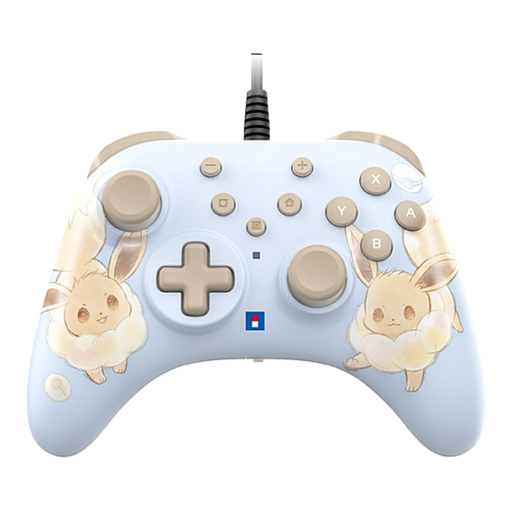
Hori Wired Controller Horipad Turbo for Switch and Switch 2 - Pokemon Eevee Cottage Core Edition
A wired option for playing in one place with a compatible Nintendo Switch or Switch 2.
The controller uses USB and has programmable rear buttons and a Turbo function. Cable not included.
Joybuy
 No image available
Nintendo Switch Pro Controller - Black
A wireless controller for playing on a Nintendo Switch.
The product information lists wireless controls and a built-in battery. A headphone jack isn’t mentioned, so check how you want to hear audio from your gaming device.
Joybuy
 No image available
Sony PlayStation 5 DualSense Wireless Controller - White
An option for PS5 players who want to use a controller with games that support DualSense features.
The controller has a 3.5 mm headset jack. PlayStation requires a wired connection for headset audio through the controller on PC; haptic feedback and adaptive triggers depend on game support.
Joybuy
 No image available
Nintendo Switch 2 - Official Pro Controller - Black
An option for Switch 2 players who want to connect wired headphones to their controller.
Nintendo specifies a 3.5 mm CTIA-standard jack and use with Switch 2 only.
Joybuy
Frequently asked questions
Will headphones work through a DualSense connected wirelessly to a PC?
Not through the headset jack when the DualSense is connected to the PC via Bluetooth: PlayStation requires a wired connection to a PC or Mac for this.
Can I use the Switch 2 Pro Controller with the original Nintendo Switch?
Nintendo specifies this controller for Nintendo Switch 2 only. Check the platform listed for the exact model before ordering.
What should I check if my wired headphones aren’t producing any sound?
First, check whether the connection supports audio through the controller. USB is required for headset audio through a DualSense on PC; Xbox lists PC Bluetooth as a limitation for Xbox headsets. Then check the audio settings on your gaming device.
Who should I contact if a controller I’ve bought is faulty?
According to the Dutch government, the retailer must provide a solution if there’s a problem with a product. There’s no fixed statutory warranty period in the Netherlands; the circumstances and the product’s expected lifespan are taken into account.
Can I return a controller bought online?
For many purchases made remotely from a business, the Dutch government states that you have a 14-day cooling-off period. Check which terms and exceptions apply to your purchase.


