First, check whether your puzzle game supports controller input and whether the controller works with your PC or console. If you don’t want to use an additional socket, you could choose a wired controller powered via USB, a wireless model with replaceable batteries or a rechargeable controller. Be sure to consider the USB ports available, the space for the cable and how the controller is powered.
Who is this buying guide for?
PC puzzle gamer
You want to find out first whether your particular puzzle game supports a controller. On Steam, Pixel Puzzles Traditional Jigsaw Puzzles is listed as having partial controller support, while Puzzle Quest: Immortal Edition has full controller support.
Gamer with few sockets
You’re comparing power from an available USB port with replaceable AA batteries or charging via a USB connection you already use.
Switch or PS5 puzzle gamer
You’re looking for a controller for your own console and want to check in advance how pairing and charging work. Support on another platform isn’t guaranteed.
What should you look for when buying?
First, check that your game and device are supported. Then compare the power options and controls you need for that game.
| What to consider |
What should you check? |
Who is this important for? |
| Game and device compatibility |
Check the input options for the specific game and the devices supported by the controller model. |
When buying a controller for a puzzle game, I want to know whether it works with my particular game and device; around 33% of consumers give compatibility top priority. |
| No additional socket |
Count available USB ports separately from sockets and check whether you need a cable, receiver or charging option. |
With few sockets, I don’t want to need an extra mains adapter to play; around 27% of consumers prioritise avoiding an additional occupied socket. |
| Batteries and charging |
Check the battery type, what’s included in the box and how the exact version is charged. |
I don’t want to be caught out by flat batteries or a break to recharge; around 20% of consumers give power and charging top priority. |
| Directional controls |
Check the D-pad and the buttons used by your game; layouts vary between controllers. |
If my puzzle game needs lots of directional input, I look for controls that suit it; around 20% of consumers prioritise suitable directional controls. |
Common buying mistakes
-
Assuming every puzzle game offers full controller support
Controller support varies from game to game. Steam lists Pixel Puzzles Traditional Jigsaw Puzzles as having partial support, while Puzzle Quest: Immortal Edition is listed as having full support.
Check the input details for your specific game before choosing a controller.
-
Assuming a wireless USB receiver means no port is needed
According to 8BitDo, the 8BitDo Ultimate 2C Wireless uses a 2.4 GHz connection with a USB receiver on Windows; Bluetooth is listed for Android. So playing wirelessly may still take up a USB port.
Check the connection method for your device and count the USB ports you have available.
You’ll need an available USB port to use this controller with the receiver on Windows.
-
Expecting the USB connection to charge AA batteries
The standard wireless Xbox controller uses AA batteries; a USB connection doesn’t automatically mean those batteries charge inside the controller. Xbox Support also notes that some controller packages don’t include AA batteries.
Check the battery type and what’s included with the exact version, and allow for replacement batteries or a separate charging solution.
AA batteries may need replacing or a separate charging solution.
Brands to consider
Logitech G
The Logitech F310 is a wired PC controller for anyone who doesn’t want a separate controller battery or charging spot.
- Logitech lists a four-button D-pad and a USB cable. XInput and DirectInput are supported.
- Logitech says DirectInput requires software installation. The cable and PC-focused connection are important considerations for your setup.
Xbox
The standard wireless Xbox controller is worth considering for supported Xbox systems, Windows and selected mobile devices if you prefer replaceable batteries.
- Microsoft lists Bluetooth and a hybrid D-pad; Xbox Support says the standard wireless controller uses AA batteries.
- Check the packaging of the exact version: Microsoft says some units sold since December 2025 don’t include AA batteries.
Nintendo
The original Switch Pro Controller is a rechargeable option for Switch; Nintendo also describes how to sync it with Switch 2.
- Nintendo lists a USB-C cable in the box and a battery life of around 40 hours, depending on use.
- Nintendo says a full charge takes around six hours. Check that the controller and game are suitable for your version of Switch.
PlayStation
DualSense is an option for PS5 and for specific supported PC or mobile games.
- Sony lists USB-C and Bluetooth for the devices it supports.
- Sony says features vary by device and game. According to Sony, haptic feedback on PC requires a USB connection when the game supports this feature.
8BitDo
The Ultimate 2C Wireless offers connectivity for Windows and Android; the Pro 2 is a separate product line with different platform support.
- According to 8BitDo, the Ultimate 2C Wireless uses 2.4 GHz or a cable on Windows and Bluetooth on Android; the model has a built-in rechargeable battery.
- The battery information provided comes from the manufacturer and isn’t based on independent testing. Check the exact model version and connection method for your device.
Controllers at Joybuy
These controllers are designed for different gaming devices and power setups. Check that your puzzle game and device are supported by each model.
 Image unavailable
NAXSIR Wireless Gamepad for Switch
A rechargeable wireless option for Switch games with controller support; the product description also says you can play while it’s charging.
The description lists Bluetooth and a battery life of up to 20 hours.
View at Joybuy
 Image unavailable
Xbox Wireless Controller for Xbox Series/PC – Ice Breaker Special Edition
An option for supported Xbox and Windows PC games if you don’t want to set aside a place to charge your controller while you play.
The product description lists two AA batteries in the box, a hybrid D-pad and a battery life of up to 40 hours with AA batteries.
View at Joybuy
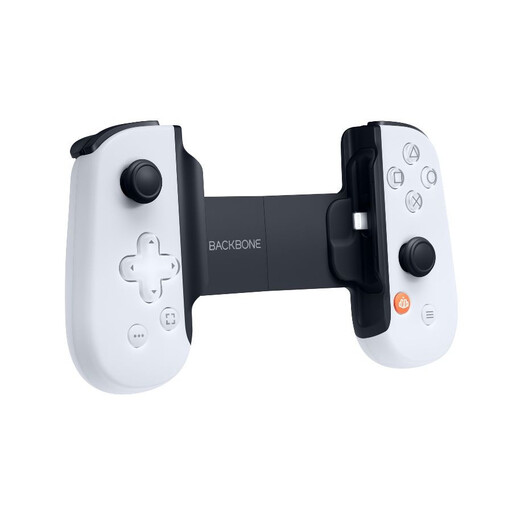 Image unavailable
Backbone ONE Gen 2 PlayStation Edition for iPhone/iPad (Lightning)
This mobile controller is suitable for an iPhone or iPad with a Lightning connector if you want to play without a separate controller battery.
The product description lists a direct Lightning connection and passive operation without a battery. The product title says the connection is for iPhone/iPad with Lightning.
View at Joybuy
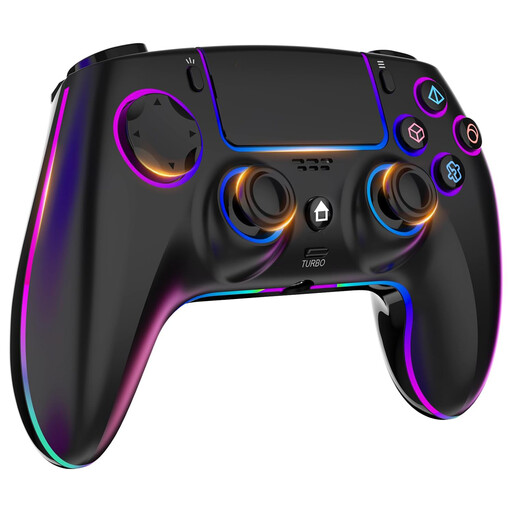 Image unavailable
Wireless controller for PS4/PC with 1000 mAh battery
A rechargeable option for PS4 and PC games that support controller input.
The product description lists a D-pad with four separate switches, a 1000 mAh rechargeable battery and a battery life of up to 8 hours.
View at Joybuy
 Image unavailable
Game controller with Dual Vibration & Gyro for Switch and PC
A rechargeable wireless option for Switch or PC games, provided the game and device support this controller.
The product description lists Bluetooth 4.0, a battery life of up to 10 hours and a USB-C charging cable in the box.
View at Joybuy
Frequently asked questions
Does every controller work with every puzzle game on PC?
No, controller support varies from game to game. Steam lists Puzzle Quest: Immortal Edition as having full support and Pixel Puzzles Traditional Jigsaw Puzzles as having partial support. Check your game’s input details and the types of controller it supports.
Can you charge a Switch Pro Controller without using an additional socket?
According to Nintendo, you can charge the original Switch Pro Controller using an available USB port on the Switch dock with the cable supplied. This charging method does, however, assume that the dock is already powered.
Who can help you in the Netherlands if your controller is faulty?
According to the Dutch government, the seller must provide a solution if a product is faulty. The Netherlands has no fixed statutory guarantee period; what you can expect from a product depends, among other things, on the product itself and the information provided. An additional guarantee doesn’t replace your statutory rights.
What should you do with flat controller batteries or an old battery pack?
Take flat batteries and battery packs to a collection point, such as collection bins at shops and supermarkets. Milieu Centraal recommends this for disposing of flat batteries and battery packs.


