
PC puzzle gamer on the sofa
Plays on a TV via a PC and checks whether the game supports controller input and whether the connection suits the distance from the seating position. Steam Support notes that games need to support gamepad input.


First, check which device runs the puzzle game and whether the game itself supports controller input; a big screen doesn’t guarantee that it does. Then choose a controller with the right controls and a connection suited to your seating position and device, and check the power type and any limitations of the exact model.
Plays on a TV via a PC and checks whether the game supports controller input and whether the connection suits the distance from the seating position. Steam Support notes that games need to support gamepad input.
Wants to know whether their existing Joy-Con controllers will do or whether a separate controller with a D-pad is better suited to the game’s controls. Nintendo explains how to use the Switch on a TV and how to sync a Switch Pro Controller.
Is looking for a controller for their Xbox or PS5 and wants to check that the specific controller works with the particular game. Xbox and PlayStation explain support for different devices, but you’ll still need to check the game itself.
Start with the device running the game and the input the game requires. Then check the controls, connection options from the sofa and the power type of the exact model.
| What to consider | What to look for when buying | Who is this important for? |
|---|---|---|
| Compatibility | Check the device, the exact controller version and whether the specific game supports controller input. | If I’m playing on a PC or console via the TV, I want to know first whether my game supports the controller. Around 36% of consumers put compatibility at the top of their list. |
| Game controls | Check whether the game requires a D-pad, analogue stick, pointer or motion input. | For consumers who mainly need clear directional input, the shape and position of the D-pad matter more than extra buttons. Around 29% put controls first. |
| Connection from the sofa | Check which connection modes the device supports and whether you need a spare USB port for a receiver. | If my PC is further away from the sofa, I want to know whether the connection will work without an awkward cable run. Around 21% of consumers give connection and distance top priority. |
| Power | Check whether the model uses AA batteries or a rechargeable battery, and which items are included. | Consumers who want to avoid disposable batteries or prefer to know in advance what they’ll need to charge pay extra attention to the power type. Around 14% put power and running costs first. |
The TV displays the picture, but the connected device and the game determine whether gamepad input works. Steam Support states that gamepad input is only available in games that support it.
Check the device, the exact controller model and the game’s control options separately.
The 8BitDo Ultimate 2C Wireless and Ultimate 2C Bluetooth have different connection modes and platforms listed by the manufacturer. The Switch Pro Controller and Switch 2 Pro Controller are also different models.
Before buying, compare the full model name, supported device and connection mode.
Choosing the wrong model could mean you still need another controller for the device you want to use.
Xbox lists AA batteries or a compatible rechargeable battery pack as power options for the Xbox Wireless Controller.
Check which power type the exact model uses and which items are included.
If you use AA batteries, you’ll need to replace them; a separate battery pack may be another option.
The Nintendo Switch Pro Controller is an option for use with a Switch or Switch 2; always check the game’s required controls and the exact model.
The Xbox Wireless Controller is designed for supported Xbox consoles, Windows PCs and the mobile devices listed by Microsoft.
DualSense is an option for PS5 players who also want to check whether they can use it with a supported PC or mobile device.
The F710 is an option worth exploring for PC gaming on a TV if a USB receiver and the supported input modes suit your set-up.
The Ultimate 2C family has separate Wireless and Bluetooth models; check which one suits your device.
This selection includes controllers for Xbox or Windows PC, PS5 and Nintendo Switch, as well as PC set-ups with a USB receiver and a controller also listed for Android TV. Always check that your specific puzzle game and device support the model you choose.
 Image unavailable
Worth considering for an Xbox or Windows PC set-up if the game supports controller input and directional controls.
The description lists a hybrid D-pad, Bluetooth and two included AA batteries.
 Image unavailable
Worth considering for PS5; for PC or mobile use, check support for your device and specific game.
The description lists a wireless connection, a rechargeable battery and USB-C. It also mentions 20 buttons, haptic feedback and adaptive triggers.
 Image unavailable
Worth considering for Switch games on a TV if you want a separate controller with a D-pad; check the game’s controls.
Nintendo describes syncing with Switch and Switch 2. The controller has a D-pad, according to Nintendo; average battery life of around 40 hours depends on use.
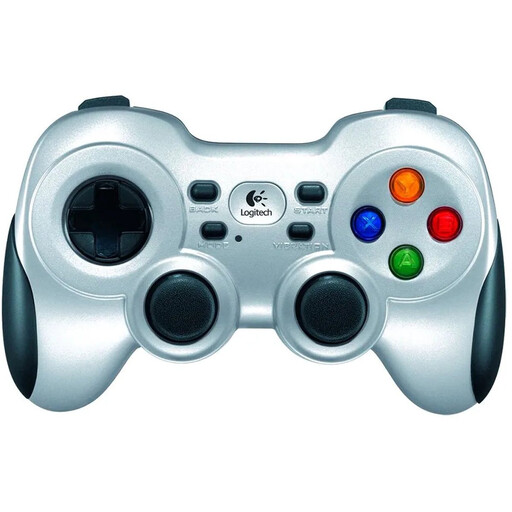 Image unavailable
Worth considering for PC gaming on a TV if you have a suitable USB port available and the game supports controller input.
Logitech lists a four-way D-pad and a 2.4GHz connection via a USB receiver; it doesn’t connect via Bluetooth. The description mentions two AA batteries. Logitech says software installation is required for DirectInput.
 Image unavailable
Worth considering if you use one of the listed devices and the connection options suit your set-up; check support for the specific game.
The product specifications list wired, wireless and Bluetooth connections, a 1500 mAh battery and six programmable buttons. The description lists PC, Switch, Switch 2, Android and Android TV.
No. It depends on the device running the game and the input the game supports. Check both the compatibility of the exact controller model and the game’s control options.
Nintendo describes syncing with a Switch or Switch 2 using the USB cable connected to the dock, or the SYNC button in the controller menu. Also check that the game supports the controller input you want to use.
No. According to Logitech, the Logitech G F710 uses a USB receiver for the listed 2.4GHz connection. For the 8BitDo Ultimate 2C Wireless, the manufacturer lists 2.4GHz for Windows and Bluetooth for Android, so check the mode supported by the exact model.
Not necessarily: Xbox lists AA batteries as a power option. If you want to use a compatible rechargeable battery pack, check whether it’s included with the model you choose.
It depends on the supported connection and the ports available on your PC. Check whether the controller uses Bluetooth or needs a USB receiver, and whether the specific puzzle game supports gamepad input.