Start with a microphone that you can position close to the puppet’s voice and further away from the fan; no recorder feature can guarantee that fan noise will disappear. A handheld recorder with built-in microphones may suit you if you can position it well, while a separate microphone gives you more flexibility if you’re operating the puppet. Make a test recording in the intended position with the fan on, then listen back.
Who is this buying guide for?
Voice recorder dealing with audible fan noise
You want the puppet’s voice to remain clear while the fan is running. RØDE explains how positioning a microphone closer to the sound source and further from unwanted noise can help reduce background noise.
Puppet performer with their hands full
You want to position the microphone and recorder without letting go of the puppet while recording. Zoom and Tascam recorders have inputs for compatible external microphones, but check that the connection matches your microphone.
Performer using a range of character voices
You switch between quiet and loud passages and want to save takes and listen back to them. Zoom and Tascam list 32-bit float recording for specific models; Philips VoiceTracer describes recording and sensitivity settings for the DVT4115.
What should you look for when buying?
RØDE describes positioning a microphone close to the sound source and away from unwanted noise as a way to reduce background noise. So start with the position, then assess the recorder’s features in a test recording with the fan on.
| What to consider |
What should you check? |
Who is this important for? |
| Clarity |
Can you position the microphone close to the puppet’s mouth and further away from the fan? Compare a short recording with the fan on. |
If I want the voice to remain clear while the fan is running, I focus on the microphone position; around 42% of consumers prioritise clarity despite fan noise. |
| Freedom of movement |
Check whether an external microphone is compatible with the exact recorder model and whether you can attach it where you want it. |
If you operate the puppet while recording, it helps to have a setup that doesn’t require you to hold the microphone; around 33% of consumers give freedom of movement while performing with a puppet top priority. |
| Managing takes |
Check the recording format, storage and playback options; make both a quiet and a loud test take. |
If my character voice switches between quiet and loud passages, I want to be able to save and review takes; around 25% of consumers prioritise recording and take management. |
Common buying mistakes
-
Assuming 32-bit float will reduce fan noise
32-bit float recording and reducing audible background noise are two different things. A recording format alone won’t remove the sound of a fan.
Make a test recording in the actual recording location and compare microphone positions before assessing the recorder’s features.
Trying a different microphone position or editing the recording afterwards may take extra time.
-
Overlooking the microphone setup
An external input is only useful if the microphone, connection and mounting method suit the way you operate the puppet.
Decide in advance where the puppet’s mouth, the puppet itself and the fan will be during recording, and check the input on the exact model.
An external setup may require a compatible microphone or mount.
-
Treating noise cut as a guarantee that your character voice will sound unchanged
A setting called noise cut doesn’t prove that fan noise will disappear or that the voice will sound exactly the same. The Philips VoiceTracer manual describes settings, not an independent test of your voice and fan.
Listen to the same short recording with the setting on and off, paying attention to both clarity and the sound of the voice.
Brands to consider
Zoom
The H1essential is a standalone recorder with built-in microphones and a MIC/LINE input. The H4essential has two XLR/TRS inputs for a compatible external microphone.
- Zoom lists 32-bit float recording for both models.
- The extra inputs on the H4essential don’t, in themselves, prove that fan noise will be less audible; check the microphone, power supply and mounting method too.
Tascam
The DR-05XP is a standalone stereo handheld recorder with built-in microphones and a stereo mini-jack input for a compatible external microphone.
- Tascam lists 32-bit float recording, four low-cut settings and an input with plug-in power.
- Tascam describes the built-in microphones as omnidirectional. So assess the recording in the intended position with the fan on.
Philips VoiceTracer
The DVT4115 is a standalone voice recorder with internal storage and a rechargeable battery.
- Philips Dictation lists 8 GB of internal storage and PCM and MP3 recording; the manual describes sensitivity and noise-cut settings.
- This product information is not an independent comparison with handheld recorders in a room with a fan.
Joybuy product picks
These product picks are aimed at recording voices independently or positioning a microphone close to the voice. For each microphone, check that its connection and recording method are compatible with your equipment.
 No image available
DJI Mic Mini 2S (2 TX + 1 RX + Charging Case)
May suit you if you want to wear a microphone close to the puppet’s voice; check how the receiver connects to your recording device before buying.
The product information lists internal 32-bit float recording and three voice tone presets. It also mentions two adjustable levels of AI noise cancellation; this doesn’t prove that fan noise will disappear in your setup.
According to the product information, the transmitter can be worn with a clip or magnet.
View at Joybuy
 No image available
AI Dictation Device 64 GB Mini Voice Recorder
May suit you if you’re looking for a compact voice recorder to capture and save voice takes; check how you can play back the files before buying.
The product name lists 64 GB, along with transcription and summaries in 118 languages. Check that the features listed meet your recording and processing needs.
View at Joybuy
 No image available
Rexsun 128GB Portable Digital Voice Recorder, L357
May suit you if you want to record and listen back to voice takes without using a separate device; test it where the fan will be running.
The product information lists 128 GB of storage, WAV and MP3 recording, one-button operation and A-B repeat. The listed noise reduction doesn’t guarantee that fan noise will disappear.
View at Joybuy
 No image available
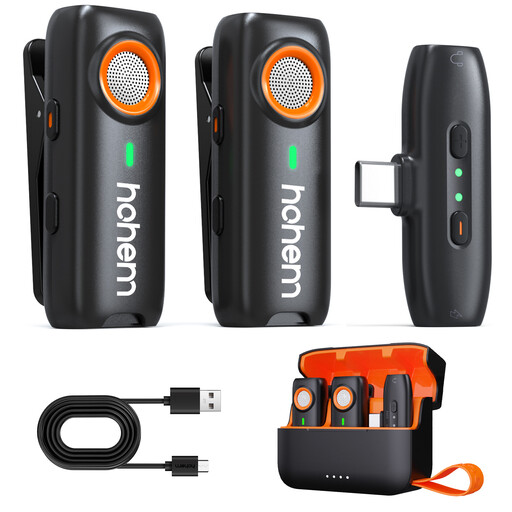
hohem Wireless Lavalier Microphone, 3-Level DSP Noise Cancelling
May be worth considering if you want to wear the microphone separately, close to the voice; check the connection and whether local recording suits your workflow.
The product information lists local TF card recording, 48 kHz/16-bit audio, and clip and magnetic mounting. The TF card is not included.
The three DSP noise-cancelling modes are not an independent test of fan noise or voice quality.
View at Joybuy
 No image available
notta 32GB AI Voice Recorder with Case
May suit you if you want to start and save voice takes without using a separate device; check how to manage the files afterwards.
The product information lists 32 GB of storage, a four-microphone array, one-touch recording and a 30-hour battery life.
View at Joybuy
Frequently asked questions
Can a low-cut filter or 32-bit float recording remove fan noise?
Don’t assume so: these recorder features don’t guarantee that fan noise will be removed. Tascam describes low-cut settings and 32-bit float recording as features; RØDE points to microphone placement as a way to help reduce background noise. Test the sound with your voice and fan.
How should I set up the recorder if I’m operating the puppet at the same time?
Position the microphone so it can sit close to the puppet’s voice and further away from the fan. If you’re using an external microphone, check the exact input and whether it needs power before choosing your setup.
What can I do if a recorder I bought online turns out to be faulty?
In the Netherlands, you can contact the seller if a product is faulty. Depending on the circumstances, the Dutch government says you may be entitled to a free repair, replacement or refund; there is no fixed statutory warranty period. When you buy online from a business, you generally have a 14-day cooling-off period, with some exceptions.
Can I also record and publish recognisable voices belonging to other people?
That depends on how the recording is used and the circumstances. The Dutch Data Protection Authority describes recognisable audio recordings as personal data; where the GDPR applies to their use, you need a valid legal basis. So assess each specific recording or publication separately.


