Who is this set-up for?

Puppeteer with a busy workspace

A headset or headworn microphone keeps the mic on your head, so you don’t need to make room for a microphone stand on a crowded desk. Audio-Technica, Shure and RØDE describe models with a movable or adjustable microphone boom.

Home recorder using a computer

If you’re after a simple computer set-up and want to monitor your audio too, compare USB headsets such as the Logitech H390 and EPOS PC 8 USB. Check that the specific connection is compatible with your computer.

Creator with an audio interface

If you already have suitable audio inputs, you can weigh up a standalone headworn microphone against a broadcast headset with earcups. Connections, power requirements and amplification vary by model.

What should you look for when choosing?

USB headset for a computer

Choose this option if: you record on a computer and want a headset that combines a microphone and headphones.

Bear in mind: a USB connection won’t necessarily work with every recorder. Make a test recording too, to hear how your character voice sounds.

Broadcast headset with headphones

Choose this option if: you want to monitor your audio through the headset while recording and have suitable separate audio inputs.

Bear in mind: the BPHS1 has separate microphone and headphone plugs; you’ll need to choose the connection cable for the beyerdynamic DT 297 PV MK II separately.

Headworn microphone without earcups

Choose this option if: you want to keep your ears free and already have another way to monitor your audio.

Bear in mind: the RØDE HS2 needs a suitable 3.5 mm microphone input with plug-in power; the WH20XLR may require a relatively high level of microphone gain.

What to consider What to look for Who is this important for?
Hands-free use and workspace Check the boom’s position and adjustability, the fit, and whether the cable gets in the way of your movement. If I want to operate the puppet with both hands and don’t have room for a stand on my desk, freedom of movement is my top priority. Around 33% of consumers put this need first.
Sound of the recorded voice Follow the positioning instructions and make a test recording with quiet, loud and expressive passages. If the recorded character voice needs to sound good, I want to try the microphone in my own space. Around 27% of consumers give voice recording their highest priority.
Connection and power Compare the exact plug with your equipment; for the HS2, check the required plug-in power too. If I want to record directly to my computer, I want to know in advance whether the connection will work. Around 20% of consumers put ease of connection first.
Monitoring and comfort Check whether the headset has earcups, whether the plug fits, and how comfortable it feels over a full session. If I want to monitor my audio during takes or don’t want to wear earcups, my monitoring set-up needs to suit me. Around 20% of consumers prioritise monitoring and comfort.

Common buying mistakes

  • Assuming every 3.5 mm plug will work

    The RØDE HS2 needs a microphone input that supplies plug-in power. Not every 3.5 mm socket will do this.

    Before buying, check both the input type and your recorder’s power specifications.

    You may need a recorder with a suitable input and power supply.

  • Confusing a broadcast headset with a USB headset

    The Audio-Technica BPHS1 has separate microphone and headphone plugs. The beyerdynamic DT 297 PV MK II is supplied without a connection cable.

    Compare the exact model and all the connections you need with your recording equipment.

    You’ll need to choose a connection cable separately for the DT 297; you may also need compatible equipment or adapters.

  • Assuming noise cancellation guarantees suitable recording quality

    The product descriptions for the USB headsets reviewed focus on communication. They don’t tell you how your expressive character voice will sound in a recording.

    Make a test recording using the same voice, distance and room as you’ll use for your actual recordings.

  • Forgetting how you’ll monitor your audio while recording

    A headworn microphone such as the HS2 doesn’t have built-in headphones. The Audio-Technica BPHS1, on the other hand, combines a microphone with earcups and a separate headphone connection.

    Decide in advance whether you want to monitor your audio while recording, and how you’ll connect your equipment.

    With a headworn microphone, you may need separate headphones or another monitoring set-up.

Brands to consider

Logitech

The H390 is a USB computer headset for anyone looking for a space-saving set-up with a microphone and earcups.

  • Logitech says the H390 has in-line controls and an adjustable microphone boom.
  • The USB-A version listed needs a compatible computer port; the product description doesn’t substantiate any specific studio sound quality for character voices.

Audio-Technica

Audio-Technica says the BPHS1 combines a closed-back headset with a movable talk microphone.

  • The EU product specifications describe a dynamic cardioid microphone, plus replaceable cables and earpads.
  • The microphone and headphone plugs are separate; the BPHS1-XF4 comes with a different cable.

Shure

The WH20 is a dynamic headworn microphone; the SM35 is a condenser alternative available in versions for different connection set-ups.

  • Shure describes the WH20 as having a lightweight headframe and cardioid pick-up.
  • Shure says the WH20XLR may need more gain than an SM58 and should be positioned close to your mouth. The SM35’s power and connection depend on the version.

RØDE

The HS2 is a lightweight headworn microphone for anyone who doesn’t need integrated earcups.

  • According to RØDE, the HS2 has an adjustable boom and an omnidirectional condenser capsule.
  • The microphone needs a suitable 3.5 mm input with plug-in power; headphone monitoring isn’t built in.

EPOS

The PC 8 USB is a computer headset with stereo earcups and a microphone.

  • EPOS lists a unidirectional microphone, in-line controls and compatibility with PC or Mac.
  • The product description focuses on voice communication and doesn’t substantiate any specific sound performance for character voices.

beyerdynamic

The DT 297 PV MK II is a closed-back broadcast headset for use with compatible recording equipment.

  • beyerdynamic specifies a cardioid condenser microphone and a swivelling boom.
  • DT 297 models are supplied without a connection cable; check which cable is compatible with your equipment.

Joybuy product picks

These Joybuy picks are headsets with microphones for hands-free recording and monitoring. Check each model’s connection and compatibility with your recording device.
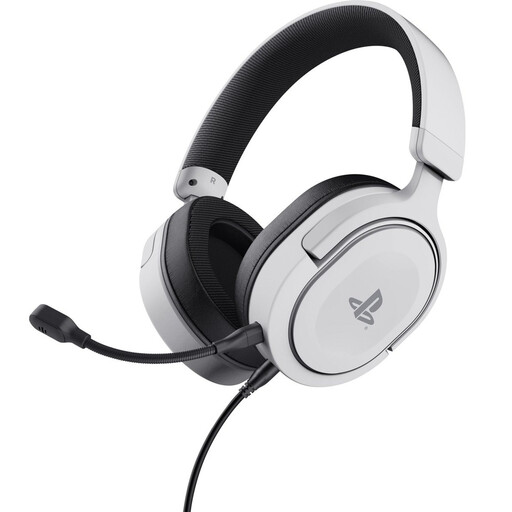
Trust GXT 498W Forta wired gaming headset in white

Trust GXT 498W Forta, wired gaming headset, officially licensed for PS5, white

The flexible microphone is attached to the headset, so you won’t need a desk stand while performing with your puppet.

Wired 3.5 mm connection, over-ear earcups and detachable microphone. Check that the connection is compatible with your recording device.

View at Joybuy
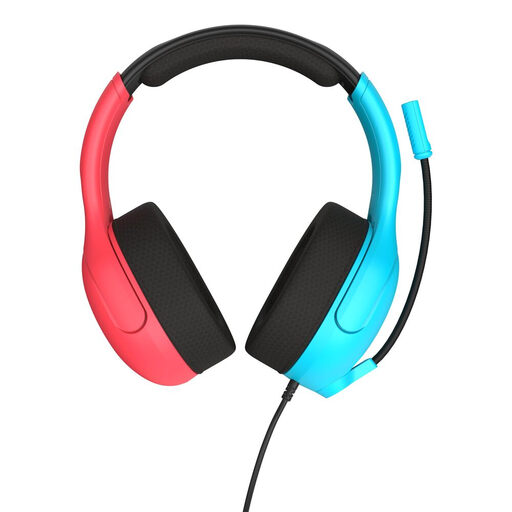
Turtle Beach Airlite Fit wired headset in blue/red

Turtle Beach Airlite Fit, wired headset, Flip-to-Mute, blue/red

You can lower the flip-up microphone while speaking, leaving your hands free to operate the puppet.

Wired 3.5 mm connection and microphone with Flip-to-Mute. Check that your recording device’s input supports the headset.

View at Joybuy

Razer Kraken V3 X headset in black

Razer Kraken V3 X, headset, black

The headset has a head-mounted microphone, so you won’t need to set up a separate desk stand while recording.

The connection listed is 3.5 mm. A splitter cable is recommended for computers with separate headphone and microphone ports; check the connections on your recording device.

View at Joybuy

Jabra Evolve2 75 USB-A MS Teams headset in black

Jabra Evolve2 75, USB-A MS Teams, black

This wireless headset has microphones mounted on the head, so you don’t need a microphone stand at your workspace.

The computer connection described uses the included USB-A Bluetooth adapter. Check that this connection method suits your recording set-up.

View at Joybuy

Logitech PC 960 USB headset

Logitech PC 960 USB headset

The adjustable microphone boom is attached to the headset, leaving your hands free to operate the puppet.

USB connection and stereo audio for computer use. Check that your computer supports the connection.

View at Joybuy

Frequently asked questions

Can I connect a USB headset directly to any audio recorder?

No, don’t assume that it will work. The Logitech H390 USB-A version described is intended to connect to a computer; for another recorder, check which USB audio devices and ports it supports.

Will a RØDE HS2 work with any 3.5 mm socket?

No. According to RØDE, it needs a 3.5 mm microphone input that supplies plug-in power. A headphone output or passive input won’t necessarily work.

How should I position a headworn microphone by my mouth?

Shure recommends positioning the SM35 at the corner of your mouth, rather than directly in front of it, to reduce plosive sounds. For the WH20XLR, Shure specifies a distance of no more than half an inch from the corner of your mouth. Follow the instructions for the model you choose.

What can I do if my headset, bought online, turns out to be faulty?

According to the Dutch Government, you’re entitled to a product that works as it should, and the seller must provide a solution if it doesn’t. There’s no fixed statutory guarantee period for all products in the Netherlands; the circumstances and expected lifespan of the product are taken into account.

Do I have a cooling-off period when I buy online?

According to the Dutch Government, consumers usually have a 14-day cooling-off period when buying at a distance. Check which terms and exceptions apply to your purchase.
