
Vandaag of morgen in huis

Kwaliteit gegarandeerd

Welkomstaanbiedingen ontgrendelen: GRATIS bezorging | Tot 80% korting | Gratis 30 dagen JoyPlus-proefperiode
Download de app
Looking for a new PS5 controller? Perhaps your current controller is due for a replacement after countless gaming sessions, or maybe you're looking for an extra PS5 controller for when friends come over. The selection today is broader than just the standard model that came with your console. You now also have PS5 pro controller options, such as the DualSense Edge and models from other brands.
This guide is designed to help you make a choice. We'll compare the main options side-by-side, highlight their specifications, and explain which type of player each controller is best suited for. This way, you can buy a PlayStation 5 controller that truly matches your playstyle.
Before we dive into specific models, here are a few key factors to make your decision easier.
The first question is whether the standard DualSense controller is enough for you, or if you want the extra features of a PS5 pro controller. Pro controllers often offer additional buttons (like back paddles), the ability to swap out thumbsticks, and options to adjust trigger sensitivity. This can provide an advantage in competitive games, but for most casual players, the standard experience is more than sufficient.
All official and licensed PS5 controllers are wireless, but the technology can differ. The standard DualSense uses Bluetooth. Some pro models, like the Razer controller PS5, use a proprietary 2.4 GHz connection via a USB dongle. According to the manufacturers, this can result in even lower latency (delay). Also, consider the advertised battery life. This varies by model and depends on how intensively you use features like vibration and haptic feedback.
Do you want to fully tailor the controller to your preferences? The DualSense Edge, for example, lets you set the trigger travel distance and save profiles for different games. The Razer Wolverine V2 Pro offers programmable buttons. Ergonomics—how the controller feels in your hands—is a personal matter, but most models are based on the familiar PlayStation design.
Below is an overview of popular choices for the PlayStation 5, from the trusted standard to the more specialised pro models.

Why it stands out This is the controller that sets the standard for the PS5 generation. Its key innovations are haptic feedback and adaptive triggers. Haptic feedback provides much more nuanced vibrations, allowing you to feel the difference between walking on sand versus metal. The adaptive triggers offer variable resistance depending on your in-game actions, such as drawing a bowstring.
Pros
Who is this a good choice for? For the vast majority of PS5 players. Whether you're looking for a replacement controller or need an extra PS5 controller for local multiplayer, the standard DualSense offers the complete, Sony-intended experience at a reasonable price.
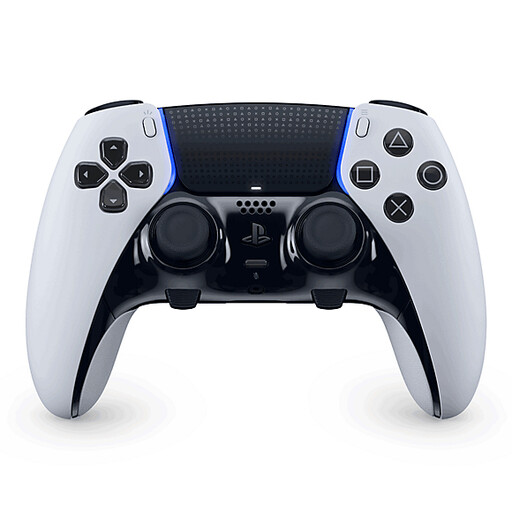
Why it stands out The DualSense Edge is Sony's answer to the demand for a PS5 pro controller. It builds on the foundation of the standard DualSense but adds an extensive set of customisation options. This is the controller for players who want to fine-tune their hardware to their playstyle for maximum control.
Pros
Who is this a good choice for? For the serious and competitive gamer who is looking for an edge and is willing to invest in personalisation. If you play a lot of shooters or other fast-paced games and want to fully optimise your control, the Edge is a logical upgrade.
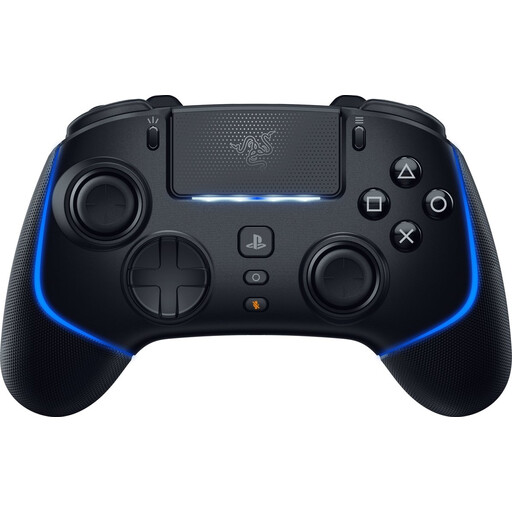
Why it stands out Razer is a well-known name in the world of competitive gaming accessories, and the Wolverine V2 Pro is their Razer controller PS5 offering. This controller focuses on speed and responsiveness. It uses Razer HyperSpeed Wireless technology, which the manufacturer claims offers ultra-low latency. The buttons also feel different, with a shorter, more clicky action.
Pros
Who is this a good choice for? For the competitive player who prefers the tactile, clicky feedback of mechanical buttons and is looking for maximum programmability. It's a strong alternative to the DualSense Edge, especially if you're already familiar with Razer products.
The models above represent the most popular choices for different types of players. If you're looking for a different colour, a bundle, or another model, you can browse our full selection.
View all gaming console controllers
1. Can I use a PS4 controller on the PS5? Yes, you can use a DUALSHOCK 4 controller on a PS5, but only to play supported PS4 games. To play PS5 games, you need a DualSense controller.
2. What is the main difference between the DualSense and the DualSense Edge? The main difference is customisation. The DualSense Edge has extra features like swappable stick modules, back paddles, adjustable triggers, and the ability to save control profiles. The standard DualSense does not have these pro features.
3. How long does the battery of a PS5 controller last? Battery life varies greatly depending on the model and usage. For a standard DualSense, you can expect around 6 to 12 hours, depending on the game and the intensity of the haptic feedback and triggers. Pro controllers often have a similar or slightly longer battery life, but this also depends on your settings.
Written by the Joybuy Product Recommendation Officer
