If kitchen light reaches the projection wall, a home cinema projector with a higher stated light output may be a better fit. If you can darken the room and often move the projector, a portable model may be more practical. Measure the distance to the wall and check how you plan to display your photos: an HDMI or USB connection alone does not guarantee that your slideshow will work.
Who is this choice relevant to?
Families with the kitchen lights on
You want to look at photos together while the lights in an adjoining room stay on. In that case, visibility on your chosen wall matters more than having the smallest possible projector. Epson and BenQ describe models designed for use in a living room with ambient light.
Families with photos on a phone or laptop
You want to start your slideshow easily, using a connection that works with the device your photos are stored on. Epson, ViewSonic and BenQ describe different connection and playback options; check the details for the exact model.
Families who change their viewing spot
You don’t leave the projector set up permanently. The distance to the wall, the space available and, if relevant, battery use all affect which set-up will work. ViewSonic and XGIMI list features for more flexible placement.
What should you consider when choosing?
Home cinema projector for ambient light
Choose this option: if you can’t keep the kitchen lights out during your slideshow and can leave the projector in one place with access to mains power. Epson states that the CO-FH02 has 3,000 lumens of both white and colour light output; BenQ lists 3,800 lumens and 1080p for the TH575i.
Keep in mind: the light output is a manufacturer’s stated figure and, on its own, doesn’t predict how photos will look on your wall. Also check the projection distance and the picture width you want.
Portable projector for changing locations
Choose this option: if you regularly change where you watch or don’t want a fixed set-up, and can limit the light reaching the wall. ViewSonic lists features such as an adjustable stand and mobile playback options for the M1X; XGIMI states that the MoGo 4 offers up to 2.5 hours of video playback on its built-in battery in eco mode.
Keep in mind: check the battery life for the stated usage mode and whether the light in your room suits your set-up. These listed features don’t prove how well the projector will perform in your room.
First, decide which limitation matters most: kitchen light, connecting to your photo source, the projection distance available or the need to move the projector.
| What to consider |
What should you check? |
Who should pay particular attention? |
| Visibility in ambient light |
Check how much light reaches the wall at the time you plan to watch. Compare the stated light output with your preferred picture size, and see whether you can darken the room. |
If you want to look at photos with the kitchen lights on, visibility comes first. Around 36% of consumers prioritise light reaching the wall when making this choice. |
| Photo source and connection |
Check the output on your phone or laptop, the projector input and whether you need an adapter. If you’re playing photos from storage, make sure the exact model supports your photo formats. |
If you want to show photos from your own phone, laptop or storage device, that source needs to work with the projector. Around 29% of consumers make source compatibility their top priority. |
| Projection distance and viewing spot |
Measure the distance from the lens to the wall and the clear wall width. Check whether that distance works for your preferred picture size on the exact model. |
If space next to the kitchen is limited, the distance and available wall space will determine how much room you have for your set-up. Around 21% of consumers prioritise the space available for placement. |
| Moving the projector and power |
Check whether mains power is available where you plan to watch, and compare the stated battery life with the planned slideshow and usage mode. |
If you regularly move the projector or want to use it without a fixed power socket, flexibility matters more. Around 14% of consumers make portability their top priority. |
Buying pitfalls
-
Choosing based only on the highest lumen figure
A manufacturer’s stated light output isn’t the only thing that determines how photos look: the light reaching the wall and the picture size you choose also play a part.
Check the wall at the time you plan to watch, and make sure the picture size you want suits the distance. When comparing light output, pay attention to the stated measurement method.
-
Assuming a USB port means the projector can display photos
A USB port alone doesn’t confirm that a projector can play photos from a USB stick. BenQ describes direct playback as a feature of certain PC-free projectors, not of every model with USB.
Check whether the exact model supports your photo formats from USB storage, or plan a suitable connection from your phone or laptop.
Without the right playback feature, you may still need a compatible source device or adapter.
-
Assuming the maximum picture size will fit your room
The picture size you can achieve depends on the model’s specific projection distance and the space available in your room.
Measure the distance from the lens to the wall and the available wall width before choosing a model or picture size.
-
Assuming a bundle is the same product as the standalone model
A version may include extra accessories or digital content. For example, the XGIMI MoGo 4 Match Night EU Edition is described as coming with a game code and an extra PowerBase stand; don’t automatically treat this version as identical to the standalone base model.
Compare the exact model name and included items before choosing a version to buy.
A different bundle may change what you get with the projector, so check which items you need for your set-up.
Brands to consider
Epson
According to Epson Netherlands, the CO-FH02 is worth considering for a permanent or temporary living-room set-up where kitchen light is a factor.
- Epson lists Full HD, HDMI and 3,000 lumens of both white and colour light output for the CO-FH02.
- These model features don’t predict the picture in your room on their own; check the distance, picture size and photo source.
BenQ
According to BenQ’s product information, the TH575i is a living-room option if you take the light in your viewing space into account.
- BenQ lists 3,800 lumens and 1080p for the TH575i, and says it can be used with the lights on.
- The claim about using it with the lights on comes from BenQ and doesn’t tell you what results you’ll get in your room. BenQ’s information about PC-free projectors doesn’t confirm that the TH575i itself can play photos from USB.
ViewSonic
According to ViewSonic Europe, the M1X is worth considering if flexible placement and playback from a compatible mobile device are important to you.
- ViewSonic lists an adjustable stand, screen mirroring, USB-C playback and up to four hours of battery use for the M1X.
- Check that your photo source is compatible and that the picture will be visible enough given the light reaching your wall.
XGIMI
According to XGIMI Europe, the MoGo 4 is worth considering for families who want to change their viewing spot and are thinking about using battery power.
- XGIMI lists a rotating stand and up to 2.5 hours of video playback on the built-in battery in eco mode.
- Check whether the battery life suits the way you plan to use it, and don’t automatically assume that a version with extra accessories is the same sales variant.
Projectors at Joybuy
This selection includes projectors for displaying a slideshow from a connected device, as well as models where flexible placement is a consideration. Check the connection, projection distance and preferred picture size for each model.
 No image available
Optoma H117ST
Worth considering if stated light output and a short-throw set-up matter to you; match the picture size to the distance from the wall.
Short throw, DLP, WXGA, 3,800 ANSI lumens and 3D; white finish.
View at Joybuy
 No image available
XGODY Gimbal A8
Worth considering if you want to share photos from a phone, tablet or laptop and adjust the projection direction; check that the connection works with your device.
Native 1080P, 1,200 ANSI, Android14.0, WiFi6 and BT5.4.
View at Joybuy
 No image available
Epson EB-W53
Worth considering for a set-up where stated light output matters and you’ll display photos from a connected device; check the available distance and preferred picture width.
3LCD, 4,000 ANSI lumens and WXGA (1200x800); white finish.
View at Joybuy
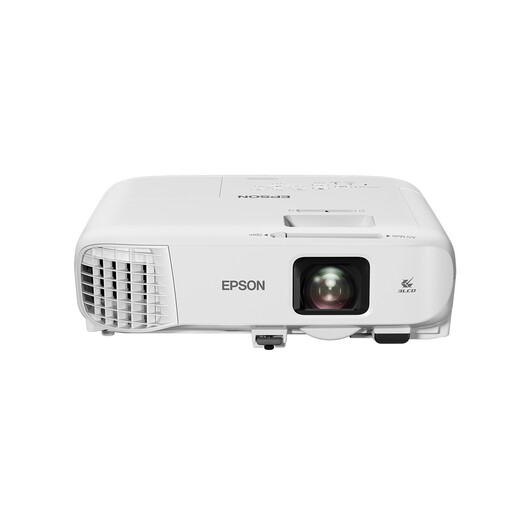 No image available
Epson EB-992F
Worth considering for a set-up with a connected photo source where stated light output matters; check that the distance and picture size suit your room.
3LCD, 4,000 ANSI lumens and 1080p (1920x1080); white finish.
View at Joybuy
 No image available
Magcubic HY350Max
Worth considering for a temporary set-up where you want to change the projector’s direction; before buying, check that the listed playback options work with your phone or laptop.
Native 1080P, 900 ANSI, Android 14 and 180° rotation.
View at Joybuy
Frequently asked questions
Can you show travel photos directly from a USB stick?
Only if the specifications for the exact model say it can play your photo format from USB storage. BenQ describes this option for PC-free projectors as a category; a USB port alone doesn’t confirm that a specific model can play photos.
How can you tell whether the picture will fit on your wall?
Measure the distance between the lens and the wall, as well as the clear wall width. Then check which projection distance works for your preferred picture size on the exact model; a distance example for one model doesn’t automatically apply to other projectors.


