
Viewers who value subtle picture detail
You mainly watch in a darkened room and want to appreciate differences in colour and detail in bright and dark nature scenes. BenQ Netherlands and Epson describe picture features you can compare across models.


Start by considering the light in your room and the distance to the screen. Then compare resolution, colour reproduction and performance in dark scenes. A permanent set-up calls for different choices from a projector you move around, while built-in apps and speakers matter most if you plan to use them. Also check that the device you receive has the correct CE marking.
You mainly watch in a darkened room and want to appreciate differences in colour and detail in bright and dark nature scenes. BenQ Netherlands and Epson describe picture features you can compare across models.
You also watch when there is light in the room and want to weigh the stated light output against your screen and viewing conditions. Epson distinguishes between white and colour light output in its projector guide.
Your screen size is fixed, but the projector’s position is not. Projection distance and image alignment features will help determine which models suit your room. BenQ Netherlands explains how distance and screen size are connected.
First, measure the distance to your screen and decide whether you can darken the room. Then compare picture features and, if you want to watch without extra devices, the built-in streaming and audio functions.
| What to consider | What should you check? | Who should prioritise it? |
|---|---|---|
| Colour and detail | Compare the stated resolution, colour coverage and available picture modes for the exact model; treat manufacturers’ claims as specifications, not independent test results. | If I watch nature documentaries in a darkened room, I want to see subtle differences in colour and fine textures. Around 28% of consumers put colour and detail first. |
| Picture in ambient light | Note when you watch, whether you can darken the room and which light-output measurement is given. Consider the projector alongside your screen and room lighting. | When I can’t always darken the room, I want to know how the picture performs in those conditions. Around 22% of consumers prioritise a usable picture with some ambient light. |
| Distance and placement | Measure the distance from the lens to the screen and check the achievable image size; then look at the zoom, lens shift or adjustable stand. | If my screen size is fixed, the image needs to fit from the space available. That’s why around 22% of consumers start by considering projection distance and placement. |
| Streaming and sound | Check whether your preferred streaming service is available on the exact model, and whether built-in speakers or an audio connection suit your set-up. | I want to start watching and listening without unnecessary extra devices, but the apps and audio need to work with what I use. Around 17% of consumers prioritise this convenience. |
| Purchase and maintenance | Compare the light-source technology and stated lifespan under the same operating mode; check what is included with the model and who the seller is. | When weighing up the purchase and maintenance, I want to know which light source the projector uses and what terms apply. Around 11% of consumers put these factors ahead of the others. |
A brightness figure may refer only to white light output, even though nature documentaries also include plenty of colourful scenes.
Check which brightness measurement is stated and weigh it against your room lighting and screen.
The achievable image size depends on the distance and the features of the exact model.
Measure the possible distance from the lens to the screen and check the image size specified for that distance.
Models may use different labels, such as 4K PRO-UHD and 4K UHD. A shared label does not automatically mean they use the same picture technology.
Check the stated resolution and technology for each model, and don’t compare these labels as if they were independent picture test results.
ACM ConsuWijzer distinguishes between the statutory guarantee and any manufacturer’s or seller’s guarantee.
First check what the seller is legally required to put right, then look at any additional terms.
The W2720i is worth comparing for a dedicated home cinema where colour coverage, 4K UHD and connections are important.
The EH-TW7100 is worth considering for a permanent set-up where optical zoom and lens shift are important.
The HORIZON S Pro is worth considering if you want to move a projector between viewing locations and are looking for a built-in adjustable stand.
The DBOX02 is worth considering if built-in streaming is a key requirement for a 4K laser projector.
These Joybuy picks are projectors for home cinema, with differences in built-in features, image alignment and stated picture specifications. Before buying, check that the device you receive has the correct CE marking.
 No image available
Worth considering if you want to position the projector in different ways, for example for ceiling projection.
The product listing states an image size of 50–200 inches, digital zoom of 50%–100% and 180° rotation.
 No image available
Worth considering if you want to watch without a separate streaming stick and are looking for autofocus and keystone correction.
The product listing states 1.000 ISO lumens, 4K support, native Netflix and VIDAA OS. Check which other apps you want are available on the exact model.
 No image available
Worth considering if you want to match a fixed projection distance to your preferred screen size.
The product listing states a UHD resolution of 3.840 × 2.160, manual 1,3× zoom and a throw ratio of 1,21:1–1,59:1. Check the distance for your room.
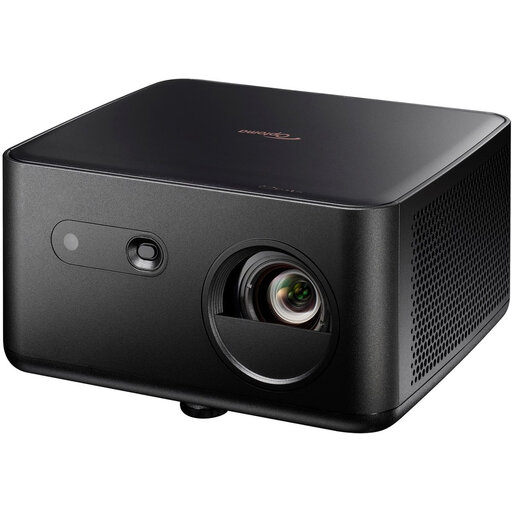 No image available
Worth considering if you’re looking for a 4K UHD projector with autofocus and automatic keystone correction.
The product listing states 1.100 ISO lumens, HDR10, HLG and a 4LED light source. The stated projection distance is approximately 1,5–4,8 metres for an image size of 60–150 inches.
 No image available
Worth considering if you’re looking for a 4K projector for a permanent set-up and can plan the projection distance in advance.
The product listing states 3.200 ANSI lumens, HDR, 1,3× zoom and automatic vertical keystone correction. Check that the stated projection distance suits your screen.
Measure the possible distance from the lens to the screen and check the specifications for the exact model to see which image size it can produce at that distance. Then check whether zoom, lens shift or an adjustable stand will support your preferred placement.
No. A high lumen figure alone doesn’t give you enough information. Epson distinguishes between white and colour light output; also compare your room lighting and screen with the picture features of the exact models.
According to ACM ConsuWijzer, you have a statutory guarantee in addition to any manufacturer’s or seller’s guarantee. If a product does not provide what you could reasonably expect during normal use, the seller must repair or replace it free of charge, or refund you where applicable. There is no single fixed statutory guarantee period for every projector.
According to ACM ConsuWijzer, online purchases generally come with a statutory cooling-off period of up to 14 days after delivery. Check the applicable terms and exceptions before ordering.
The Dutch Authority for Digital Infrastructure states that electrical and electronic equipment must have the correct CE marking. Check the device you receive; a brand page does not confirm the marking on your individual product.