First, choose an image size that’s easy to follow from every seat, then check that it will work from the available position. Match the brightness to the light in the room, and check separately that the film, playback source and audio set-up meet your needs. A larger image or built-in smart features won’t automatically take care of these requirements.
Who is this guide for?
Film nights with a larger group
You want viewers at the side or back of the room to be able to follow the picture. Image size, sightlines and manageable ambient light therefore matter more than extra smart features. Epson Europe highlights viewing distance, room dimensions and the viewing environment as factors to consider when choosing.
Viewers with limited space for set-up
You need to be able to project a suitable image size from the space available. A measured projection distance and flexible placement options are then more important than simply looking at the maximum image size on paper. Epson Europe emphasises that viewing distance and room dimensions are also key considerations.
Viewers who want an easy set-up
You want to watch a film using a familiar device and follow the dialogue clearly. Check the Dutch-language options for each title, and make sure the projector has the connections and audio features to suit your set-up.
What should you look for when buying?
Fixed home cinema projector
A good fit if: you usually watch in the same room and can plan the projection distance and position in advance.
The trade-off: installation takes planning, and you may need a separate playback source or audio system.
All-in-one living room projector
A good fit if: built-in controls and a more flexible set-up are important to you.
The trade-off: check that it supports your preferred app, suits the projection distance and makes dialogue easy to hear from your seats. Built-in TV features don’t guarantee Dutch-language options for every film.
Portable projector with a battery
A good fit if: you want to move your film night between rooms or suitable outdoor locations.
The trade-off: the stated maximum battery life may apply in eco mode, with lower brightness and limited volume. Compare these conditions with how you plan to use it.
| What to consider |
What to look for when buying |
Who is this important for? |
| Visibility for the group |
Measure the viewing distances and available screen space, and take the ambient light during your film night into account. |
If I want everyone to be able to follow the picture from their seat, I look at sightlines and the light in the room. Around 33% of consumers put visibility for the group first. |
| Image size and projector position |
Measure the distance from the lens to the projection surface and compare it with the model specifications. Check for lens shift and optical zoom if needed. |
If there’s only one place where I can position the projector, I want to know in advance whether I can get the image size I want. Around 25% of consumers prioritise the available space for set-up. |
| Dutch-language options and playback |
Check the language options for each film and service on the device you use, as well as app compatibility and the connections you need. |
If I want to watch a particular film in Dutch, I check the audio or subtitle options for that title. Around 25% of consumers prioritise language options and playback. |
| Sound and portability |
Check the audio connections and the conditions under which the manufacturer states the battery life. |
For a film night in different locations, I want the sound to suit the seating arrangement and to know how long the battery will last with my chosen settings. Around 17% of consumers put sound and portability first. |
Common buying pitfalls
-
Comparing only the maximum advertised image size
The image size you can achieve also depends on the room dimensions, seating and projection distance. So a large image size on paper doesn’t tell you whether everyone in your set-up will be able to watch comfortably.
Measure the space and map out the seating, projection surface and lens position before choosing a model.
-
Assuming ‘smart’ features guarantee the film and language you want
Whether a streaming app is available depends on the compatibility of the exact model. You’ll also need to check the audio or subtitle options for each title. Netflix notes that available languages can vary by title.
Check the film’s language options on the playback device you actually plan to use, and make sure the app works with the exact projector model.
If the app isn’t available, you may need a compatible external playback source.
-
Assuming the maximum battery life applies at every setting
Nebula states that the Mars 3 offers up to five hours under specific eco conditions: 300 ANSI lumens and 25% volume. So the stated battery life won’t necessarily apply with other settings.
Compare the stated conditions with the brightness, volume and film length you need.
For a longer film night, you may need a power source or a different set-up.
-
Treating every group screening like a private film night
Auteursrecht.nl distinguishes between screenings within a strictly domestic circle and those outside it. An organised event for a club or company, for example, may require permission from the rights holders.
Decide in advance whether the screening is within a domestic circle, and ask the rights holders for permission if necessary.
A screening that requires permission may need a screening licence.
Brands to consider
Epson
The EH-TW7000 is an example of a home cinema projector for a planned installation with a separate playback source.
- Epson lists 3,000 lumens, lens shift, optical zoom, two HDMI ports and a lamp life of 5,000 hours in eco mode for the EH-TW7000.
- These are manufacturer specifications, not the result of an independent picture test. The stated lamp life isn’t a guarantee of how long every lamp will last. When choosing, also consider installation and future lamp costs.
BenQ
According to the Dutch product specifications, the GP520 combines Google TV with built-in audio for film nights in the living room.
- BenQ lists two 12 W speakers, two HDMI inputs and eARC.
- These specifications don’t tell you whether dialogue will be easy to hear in every room or from every seat. Check the language options for each film title too.
Nebula
The Mars 3 is a portable model for film nights where the set-up may change.
- Nebula lists 1080p resolution and a handle for the Mars 3.
- The manufacturer states a maximum battery life of five hours in eco mode, at 300 ANSI lumens and 25% volume. Compare these conditions with the brightness and group listening volume you need.
XGIMI
The HORIZON S Pro is an example of a 4K home cinema model with an integrated adjustable stand.
- XGIMI lists 1,800 ISO lumens for the HORIZON S Pro.
- ISO lumens are a different measure from ANSI lumens, so don’t compare the figures directly as a measure of performance. Check the model’s current availability separately.
Projectors at Joybuy
This Joybuy selection includes portable projectors for different viewing locations and models with built-in features for a living room set-up.
 No image available
V1 Outdoor Mini Projector 720P
A portable option for moving your film set-up. Check that the stated image size and brightness suit the room and your group.
The product information lists native 720p resolution, an image size of 30–100 inches, a 10,400 mAh battery, autofocus and automatic keystone correction. The title also mentions 4K support, which isn’t the same as native 4K resolution.
Joybuy
 No image available
ETOE Dolphin 2 RGB Laser 1080P
The built-in battery and Google TV make this a good fit if you want a portable set-up with built-in controls.
The product information lists native 1080P resolution, 800 ANSI lumens, Google TV, an adjustable stand, two 5 W speakers and a battery life of 2 hours. The title also mentions HDMI 2.1 and USB-C.
Joybuy
 No image available
XGIMI Vibe One Match Night EU Edition
The projector, screen and stand are supplied together for a self-contained viewing set-up. Check that the screen fits the space available.
The product information lists Full HD 1080p, 250 ISO lumens, Google TV, JBL audio and a built-in battery.
Joybuy
 No image available
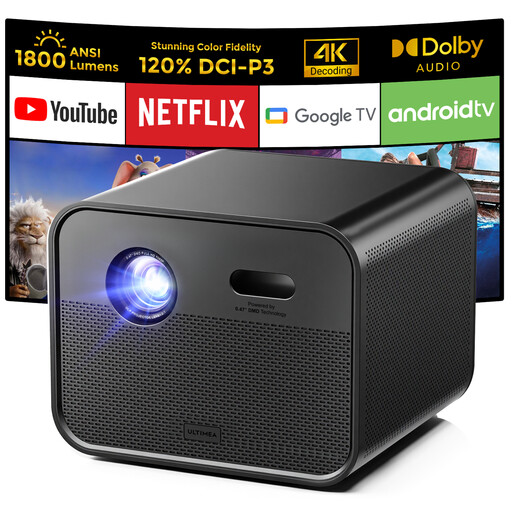
Ultimea Poseidon E100
An option if you’re looking for a living room set-up with built-in streaming features and speakers.
The product information lists native 1080P resolution, 1,800 ANSI lumens, Google TV and two 10 W speakers. The title also mentions 4K support, autofocus and 6D keystone correction.
Joybuy
 No image available
Ultimea Apollo P40
Before choosing an image size, compare the stated projection distance with the position where you plan to place the projector.
The product information lists native 1080p resolution, 700 ANSI lumens, a throw ratio of 1.4:1 and a recommended image size of 35–150 inches. It also mentions two 5 W speakers and autofocus.
Joybuy
Frequently asked questions
Does a projector automatically provide Dutch audio or subtitles?
No. Check the language options for the specific film on the device and service you use. Netflix notes that available languages can vary by title; a projector doesn’t add these languages itself.
How can you check whether the image will fit on your wall?
Measure the distance from the lens to the projection surface and decide on your preferred image size. Before finalising your set-up, compare these measurements with the specifications or projection calculator for the exact model.
Do you need a screening licence for a film night with a group?
The number of viewers alone doesn’t determine this. Auteursrecht.nl says that screenings within a strictly domestic circle, including family and close friends, are permitted without separate permission from the film rights holders. Permission is needed for screenings outside that circle, such as a club night or company party. FilmService provides a point of contact for public group screenings.
What happens in the Netherlands if your projector develops a fault?
The Dutch government states that you’re entitled to a product that works properly, and that there’s no fixed statutory warranty period in the Netherlands. If your projector develops a fault, contact the seller to discuss the situation and a suitable solution.


