Start by considering where the projector can go, how far it will be from the wall or ceiling, and the image size you want. Epson highlights that the room layout is a key factor. For watching from bed, an adjustable projector gives you more freedom to direct the image, while a portable model is more practical if you plan to move it around. Also check that your streaming service works on the exact model, and assess the brightness and sound in your bedroom conditions.
Who is a bedroom projector for?
Viewers who want to project while lying down
You want to watch travel programmes on the wall or ceiling from bed. So look for a stable setup and consider how you’ll direct the image. BenQ Netherlands describes the GV50 as having an adjustable base for projecting in either direction; also check that the distance works for your room.
Evening viewers who use a streaming service
You usually watch in a bedroom where you can block out the light, and want to stream programmes through an app or connected device. Check that your service is supported on the exact model. The Netflix Help Centre recommends checking support information for the specific device.
Viewers who move their projector around
You want to use the same projector in more than one place, so you’ll want to consider its power supply, battery and adjustability. XGIMI lists the MoGo 4 as having a rotating stand and built-in battery; battery life also depends on the mode you choose.
What should you look for when choosing?
Adjustable projection from bed
A good fit if: you want to watch the wall or ceiling from a fixed spot beside the bed. BenQ describes the GV50 as having an adjustable base.
Bear in mind: an adjustable stand won’t compensate for an unsuitable projection distance or ambient light.
Moving a portable projector around
A good fit if: you want to use the projector in different places or sometimes watch without access to a power socket. XGIMI lists the MoGo 4 as having a rotating stand and built-in battery.
Bear in mind: XGIMI states that the MoGo 4 offers up to 2.5 hours of video playback in energy-saving mode. Its stated 450 ISO lumens cannot be directly compared with ANSI lumens without taking the measurement standard into account.
A fixed projection setup
A good fit if: the projector will stay in one place and you want to decide on the image size and projection direction in advance. Epson recommends choosing the distance and position to suit both the room and the specific model.
Bear in mind: a fixed setup gives you less flexibility to change the viewing direction from bed.
| What to consider |
What should you check? |
Who is this important for? |
| Position and viewing angle |
Measure the distance from the lens to the wall or ceiling and consult the projection chart for the exact model. Also check which projection directions and positions are supported. |
When I watch from bed, I want to know in advance whether the projector can sit securely and place the image where I want it. Around 31% of consumers prioritise position and viewing angle. |
| Visibility in room lighting |
Consider whether you’ll be watching in daylight, with a lamp on or in a darkened room. Compare the stated brightness, taking the measurement standard and image size into account. |
I want to follow my programme in the lighting I usually watch in, and know whether I’ll need to darken the room. Around 25% of consumers prioritise visibility in their usual room lighting. |
| Access to programmes |
Check that your service and subscription work on the exact model, or decide which compatible external source and connection you’ll use. |
I want to know in advance whether I can watch travel programmes through an app or connected device, rather than relying on an unsupported service. Around 25% of consumers prioritise access to the programmes they want to watch. |
| Sound and power supply |
Only compare stated noise levels when they relate to the same mode. Check where the nearest power socket is and which operating mode applies to the stated battery life. |
If the projector is close to my bed or I want to use it elsewhere, I need to consider noise and power. Around 19% of consumers prioritise quiet and flexible use. |
Common pitfalls
-
Assuming a lumen figure guarantees a great image in every situation
Ambient light and image size affect how bright a projection looks. ANSI and ISO lumens are not directly comparable unless you take the measurement standard into account.
First, consider when you’ll be watching and how much you can darken the room. Then compare the stated brightness and measurement standard for the image size you plan to use.
-
Relying solely on automatic image correction
Automatic correction doesn’t replace checking whether the projector can produce the image size you want from your chosen position.
Measure the distance to the projection surface and consult the projection chart for the exact model before choosing a setup or stand.
-
Assuming every smart projector supports your service
A built-in operating system doesn’t automatically mean your streaming service or subscription will work on the device.
Check support for the specific service and exact model. If you’re using an external source, check the connection you’ll need too.
-
Choosing an older model without checking its status
Epson lists the EF-22N as discontinued. BenQ has issued a recall for the GV31 due to batteries that may overheat.
Check the full model name and the manufacturer’s notice. If you own a BenQ GV31, stop using it and follow BenQ’s recall instructions.
Brands to consider for this type of setup
BenQ
The GV50 is an example of an adjustable projector for projecting onto the wall or ceiling beside your bed.
- BenQ lists the GV50 as having an adjustable base, Google TV, 500 ANSI lumens and a noise level of 28 dBA in typical sound mode.
- These specifications apply to the GV50 and don’t, by themselves, tell you how bright or quiet it will be in your bedroom. BenQ has issued a recall for the GV31 due to batteries that may overheat; owners should stop using it and follow BenQ’s instructions.
XGIMI
According to XGIMI, the MoGo 4 is a portable 1080p projector with a rotating stand, battery and Google TV.
- XGIMI lists 450 ISO lumens and up to 2.5 hours of video playback in energy-saving mode.
- The stated battery life applies to that mode and isn’t guaranteed for every setting. Accessories and extras included in a particular bundle aren’t necessarily included with every MoGo 4 version.
Epson
Epson provides information on projection distance and positioning to help you plan a fixed setup and choose an image size.
- Projection distance helps you work out which image size will suit your room layout; check the details for the specific model.
- Epson lists the EF-22N as discontinued. So, a product page for this model doesn’t confirm that it’s currently available.
Joybuy products for watching from bed
These Joybuy products are designed for adjustable projection from bed and watching programmes through built-in software or a connected source. For each model, check the projection distance, image size you want and support for your streaming service.
 No image available
Yaber L2 projector
The flexible stand and built-in Google TV make this model worth considering if you want to direct the image from bed and stream through an app.
Native 1080P; 520 ISO lumens; 1.17:1 throw ratio; two 5 W speakers. The product information recommends professional installation for ceiling mounting and secure fixing.
Joybuy
 No image available
XGODY Gimbal N6 Pro
The product information lists WhaleOS 3.0 and Netflix support; check that your preferred service works on this version.
Native 1080P; 700 ANSI lumens; WhaleOS 3.0; product listing with HDMI and USB connections.
Joybuy
 No image available
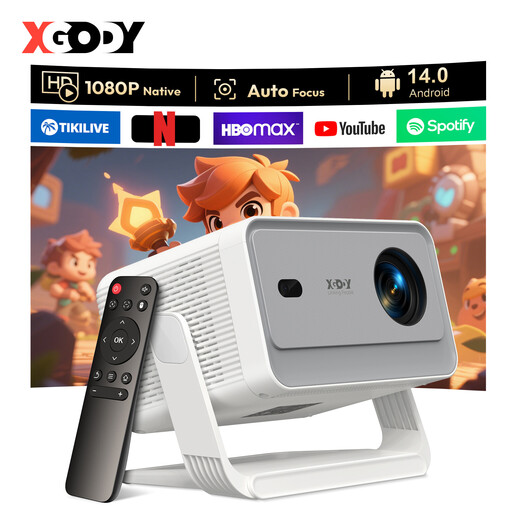
XGODY Gimbal A6 Pro
The product information lists an adjustable stand for projecting onto the wall or ceiling, and Android 14 for using apps.
Native 1080P; 650 ANSI lumens; stand adjusts by 135°; HDMI and USB connections.
Joybuy
 No image available
Magcubic HY350Max
The product information lists 180° rotation and projection onto the wall or ceiling, which may be useful if you want to direct the image from bed.
Native 1080P; 900 ANSI lumens; Android 14; 1:1 throw ratio.
Joybuy
 No image available
XBJ 360° Portable Projector
The product listing mentions projection onto the ceiling, wall and a table, plus Wi-Fi streaming with built-in apps; check that your preferred service is supported.
Full HD 1080P; 500 lumens; 360° rotation; product listing with HDMI connection.
Joybuy
Frequently asked questions
How can you tell in advance whether the projector will give you the image size you want from bed?
Measure from the intended lens position to the wall or ceiling and consult the projection chart for the exact model. Epson points out that distance and positioning both affect image size.
Will your streaming service automatically work on a smart projector?
No. First check that your service and device are supported. The Netflix Help Centre recommends checking the information for the specific device; a compatible connected source may be an alternative.
What should you do if you own a BenQ GV31?
BenQ has issued a recall for the GV31 due to batteries that may overheat. BenQ advises you to stop using it immediately and follow the service programme instructions.
What can you do with your old projector when you buy a new one?
According to the Dutch government, you can return an old electrical appliance to the shop or online retailer where you buy a new, similar appliance, or take it to a collection point or recycling centre.
What are your rights if a projector bought online doesn’t meet your expectations or breaks?
Online purchases generally come with a statutory 14-day cooling-off period after delivery, although exceptions apply. ACM ConsuWijzer also explains that your statutory rights are separate from any retailer’s or manufacturer’s guarantee. If a product is faulty, the seller is responsible for providing an appropriate solution under the applicable terms.


