First, choose an image size that feels comfortable from your seat. Then check whether the projector can create that image width from the planned lens position. BenQ Netherlands recommends considering screen size and projection distance together: sitting far away doesn’t automatically mean the projector needs to be far from the screen.
Who is this guide for?
Watching from the back of a long room
You sit relatively far from the screen and want to know in advance what image size will look comfortable. Use your viewing distance as a starting point, then factor in your own preference. The Consumers’ Association’s guidance on viewing distance is for televisions, not a fixed rule for projectors.
Watching in a bright living room
You can’t always darken the room, so consider the stated light output alongside your preferred image size and the light falling on the projection surface.
Working around a tricky projector position
You may have a fixed shelf, limited space near the screen or want to move the projector around. In that case, the throw ratio and adjustment options of the exact model are important.
What should you look for?
Standard throw
A good fit if: you can position the lens far enough from the screen and measure the setup in advance.
Bear in mind: a standard lens won’t necessarily work on a shelf close to the wall. Check the throw ratio and zoom of the model you’re considering.
Short or ultra-short throw
A good fit if: the projector needs to sit close to the screen, even though you’re sitting further away.
Bear in mind: this lens category changes the distance needed between the lens and the screen, not your viewing distance. Check the intended image width for each model.
Portable smart projector
A good fit if: you want to set up your projector quickly and built-in streaming or speakers are important to you.
Bear in mind: check that your film source and preferred app will work, and that the built-in sound suits your seating position. The listed features alone don’t guarantee this.
| What matters |
What to look for |
Who is it most relevant to? |
| Comfortable image size |
Measure the distance from your eyes to the screen, choose your preferred image width and check that the model can project at that size. |
If I’m sitting at the back, I want to know in advance whether the image will look comfortably large from my seat. Around 36% of consumers prioritise image size. |
| A suitable projector position |
Measure the distance from the lens to the screen and, at your preferred image width, compare it with the throw ratio and optical zoom of the exact model. |
If my projector has a fixed position, I want to know whether I can achieve the image width I want. Around 29% of consumers start by considering where the projector will go. |
| Picture quality in ambient light |
Consider the lighting conditions, intended image size and stated unit of light output. Different lumen ratings aren’t automatically comparable. |
If I can’t always darken the room, I want to judge the picture in the same light in which I watch films. Around 21% of consumers give this priority. |
| Film source and sound |
Check that your app or external player can connect, and look at the audio outputs and built-in speakers in relation to where you’ll be sitting. |
If I want to play my own films from a particular source, I also want to know whether the sound will reach my seat. Around 14% of consumers prioritise source and sound. |
Common mistakes when choosing
-
Confusing viewing distance with projection distance
The distance from your seat to the screen and the distance from the projector lens to the screen answer different questions. Confusing the two can lead you to choose an image size or projector position that doesn’t work for you.
Measure both distances separately. Then check whether the model can project your preferred image width from the planned lens position.
-
Assuming different lumen ratings mean the same thing
Manufacturers use ratings such as ISO lumens and LED Lumens. Read the number and its unit together; they don’t automatically represent identical measurements.
Make a note of the stated unit and assess your preferred screen size in the light conditions of your room.
-
Assuming every 4K rating means the same thing
BenQ lists a UHD image of 3840 × 2160 for the TK710, while Epson describes the EH-TW7100 as 4K PRO-UHD. The names alone don’t mean the technology is the same.
Read the model specifications and check the resolution of your short films.
-
Assuming built-in apps or speakers will be enough
A listed streaming service doesn’t confirm that your film source will be available. And a built-in speaker doesn’t automatically mean the sound will be good enough from a seat at the back.
Before buying, check the app or HDMI source, any subscription requirements and the audio outputs.
Brands to compare
BenQ
The TK710 is a standard-throw projector with zoom, while the W5850 has a different throw ratio. Compare both models with your planned setup.
- BenQ lists 1.3× zoom and 10% vertical lens shift for the TK710.
- BenQ lists a throw ratio of 1.0–1.6 for the W5850. These model specifications don’t prove that every model will suit every room.
Epson
The EH-TW7100 is a home cinema model to consider if you’re looking at a fixed setup with optical zoom and lens shift.
- Epson lists a lamp light source, two HDMI ports, built-in speakers and lens shift for the EH-TW7100.
- A lamp model and an ultra-short-throw model solve different positioning challenges. Check each model’s throw distance and the terms and conditions of any claims about lamp life.
XGIMI
According to XGIMI, the HORIZON 20 is designed for an all-in-one film setup with standard throw and built-in features.
- XGIMI lists 3,200 ISO lumens, optical zoom, lens shift, Google TV and built-in speakers for this model.
- Check that the lens distance and apps you want are right for the model version and your room. The stated light output isn’t an independent measurement taken in your space.
ViewSonic
The X1-4K Pro is an LED home projector with streaming features and adjustment options for films and other entertainment.
- ViewSonic lists Google TV, vertical lens shift and 1.3× optical zoom for the X1-4K Pro.
- Its light output is rated in LED Lumens. Don’t assume this is directly comparable with lumen ratings described in other ways.
Dangbei
The N2 Mini is a compact option to consider if easy setup and built-in streaming are important to you.
- The manufacturer lists native 1080p, a tilt stand and built-in Netflix for the N2 Mini.
- The recommended 100-inch projection size is a manufacturer’s stated figure. Check that it suits your room and lighting conditions. This doesn’t tell you anything about other Dangbei models.
Projectors at Joybuy
These Joybuy products are options for watching films at home, from projectors for a fixed position you’ve measured in advance to portable models. For each projector, check the distance, preferred image size, film source and conditions in your own room.
 No image available
Optoma UZ38X 4K UHD Dual-Laser Projector
Worth considering if you want to check the image size and lens distance in advance for watching films at home.
4K UHD, DLP, 3,800 lumens, 1.3× zoom and a 15 W speaker. Stated image size: 28–300 inches; throw ratio: 1.21:1–1.59:1. Projection screen and source device not included.
View at Joybuy
 No image available
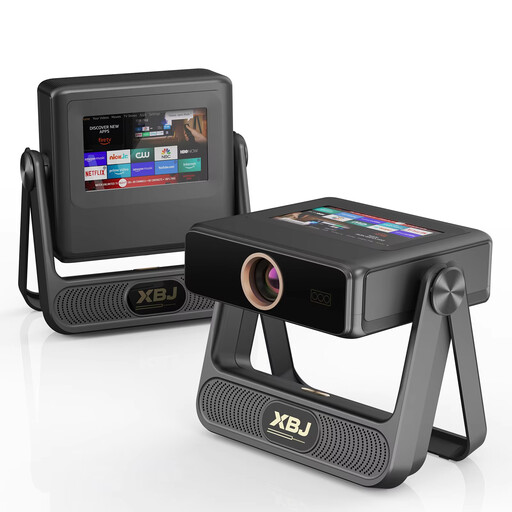
XBJ A5Pro Outdoor Smart Projector, Grey
An option to consider if you’re looking for a smart projector and want to check your preferred image size and positioning in advance.
Native 1080P, stated image size up to 300 inches, 900 ANSI lumens, Wi-Fi 6 and Android OS.
View at Joybuy
 No image available
XGIMI MoGo 4 Portable Projector, Full HD 1080p, Google TV, 450 ISO Lumens, Harman Kardon Audio, 2.5-Hour Battery + EA SPORTS FC 26 Game Code, Match Night EU Edition
Worth considering if you want a portable film setup with streaming and a built-in battery.
Full HD 1080p, Google TV, 450 ISO lumens, Harman Kardon audio and a 2.5-hour battery. This version also includes an EA SPORTS FC 26 game code and Match Night EU Edition.
View at Joybuy
 No image available
Projector with built-in apps, 50–200 inches
Worth considering if built-in apps and a range of connection options suit your film source.
Stated image size: 50–200 inches. The title lists built-in apps and Play Store, Wi-Fi 6, Bluetooth, 50%–100% digital zoom and 180° rotation.
View at Joybuy
 No image available
XGIMI Elfin Flip Mini Laser Projector, 1080P Full HD
A model to compare if you’re looking for a mini projector and want to factor optical zoom into your setup.
1080P Full HD, 1,600 ISO lumens, RGB triple-laser light source, optical zoom and Harman Kardon sound. The product name also lists automatic focus and correction.
View at Joybuy
Frequently asked questions
Is a long viewing distance the same as a long projection distance?
No. Measure the distance from your seat to the screen separately from the distance between the projector lens and the screen. Use the first measurement to work out your preferred image size, and the second, together with your preferred image width, to check the model specifications.
How can you set up a projector without relying too much on digital correction?
First decide where the screen and lens will go, then check the exact model’s optical zoom and any lens shift. For example, BenQ lists 1.3× zoom and 10% vertical lens shift for the TK710. If you’re installing the projector in a fixed position, also consult the model’s manual.
Do you need a separate streaming device or sound system for short films?
It depends on your film source and where you’ll be sitting. Epson lists two HDMI ports and built-in speakers for the EH-TW7100, while XGIMI lists Google TV and built-in speakers for the HORIZON 20. Check that your app or player can connect and that the sound is good enough from your seat.
What are your rights to a warranty and a cooling-off period when buying online in the Netherlands?
If a product is faulty, ACM ConsuWijzer says you’re entitled to a statutory guarantee from the seller, separate from any manufacturer’s warranty. Online purchases generally come with a 14-day cooling-off period after delivery, subject to legal exceptions.
Can you organise a public screening of someone else’s short film?
Don’t assume you can screen a protected film publicly without permission. The Dutch Government distinguishes between making a private copy for personal use and distributing or making material available to the public. For a public screening, arrange the necessary permission for the film in question.


