Start with the room: measure the distance to the wall and work out how much light you can block out during the slideshow. A compact projector is handy if you’ll be moving it between rooms. For a shared room that’s harder to darken, it’s worth comparing models with a higher stated light output. Then check how your laptop or phone can actually send the photos to the projector.
Who is this buying guide for?
Watching in a shared room
You want to look at travel photos with your housemates and need to consider how much ambient light remains in the room. Epson Netherlands and BenQ Netherlands provide light output specifications for various projector models.
Short on floor and storage space
You want to put the projector away after use, so available space, projection distance and temporary set-up all matter. BenQ Netherlands recommends checking the room layout and distance to the wall in advance.
Sharing photos from your own device
You want to connect a laptop or phone, so you’ll need to check your device’s video output against the projector’s inputs. Epson Netherlands and BenQ Netherlands list the connections available on their models.
What should you look for when buying?
Start with the room layout and connection to your photo source. Then compare how easy the projector is to move and what running costs you may need to consider.
| Consideration |
What to look for |
Who is this important for? |
| Visibility in ambient light |
Consider your preferred image size and how much light will remain in the room. Compare light output only on the same measurement basis; the specifications aren’t a measurement of your room. |
If I’m watching with housemates while there’s still light in the room, I want to know whether the image size will work; around 28% of consumers prioritise visibility in ambient light. |
| Getting the right image on the wall |
Measure the available distance and wall width, then check the throw ratio of the exact model. BenQ Netherlands recommends deciding on the position and distance in advance. |
If furniture or housemates limit where I can put it, I want to know whether I can get the image size I want from that distance; around 22% of consumers prioritise a suitable image set-up. |
| Photos from your own device |
Check your phone or laptop’s video output, the projector input and whether you’ll need an adapter. BenQ lists HDMI and USB-C DisplayPort for the GV50. |
If I want to show photos from my phone or laptop, I need to know that my source device can output a picture through the connection I choose; around 22% of consumers prioritise this connection. |
| Moving and storing it |
Check the weight and power supply of the exact model. A built-in battery doesn’t automatically mean you can finish every slideshow without mains power. |
After the show, I want to be able to put the projector away easily, so I consider its weight and power supply; around 17% of consumers prioritise ease of moving and storage. |
| Purchase and running costs |
Check whether the projector has a replaceable lamp and factor in potential replacement costs when comparing prices. Epson lists a replacement lamp for the CO-FH01, sold separately. |
For occasional screenings, I want to factor in possible costs after purchase as well as the initial price; around 11% of consumers prioritise costs over the product’s lifetime. |
Pitfalls to avoid when choosing
-
Treating a BenQ GV31 as an ordinary second-hand option
BenQ has announced that the GV31’s battery may overheat and cause a fire. According to BenQ, all GV31 projectors are included in the recall.
Stop using a GV31 and contact BenQ to follow the recall procedure.
-
Confusing a supported video signal with native resolution
Philips states that the NeoPix 130W has a native resolution of 720p. That’s a different proposition from the Full HD models discussed here.
Compare the native resolution of the exact model; don’t infer it from the video signals it can receive.
-
Assuming your phone will connect automatically
An HDMI or USB-C input doesn’t tell you whether your phone can output a picture through the connection you’ve chosen.
Check your device’s output and the projector’s input, see whether you need a suitable adapter, and test your presentation in advance.
-
Comparing only the purchase price of a lamp-based projector
Epson lists a replacement lamp for the CO-FH01, sold separately.
Check which lamp fits the exact model and factor in the potential replacement cost when comparing, especially if you use the projector often.
Brands to compare
Epson
The CO-FH01 and CO-FH02 are Full HD models available in the Netherlands. They’re worth comparing if a fixed set-up and stated light output are important to you.
- Epson Netherlands lists Full HD, HDMI and 3,000 lumens of both white and colour light output for both models.
- The CO-FH01 has a replaceable lamp. Its stated brightness doesn’t guarantee a particular picture in every living room.
BenQ
The GV50 is a portable model worth comparing for a temporary set-up; the TK710STi is a separate short-throw option.
- BenQ lists 1080p, 500 ANSI lumens, HDMI, USB-C DisplayPort and a built-in battery for the GV50.
- Don’t confuse the GV50 with the GV31. BenQ has announced a recall of all GV31 projectors due to a battery risk.
Philips
The NeoPix 130W is a smaller HD model to consider if 720p and the intended image size suit your presentation.
- Philips lists 720p and an image size of up to 70 inches.
- Philips’s product page includes user complaints about apps. These reports aren’t an independent test and don’t show that every unit has the same issue.
Projectors at Joybuy
This selection includes compact projectors for a temporary set-up and models for a permanent position. Before choosing a model, compare your room, the available projection distance and the connection to your photo source.
 Image unavailable
Yoton Y6 5.2 Bluetooth 4K LCD projector, native 1080P
Its compact, portable design could suit you if you want to put the projector away after the slideshow.
Native 1080P; stated image size 40–300 inches; HDMI, USB and AV; approx. 2.5 kg.
Joybuy
 Image unavailable
Optoma Photon Go
The short stated projection distance could be useful if the projector needs to sit close to the wall.
1080p Full HD; HDMI 2.0; projection distance 0.26–0.4 m for a 60–100-inch image; net weight 1.72 kg.
Joybuy
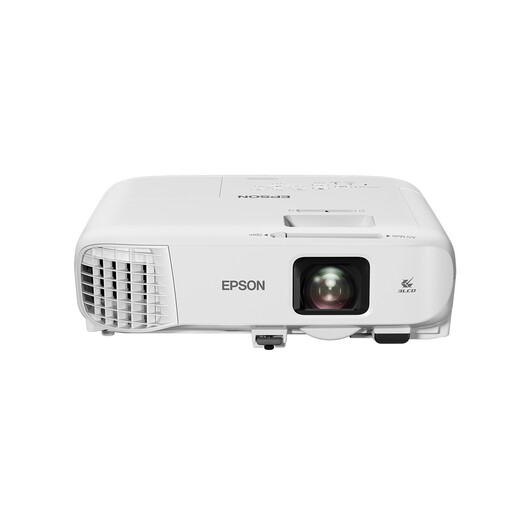 Image unavailable
Epson EB-992F Full HD projector, 4000 ANSI lumens, white
Its stated light output may be worth comparing for a shared room that can’t be fully darkened; the specification can’t predict exactly how the picture will look in your space.
1080p Full HD; 4000 ANSI lumens; two HDMI inputs; 1.6× optical zoom; lamp life of up to 17,000 hours in ECO mode.
Joybuy
 Image unavailable
Dangbei N2 Mini 1080P projector with Wi-Fi and Bluetooth
Automatic image adjustment features could be useful if your temporary projector set-up isn’t directly in front of the wall.
1080P; autofocus; automatic keystone correction; obstacle avoidance.
Joybuy
 Image unavailable
Epson EF-22N 3LCD Full HD projector, black and blue
Check whether the stated light output suits the amount of light that remains in your shared room.
1080p (1920 × 1080); 1000 ANSI lumens; image size 30–150 inches; built-in speakers. Light output is a factor to consider if the room can’t be darkened properly.
Joybuy
Frequently asked questions
How can I check whether the image will fit our room?
Measure the usable width of the wall and the distance from the intended projector position to the wall. Then check the throw ratio and range of the exact model; don’t estimate the required distance from the word ‘portable’ alone.
Can I show my travel photos directly from my phone?
That depends on your phone’s video output and the connection you choose. BenQ lists HDMI and USB-C DisplayPort for the GV50; check whether your phone can actually output a picture through that connection and whether you need an adapter.
What should I look for in a lamp-based projector?
Check the instructions and possible replacement lamp for the exact model. Epson lists a replacement lamp for the CO-FH01, sold separately; the lifespan of a light source depends on the stated conditions of use.
Who can help if the projector breaks sooner than expected?
If you’ve used the product normally and it doesn’t meet what you could reasonably expect, the seller is responsible for providing a solution under the Dutch statutory guarantee, according to ACM ConsuWijzer. A separate manufacturer’s guarantee doesn’t remove that right.
What should I check for electrical projector safety in the Netherlands?
The Netherlands Food and Consumer Product Safety Authority says that electrical products covered by the Commodities Act Decree on Electrical Equipment must carry a CE mark. Check which rules apply to the device and its power supply; a CE mark alone doesn’t prove that it has undergone an independent safety test. If you have a BenQ GV31, stop using it immediately and follow BenQ’s recall instructions.


