Start by checking how much light falls on the wall you plan to project onto. Then measure your preferred image width and the distance from the lens to the wall. A standard-throw projector will work if you have enough distance; a short-throw model can help when space is limited, while a portable projector is most practical if you can reduce ambient light. Also check in advance that your tennis coverage will work with your chosen playback device, and how you’ll connect the sound.
Who is this projector guide for?
Watching during the day in a bright kitchen-diner
You want to follow the ball and score while there’s daylight or the kitchen lights are on. So, don’t just look at the stated brightness: consider how much light reaches the projection wall too. Epson Netherlands points out that ambient light affects visibility.
Watching with limited space for positioning
You have a suitable wall but not much room to position the projector. Your preferred image width and the model’s throw ratio will determine whether the setup works; BenQ Netherlands lists this ratio for each model.
Putting the projector away after watching
You want to store or move the projector after use, so portability, connections and sound are important. A portable model won’t necessarily be easy to see in bright ambient light; Yaber lists portability and HDMI among the T2 Plus GTV’s features.
What should you look for when choosing?
First assess the light on the wall, then measure your space, and finally check the coverage and sound. A high lumen rating alone doesn’t guarantee a clear picture.
| What to consider |
What to look for |
Who is this important for? |
| Visibility in bright conditions |
Check where daylight or kitchen lighting falls on the wall, whether you can darken the room, and how the projector’s brightness has been measured. |
If I want to keep the kitchen lights on during the match, visibility comes first; around 33% of consumers say this is their main concern when buying. |
| Image width and distance |
Measure the available image width and the distance from the lens to the wall, then compare these with the throw ratio of the exact model. |
If I have little room between the projector and the wall, the image width I want needs to fit the available space; around 27% of consumers say this is their main consideration. |
| Live coverage |
Check that your service and subscription work through your chosen app or external device, and confirm which HDMI connections you need. |
If I want to watch a particular tennis match, I’ll first check that my playback setup works; around 20% of consumers give this top priority. |
| Sound and commentary |
Compare the model’s built-in speaker and audio output with your viewing distance and planned sound setup. |
If I want to follow the commentary in a shared dining area, I’ll check the sound and connections; around 13% of consumers choose a product primarily on this basis. |
| Maintenance and service |
Check the stated lifespan for each operating mode, the availability of replacement parts and who the seller is. |
If maintenance and help with faults are my main concerns, I’ll check these points before buying; around 7% of consumers say this is their main concern when buying. |
Pitfalls to avoid
-
Choosing a projector based only on its highest lumen rating
Light falling directly on the projection wall can reduce visibility. The stated brightness alone doesn’t tell you what the picture will look like in your kitchen.
First check the light in the room and where the screen will go. Then compare the brightness and how it was measured.
-
Ordering a projector before measuring the distance
For the same image width, a standard-throw projector needs a different lens position from a short-throw model. Having a suitable wall doesn’t automatically mean every projector will produce the image you want from the space available.
Measure the available image width and the distance from the lens to the wall, then check the throw ratio of the exact model.
A setup that doesn’t fit may mean you need to find another spot or get a suitable projection screen.
-
Assuming a smart platform includes the match
A smart TV dongle or HDMI input doesn’t confirm that your app, subscription and tennis coverage will be available. BenQ says app availability may depend on your region, subscription and device settings.
Check that the specific coverage and playback setup you want will work before match day.
You may need a separate playback device or a suitable subscription.
-
Assuming the lifespan in Eco mode is the same as in brighter modes
For lamp-based models, the stated lifespan depends on the mode you choose. So, a figure for Eco mode doesn’t tell you how long the lamp will last in a brighter mode.
Read the specifications for each mode and check which replacement parts are available for the model.
A lamp-based model may eventually need a replacement lamp.
Brands and models to consider
Epson
The EH-TW840 is worth considering if visibility in ambient light and two HDMI inputs are important to you.
- Epson Netherlands lists Full HD, 4,000 lumens of white and colour brightness, and two HDMI inputs for the EH-TW840.
- The stated brightness doesn’t guarantee contrast on a wall in direct sunlight; the built-in speaker is a 2 W mono speaker.
BenQ
Compare the TH575i for standard-throw setups with the TK705STi if you have little distance between the projector and the wall.
- BenQ lists 3,800 ANSI lumens and a Google TV dongle included with the TH575i. For the TK705STi, it lists a throw ratio of 0.8 and 3,000 ANSI lumens.
- BenQ’s claims about its sports mode and motion enhancement are manufacturer claims, not independent measurements taken in a kitchen-diner. Also check that your app and subscription can stream the match.
Optoma
The HD28e is a Full HD lamp-based model to compare if you use an HDMI source and have enough projection distance.
- The European specification sheet lists 3,800 lumens, a throw ratio of 1.47–1.62, one HDMI input and a 5 W speaker.
- The sports-use description is a manufacturer claim. Check that the distance, connection and sound suit your setup.
ViewSonic
The European PX701HDH is a useful comparison if you’re looking for a Full HD projector with two HDMI inputs.
- ViewSonic lists 3,500 ANSI lumens and a lamp life of up to 20,000 hours in SuperEco+ mode.
- That lifespan doesn’t automatically apply to the brightest viewing mode. The manufacturer’s claims about use in lit rooms haven’t been independently assessed for this kitchen.
Yaber
The T2 Plus GTV is a portable option if you want to move the projector and can reduce ambient light.
- Yaber lists a battery, HDMI connection, carry handle that doubles as a stand, and a Google TV dongle for the Plus version.
- Check the brightness and battery life for watching your match, and make sure your tennis service works with your chosen playback setup.
Projectors on Joybuy
These projector picks from Joybuy offer different options for watching tennis in a kitchen-diner. Compare each model’s throw distance, brightness, resolution and playback connections with your space and streaming service.
 Image unavailable
Optoma H117ST Short Throw DLP Projector, WXGA
The short-throw ratio may suit a setup with limited projection distance; measure your preferred image width first.
Native WXGA resolution of 1280 × 800, stated brightness of 3,800 ANSI lumens, throw ratio of 0.52:1, HDMI and a built-in 10 W speaker. The native resolution isn’t Full HD.
View on Joybuy
 Image unavailable
XGIMI MoGo 4 Match Night EU Edition
A portable model to consider if you want to move the projector after use; check how visible the picture will be in your kitchen’s lighting.
The product title lists Full HD 1080p, Google TV and a battery with a stated runtime of 2.5 hours. The product description mentions HDMI, 450 ISO lumens and Harman Kardon audio. This version also includes an EA SPORTS FC 26 Game Code.
View on Joybuy
 Image unavailable
2026 Video Projector, 180° Rotation
The listed HDMI compatibility may be useful if you want to connect an external playback device; check in advance that your coverage works through it.
The title lists automatic image correction, an image size of 50–200 inches, 50–100% zoom and 180° rotation. The product description mentions HDMI and USB sources, and access to apps through a built-in system.
View on Joybuy
 Image unavailable
Magcubic HY350Max
The stated throw ratio can help you assess whether it will suit a compact setup; compare it with your preferred image width and measure the lens distance.
The product description lists native 1080p, 900 ANSI lumens, a throw ratio of 1:1, HDMI, a built-in 15 W speaker, autofocus and keystone correction.
View on Joybuy
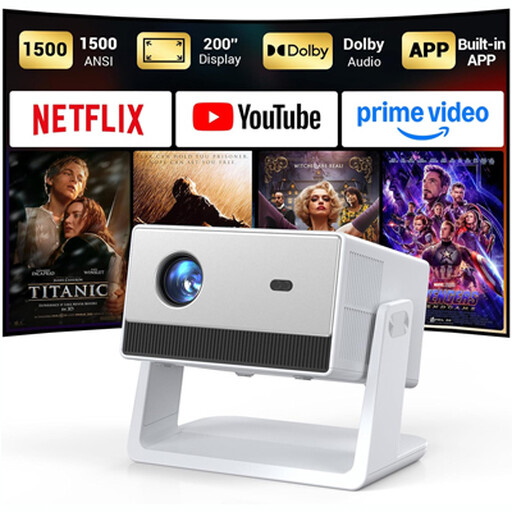 Image unavailable
Funfilx Smart Projector, Native 1080P
The built-in speakers may suit you if you don’t want to use a separate speaker; compare the audio connection and positioning with your own setup.
The product description lists native 1080p, 1,500 ANSI lumens, HDMI, two built-in 5 W speakers, autofocus and an adjustable stand.
View on Joybuy
Frequently asked questions
How can I tell whether a projector image will fit on my wall?
Measure the available image width and the distance from the intended lens position to the wall. BenQ Netherlands describes the throw ratio as the lens distance divided by the image width; compare your result with the ratio for the exact model.
Can I watch tennis directly through a smart projector?
Not necessarily: a smart TV dongle or HDMI input doesn’t confirm that your app, subscription and coverage will work. Check the specific tennis service and playback setup before you buy.
How can I keep a projector safe in the kitchen?
Place the projector on a stable surface, away from walkways, and follow the instructions for the exact model. The Yaber T2 Plus GTV product instructions warn against looking into the lens, advise keeping the ventilation openings clear, and say not to expose the device to moisture or liquids. Check the instructions for other models separately.
What are the rules in the Netherlands for repairs, returns and the legal guarantee?
According to ACM ConsuWijzer, the seller must help repair a product if it breaks sooner than you could reasonably expect under normal use; there is no fixed general end date for the legal guarantee. For a standard online purchase, you’ll usually have a 14-day cooling-off period after delivery, subject to legal exceptions. If you’re buying through a platform, check who the actual seller is.
Does a projector need CE marking?
It depends on the rules that apply to the specific product. According to the European Commission, CE marking is required for products covered by harmonised EU rules that require it; the manufacturer is responsible for the assessment and marking. A CE logo on its own isn’t an independent certification.


