Who is this relevant to?

Organiser in a bright room

You want viewers further from the screen to be able to follow the match, even when the room isn’t completely dark. Brightness, screen size and positioning are therefore important considerations. BenQ and ViewSonic state the brightness for specific models, but these manufacturer figures alone don’t tell you how the picture will look in your room.

Viewing group with limited space for projection

You want a large picture without placing the projector in the middle of the viewers. So first measure the available distance and compare it with the specifications for the exact model. BenQ and Epson describe models designed for shorter or ultra-short throw distances.

Host streaming the match

You want to connect the match source and clear audio for the group. Check the connections and whether the app you need is available for your device and subscription. BenQ notes that app availability can vary by region, subscription and device.

What should you look for when choosing?

What to consider What to look for Who should pay particular attention?
Visibility in ambient light Assess the stated brightness alongside your preferred screen size and the light in the room. Only compare lumen figures if they use the same measurement basis. If you’re watching with a group in a room that isn’t completely dark, you’ll want the picture to remain easy to follow from further away. Around 33% of consumers put visibility in ambient light first.
Throw distance and viewing lines Measure the available distance and check the throw distance or throw ratio for the exact model. Consider where the projector will sit in relation to the viewers. If there’s limited space in front of the screen, you’ll want to know whether the projector can be positioned suitably without getting in the group’s way. Around 27% of consumers prioritise throw distance and positioning.
Match details and motion Check the model’s native resolution and the specific motion feature it lists. A sports mode or MEMC doesn’t guarantee that every broadcast will look sharper. If you want to follow the players, lines and score clearly on a large screen, resolution and fast-action performance are important considerations. Around 20% of consumers prioritise match details.
Match source and audio for the group Check that the inputs are compatible with your receiving device and that the audio connection suits the sound system you plan to use. If you’re using built-in apps, check that the service you want is available. If you want to play a livestream and commentary for several viewers, it’s worth checking in advance how the source and audio will connect. Around 20% of consumers start by considering the match source and audio for the group.

Common buying mistakes

  • Focusing only on the maximum number of inches

    A stated image size doesn’t automatically tell you whether the projector can produce a usable picture from the distance available.

    Measure the distance from the lens to the screen, then assess the image size alongside the ambient light and where viewers will sit.

    You may need a different screen size or setup if the combination you have in mind won’t work.

  • Comparing lumen figures without checking how they were measured

    Specifications may use ANSI lumens, ISO lumens or CLO. These figures aren’t part of a directly comparable performance test.

    Note the measurement unit for each model and assess how you plan to set it up; don’t rank projectors by the highest figure alone.

  • Assuming streaming will also take care of the source and audio for the group

    An available app doesn’t automatically mean that your tennis broadcast will work on it or that the audio will suit the group. BenQ notes that app availability can vary by region, subscription and device.

    Test the match source and audio connection in advance. Factor in a separate receiving device or sound system if your setup requires one.

  • Treating a business screening like a private viewing at home

    Ondernemersplein states that businesses and organisations showing TV programmes to employees or customers need a licence. The stated Videma coverage doesn’t apply to channels that require a separate paid subscription.

    For a business or organisation event, check in advance which rights apply to the specific broadcast and screening arrangement.

    A licence and possibly a separate channel subscription may be required for a business screening.

Brands to consider

BenQ

BenQ lists models for both longer and shorter throw distances.

  • For the TH575i, BenQ states 120 inches at 4–4.4 metres and 3.800 lumens. For the TK705STi, the brand lists 150 inches at 2.7 metres, 3.000 lumens, MEMC and a sports mode.
  • These are manufacturer specifications for specific models, not an independent comparison. App availability can vary by region, subscription and device.

Epson

The EB-810E is an ultra-short-throw option that can be positioned close to the wall.

  • Epson states an image size of 80–160 inches and 5.000 lumens CLO with 3LCD for this model.
  • CLO can’t be directly equated with lumen figures measured in other ways. Check that the business model, positioning and connections suit your viewing space and match source.

ViewSonic

The PX701HDH is a Full HD lamp-based model with a stated brightness and HDMI connections.

  • ViewSonic states 3.500 ANSI lumens and two HDMI inputs for this model.
  • The stated lifespan of up to 20.000 hours applies to SuperEco+ mode and not necessarily to every brightness setting.

Optoma

The HD146X is a standard Full HD projector with a wired connection.

  • The European data sheet lists 3.600 ANSI lumens, a throw ratio of 1,47:1–1,62:1 and one HDMI input.
  • The stated lamp life varies by operating mode. Check the distance you need and your match source before choosing your setup.

JMGO

The N1S Ultra is a 4K triple-colour laser projector for those considering flexible positioning and built-in smart features.

  • JMGO states 2.800 ISO lumens, Google TV and two HDMI 2.1 inputs for the N1S Ultra, one of which supports eARC.
  • A product description also lists 3.000 ANSI lumens and the name N1 Ultra. Don’t treat these lumen figures as equivalent, and check the exact model.

Projectors at Joybuy

These Joybuy products are suited to watching tennis with a group, including options for positioning close to the screen and connections for picture and sound. Check the dimensions and features of the exact model to make sure it suits your space.

XGODY N7 Cine smart projector

XGODY N7 Cine

The stated throw ratio of 1,1:1 could be useful if you have limited space in front of the screen; measure the distance needed for your preferred image size.

Native 1080p; 1.000 ANSI lumens; image size 60–140 inches; two built-in 8 W speakers.

View at Joybuy

XGIMI AURA 2 UHD 4K ultra-short-throw projector

XGIMI AURA 2 UHD 4K

The short stated throw distance may suit you if the projector needs to sit close to the screen; the stated image size is 60–100 inches.

4K UHD; 2.300 ISO lumens; throw ratio 0,18:1; throw distance 0,26–0,4 metres; two built-in 10 W speakers.

View at Joybuy

Optoma Photon Beam PK52 projector

Optoma Photon Beam PK52

The two HDMI inputs provide a wired connection option for a compatible match source. Check the distance needed to achieve your preferred image size.

4K UHD; two HDMI inputs; two built-in 15 W speakers; throw ratio 1,21:1–1,59:1.

View at Joybuy
Dangbei Atom portable laser projector

Dangbei Atom

The stated HDMI-ARC connection and built-in speakers may be useful if you want to connect the source and audio through the projector.

1080p; 1.200 ISO lumens; image up to 180 inches; two built-in 5 W speakers; HDMI-ARC.

View at Joybuy
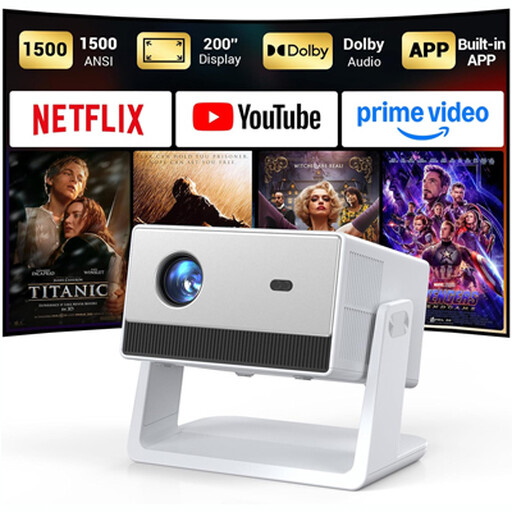
Funfilx smart home cinema projector

Funfilx smart projector

The adjustable stand and automatic keystone correction can help with positioning; check the image size and match source in advance.

Native 1080p; 1.500 ANSI lumens; image up to 200 inches; HDMI, USB and 3,5mm connection; two built-in 5 W speakers.

View at Joybuy

Frequently asked questions

How can you tell whether a projector will produce a large enough picture in your room?

First measure the possible distance from the lens to the screen, then check the image size or throw ratio for the exact model. For example, BenQ states that the TK705STi can project a 150-inch image from 2,7 metres; this doesn’t automatically apply to other projectors.

Can you use a separate speaker for the commentary?

That depends on the connections available on the exact model and your speaker. ViewSonic lists HDMI inputs for the source on the PX701HDH; JMGO lists HDMI-eARC and Bluetooth for external audio, among other features, on the N1S Ultra.

What should you check before your guests arrive?

Test the image size, the available app or external match source, and the audio in the intended location. BenQ notes that app availability can vary by region, subscription and device settings.

What maintenance should you consider for a lamp-based projector?

Check the operating mode and the terms for any replacement lamp. Optoma lists different maximum lamp lives by mode for the HD146X; ViewSonic’s stated lifespan of up to 20.000 hours for the PX701HDH applies to SuperEco+ mode.

Can a business or organisation in the Netherlands show a tennis broadcast to guests?

Ondernemersplein states that businesses or organisations showing TV programmes to employees or customers need a licence. Its information refers to Videma for affiliated TV channels and makes clear that this coverage doesn’t apply to channels requiring a separate paid subscription. Check with the relevant rights holder which rights apply to the specific broadcast and screening arrangement; this doesn’t refer to a private viewing at home.
