Who is this guide for?

Tennis fan who wants to follow the rallies

You want to see fast-paced action and clear details. Compare the picture settings and resolution of both the projector and your match source. BenQ and Epson describe picture-processing features, but these descriptions aren’t independent tests of how tennis looks.

Viewer with a dedicated, dark room

You can limit ambient light and are looking for the right combination of picture quality and positioning. Epson Netherlands highlights the role of the viewing environment when choosing brightness; also measure the distance to the screen.

Viewer with a changing setup

You move the projector and want to refocus and realign it afterwards. Check the setup features of each model; XGIMI, for example, lists automatic focus for the HORIZON.

What should you look for when choosing?

Fixed home cinema setup

Suitable for: a fixed screen position where you want to align the projector precisely. Epson lists optical zoom and lens shift for the EH-TW7000.

Keep in mind: the EH-TW7000 uses a lamp. Epson’s claim about frame interpolation isn’t an independent test of how tennis looks.

DLP model with a sports picture mode

Suitable for: a setup where you want to compare a sports picture mode. BenQ lists one for the TK700; Optoma positions the HD28e for live sport.

Keep in mind: the TK700 is 4K UHD, while the HD28e is Full HD. A sports mode or stated input lag doesn’t prove how clearly a tennis rally will appear.

Portable home projector

Suitable for: a setup where you want to reposition the projector and automatic focus or built-in sound matters. XGIMI lists these features for the HORIZON.

Keep in mind: XGIMI gives this model a rating of 1.500 ISO-lumens; don’t compare this measurement directly with lumen ratings stated in different terms.

What to consider What should you check? Who is this important for?
Fast action and detail Compare the resolution of your match source and projector, and check which picture modes are available on the exact model. A sports mode doesn’t prove that the picture will look better. If I want to keep following the ball during rallies, I look at the source resolution and picture settings; around 36% of consumers give action and detail top priority.
Picture in a dark room Check the stated brightness, including its measurement standard, and the available picture modes. Epson Netherlands’ advice distinguishes between different levels of ambient light. I want a picture that suits a darkened room and don’t want to choose based on a single lumen figure; around 29% of consumers give picture quality in a dark room top priority.
Distance and alignment Measure the distance from the lens and the desired image width, then compare them with the throw ratio of the exact model. BenQ Netherlands lists 1,127–1,46:1 for the TK700; Optoma Europe lists 1,47–1,62:1 for the HD28e. If my projector needs to fit in a fixed position, I check the distance before choosing a model; around 21% of consumers give positioning and alignment top priority.
Match source and sound Check the connections you need and the signal supported by both devices. Also consider whether you want built-in or external sound; BenQ warns that app availability may depend on your region, subscription and device settings. I want to be sure how I’ll watch the match and hear the commentary; around 14% of consumers give the match source and sound setup top priority.

Common buying mistakes

  • Automatically choosing the highest lumen rating

    A lumen figure on its own doesn’t give you the full picture when choosing a projector for a dark room; you also need to consider ambient light.

    Start by considering how much you can darken the room, then compare the brightness and picture modes of the exact model.

  • Assuming a sports mode or low input lag guarantees sharp rallies

    A sports picture mode and a stated input lag don’t automatically tell you how moving tennis footage will look. BenQ’s input-lag figures relate to stated gaming signals.

    Check the settings for your match source and treat manufacturers’ claims about sports picture quality as just that: manufacturer claims.

  • Checking the projection distance only after buying

    Projectors with different throw ratios can produce different image widths from the same position.

    Measure the distance from the lens to the screen and compare it with the specifications for the exact model variant. You may need to choose a different position or adjust your planned screen size.

Brands worth comparing

Epson

For a fixed home cinema setup, you could compare the EH-TW7000 and EH-TW6250. Epson lists optical zoom and lens shift for the EH-TW7000; the EH-TW6250 is a different home entertainment model with 4K PRO-UHD.

  • According to Epson, the EH-TW7000 offers optical adjustment options.
  • The EH-TW7000 uses a lamp. Epson’s description of frame interpolation is a brand claim, not an independent comparison of how tennis looks.

BenQ

The TK700 is worth comparing if you’re looking for a 4K DLP projector with a sports picture mode. Its stated features are BenQ’s model specifications.

  • BenQ lists 4K UHD, 3.200 ANSI-lumens and a throw ratio of 1,127–1,46:1 for the TK700.
  • The sports picture benefits are claims made by BenQ; gaming input-lag figures aren’t an independent measurement of how tennis looks.

Optoma

The HD28e is a Full HD model that Optoma positions for live sport.

  • Optoma lists Full HD, HDMI, an audio output and a lamp for the HD28e.
  • The stated suitability for sport is information from the manufacturer, not an independent comparison with other models.

XGIMI

The HORIZON is a Full HD home projector to consider if easy refocusing and built-in sound matter to you.

  • XGIMI lists automatic focus and two built-in 8 W speakers for the HORIZON.
  • XGIMI gives this model a rating of 1.500 ISO-lumens; bear the measurement standard in mind when comparing it with other models.

Projectors at Joybuy

These projectors are designed for home and entertainment use. Compare the listed resolution, connections and setup features with your match source and the position where you want to project.

XGODY Gimbal A8 projector

XGODY Gimbal A8 projector

Suitable for a match source with a 1080p signal and a setup you want to realign; the product details list autofocus and automatic keystone correction.

Native 1080p; 1.200 ANSI-lumens; HDMI; gimbal with 90° rotation; two 8 W speakers; Android 14.0; 2 GB RAM and 16 GB ROM.

View at Joybuy

XGODY N7 Cine Smart projector

XGODY N7 Cine Smart projector

An option to compare if native 1080p, HDMI and automatic focus suit your match source and setup.

Native 1080p; 1.000 ANSI-lumens; Whale TV OS; autofocus; automatic keystone correction; 90° rotation; 2 GB RAM and 16 GB.

View at Joybuy
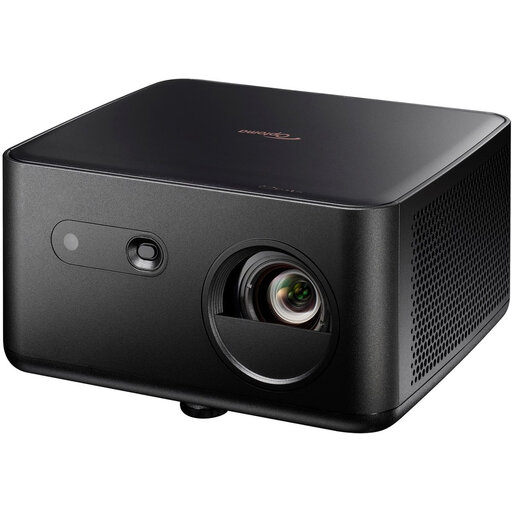
Optoma Photon Life PK32 4K UHD DLP projector

Optoma Photon Life PK32 4K UHD DLP projector

Suitable for a match source with a UHD signal if 4K UHD and two HDMI 2.0 inputs work with your equipment.

4K UHD; 1.100 ISO-lumens; autofocus; automatic keystone correction; two HDMI 2.0 inputs; two built-in speakers.

View at Joybuy

Magcubic HY350Max Smart projector

Magcubic HY350Max Smart projector

Worth comparing if native 1080p and HDMI suit your match source and automatic focus would be useful when repositioning the projector.

Native 1080p; 900 ANSI-lumens; Android 14; 180° rotation; autofocus; automatic keystone correction; HDMI.

View at Joybuy

XBJ 360° portable projector

XBJ 360° Portable Projector

An option for a changing projection position; the product details list autofocus and automatic keystone correction.

Full HD 1080P; 500 lumens; 360° rotation; autofocus; automatic keystone correction; HDMI.

View at Joybuy

Frequently asked questions

How can you tell whether a projector will fit your room?

Measure the distance from the planned lens position to the screen and decide how wide you want the image to be. Compare both with the throw ratio of the exact model variant, then check the available zoom and alignment options.

Can you watch a live match directly through a smart projector?

First check whether the app you want is available in your region and works with your subscription and device settings; BenQ notes that availability can vary. An external HDMI source is another option if the projector and source support the signal.

What should you readjust after moving the projector?

After moving it, check the focus, image size and alignment. XGIMI lists automatic focus and keystone correction for the HORIZON; check which features are available on each model.

What should you know about maintenance and warranty?

Check the light source type and maintenance information for the exact model; Epson lists a lamp for the EH-TW7000. In the Netherlands, statutory consumer rights are separate from any commercial warranty. According to ACM ConsuWijzer, what you can reasonably expect from the product determines the level of statutory protection.

Can you try out a projector bought online and return it?

For a consumer purchase made online, ACM ConsuWijzer says you generally have a statutory cooling-off period that ends 14 days after delivery. Check the terms and exceptions for your specific purchase; this cooling-off period doesn’t mean you can use the product without limits.
