First, measure the available projection distance, the clear wall width and your viewing distance. Then choose between a standard-throw projector, a short-throw model or an ultra-short-throw model placed close to the wall. Watch an episode of your own series to check whether the subtitles are easy to read from your seat, and whether the ambient light, playback source and audio setup suit the room. Manufacturer specifications can help you assess where to place the projector, but they can’t show you exactly how the picture will look at home.
Who is this buying guide for?
Viewer with limited space for setup
You want to know whether your preferred picture size will work at the available distance from the projection wall. A short-throw or ultra-short-throw setup may be worth considering; BenQ Netherlands, Epson Netherlands and Optoma Netherlands all describe distance and placement as model-specific factors.
Viewer who prioritises subtitles
You choose the picture size from your seat and want to check the sharpness and subtitles with your own playback source. According to the Netflix Help Centre, available languages and playback options can depend on the title and device.
Viewer in a room with ambient light
You can’t always darken the living room, so you need to consider ambient light, picture size and the projection surface together. A stated light output alone can’t predict how the picture will look at home; BenQ Netherlands, Epson Netherlands and Optoma Netherlands treat lighting and setup as separate factors.
What should you look for when buying?
Start with the distance and picture width. Then check the subtitles from your seat, followed by the lighting and playback setup.
| What to consider |
What to look for when buying |
Who is this important for? |
| Will the picture fit in the room? |
Measure the possible lens positions and the clear wall width. Compare these with the distance chart for the exact model and your preferred picture width. |
If I have limited space, I want to know whether my preferred picture size will work at the available distance; around 36% of consumers prioritise placement. |
| Are the subtitles easy to read? |
Watch an episode at your intended picture size from your usual seat. Check the sharpness and subtitle settings on your own playback device. |
If I watch a subtitled drama series, I want to follow the text comfortably from my seat; around 29% of consumers give readable subtitles top priority. |
| Will the picture work in ambient light? |
Assess the picture with the lighting you normally use. Take picture size and the projection surface into account when comparing light output. |
If I don’t want to keep darkening the room, I want to know how the picture looks in my usual living-room light; around 21% of consumers prioritise watching in ambient light. |
| Will it work with my playback setup? |
Check that your preferred streaming service and series work on the intended device, and check the connections you’ll need, including any connection for external audio. |
If I want to use my own streaming device or audio equipment, I want to know that everything will connect; around 14% of consumers give playback and connectivity top priority. |
Common buying mistakes
-
Choosing a large screen size without measuring first
The throw ratio determines the distance needed for a particular picture width. The term ‘short throw’ alone doesn’t tell you where the exact model needs to go.
Measure your preferred picture width and possible lens positions, then check the model’s distance chart before buying.
An unsuitable place to set up the projector could mean replanning your room layout; you may also need a suitable screen or piece of furniture.
-
Confusing 4K input with native 4K projection
A projector may accept a 4K signal without projecting at native 4K resolution. For the EH-LS800W, Epson distinguishes between panel resolution and 4K image enhancement; Optoma describes the GT2000HDR as Full HD with support for 4K input.
Compare native resolution, supported input signals and image enhancement as separate specifications.
-
Assuming a smart projector will automatically display your preferred subtitles
According to the Netflix Help Centre, available subtitle languages and settings can vary by title and device. Not every option is available on every connected device.
Test your series and subtitle settings on the playback source you actually plan to use.
If the app or subtitle option you want doesn’t work on your chosen device, you may need a different playback source.
Brands to compare
Epson
Epson describes home cinema models for a range of setups, including the ultra-short-throw EH-LS800W and the EH-TW7000, which has optical zoom and lens shift.
- According to Epson’s specifications, the EH-LS800W combines ultra-short-throw placement with 3LCD and 4K image enhancement.
- According to Epson, the EH-LS800W has three 1920 × 1080 panels; 4K image enhancement doesn’t mean the model has three native 4K panels. Check the placement requirements and whether your wall is suitable for the exact model.
Samsung
The Premiere 7 is Samsung’s smart projector, designed for ultra-short-throw placement by the projection wall.
- Samsung lists built-in smart features and sound.
- Samsung recommends a dedicated ultra-short-throw screen for optimal viewing. Check the placement requirements for your chosen picture size; a general warranty statement isn’t proof of an additional warranty specifically for a projector.
Optoma
The GT2000HDR is Optoma’s short-throw laser projector with native Full HD resolution.
- Optoma says it can project a 100-inch picture from just over a metre away.
- 4K support refers to input, not native 4K projection. Stated light output and lifespan are manufacturer specifications, not independent measurements.
BenQ
BenQ provides information about projectors and placement for living rooms; the TK700STi is presented primarily as a short-throw gaming projector.
- BenQ treats room size, placement and ambient light as separate factors to consider.
- Assess whether a particular gaming model is suitable for relaxed series viewing on its own merits; information about one model doesn’t necessarily apply to the whole brand.
Projectors at Joybuy
This Joybuy selection includes projectors for home use. Compare the listed features of each model and check that its placement, picture size and playback options suit your room and series.
 No image available
Yaber L2 projector, native 1080p
The product information lists a short-throw ratio; check the distance needed for your preferred picture width before choosing where to set it up.
Native 1080p; 520 ISO lumens; built-in Google TV; two 5 W speakers; compatible with a rotating ceiling mount.
View at Joybuy
 No image available
Yoton Y6 projector, native 1080p
The product title states native 1080p; check that the connections and playback source you want to use are compatible with this version.
Native 1080p; the title also mentions 5.2 Bluetooth and 4K LCD.
View at Joybuy
 No image available
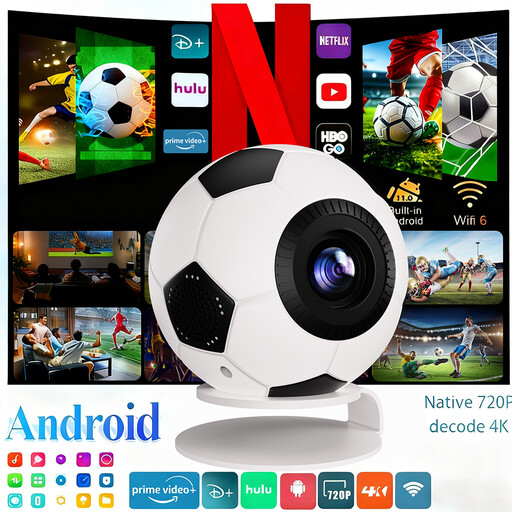
XBJ Football-Shaped Mini Projector
The product title lists native 1080p and an included projection screen; check that the screen size and projection distance suit your room.
Native 1080p; 800 ANSI lumens; Android 14; Wi-Fi 6; Bluetooth 5.4; automatic keystone correction.
View at Joybuy
 No image available
Magcubic HY350Max projector
The title lists native 1080p; compare the stated throw ratio with the distance and picture size you can achieve in your living room.
Native 1080p; 900 ANSI lumens; Android 14; Wi-Fi 6; Bluetooth 5.4; 180° rotation; automatic keystone correction.
View at Joybuy
 No image available
Optoma H117ST short-throw projector
The product title specifies short throw; check the picture width and projection distance for the position where you want to place the projector.
WXGA; 3800 ANSI lumens; 3D.
View at Joybuy
Frequently asked questions
How do I know if a projector will fit in the spot I have in mind?
Measure the distance between the intended lens position and the wall, then work out the available picture width. The throw ratio shows how the distance relates to the picture width; then check the distance chart and mounting position for the exact model.
Can I make subtitles larger on every projector?
No, not every option is available on every device. According to the Netflix Help Centre, subtitle settings can depend on the title and playback device, so try the series you want to watch on the streaming device or app you plan to use.
Do I always need a special screen for ultra-short-throw?
Not according to Samsung for The Premiere 7: Samsung says the model can also project onto a flat, plain wall, but recommends a dedicated ultra-short-throw screen for optimal viewing. Check the advice for your chosen model and assess your own wall.
What usage and connection details should I check before buying?
Check which connections your playback source and any external speakers need, and decide whether you want to use a screen or a separate streaming device. Also check the stated maintenance requirements for the exact model; specifications for another model don’t necessarily apply.
Can I return a projector bought online if the setup doesn’t fit?
For an eligible online purchase from a business, you generally have a statutory 14-day cooling-off period from delivery in the Netherlands, according to ACM ConsuWijzer. Check which terms apply to your purchase and handle the projector carefully while trying out the setup.


