
Anyone who wants to read subtitles from every seat
Check from the back row that the subtitles look sharp and large enough. Available language and display options can vary by title and device, according to the Netflix Help Centre.


First, choose an image size and projector position that make subtitles easy to read from the back row, then check the subtitle options on the playback device you plan to use. Portable models may suit a room you can darken, while a living room with the lights on calls for suitable brightness and possibly a smaller image. Light falling on the projection surface can make dark scenes look washed out, as Tweakers explains. So, measure the projection distance too, and check the connections and sound before you buy.
Check from the back row that the subtitles look sharp and large enough. Available language and display options can vary by title and device, according to the Netflix Help Centre.
You want to be able to see your guests, but light falling on the projection surface can make dark scenes look washed out. Tweakers describes this effect, while Epson Netherlands emphasises that the brightness you need also depends on your viewing environment.
Compare the space available, the projection distance and how adjustable the projector is. The right position depends on the room layout and the image size you want.
Start with the image size you want and whether you can darken the room. Then check that the projector will work at the available distance, and that your chosen playback device offers the subtitles and sound you need.
The percentages give a general indication of the main buying priorities for consumers choosing a projector for this particular viewing occasion.
| What to consider | What should you look for? | Who will find this especially important? |
|---|---|---|
| Readable subtitles | Check the focus and image size from the back row. Test the title and subtitle settings you want on the playback device you plan to use. | When I watch from the back seat, I want to be able to read the text clearly and test my chosen title on my own playback device. Around 36% of consumers put readability first. |
| Picture with the lights on | Check which lights will stay on and compare brightness ratings only when you know how they were measured. Also consider the image size you want. | I want to keep the lights on during the evening without dark scenes looking washed out. Around 29% of consumers prioritise visibility with their preferred room lighting. |
| A suitable set-up | Measure the distance from the lens to the projection surface and check the projection chart for the exact model and image size you want. | If the seating or projector position changes, I want to be able to adapt the set-up to the room. Around 21% of consumers give positioning top priority. |
| Playback and sound | Check which app or HDMI source you need, the subtitle options for your chosen title and the audio connections available. | I want to start the episode easily and follow the dialogue from the back row too. Around 14% of consumers put playback and sound first. |
A large image can still be difficult to read from the back row. The projection distance and focus you need also depend on the room and the model you choose.
Choose an image size based on your seating, then check the projection chart for the exact model. Test the subtitles at the edges and in the centre of the image too.
Manufacturers may use different measurement standards. A figure on its own won’t tell you how clearly dark scenes will show with the lights on.
Compare figures only when they use the same measurement standard. Also consider how much light falls on the projection surface and the image size you want.
Subtitle options vary by title and device. BenQ lists the Android TV dongle as optional for the BenQ W1800.
Before buying, check which playback device and accessories you’ll need, and test your chosen title on the device you plan to use.
A separate playback device or sound system may need extra space and connections.
The EH-TW6250 is designed for a living-room set-up, while the EF-61W is a portable Full HD projector. These features apply to those models and aren’t necessarily shared by the whole brand range.
The W1800 is designed for a planned film set-up, while the GV50 is made for moving around and projecting flexibly.
The N2 mini is a compact streaming option to consider for a darkened room and a straightforward set-up.
The HORIZON S Pro is a 4K projector with an integrated adjustable stand, according to XGIMI.
These projectors are designed for home viewing and include portable and smart models. For a group evening with subtitles, assess them based on image size, room lighting and the space available for set-up.
 Image unavailable
Could suit a portable viewing set-up where you want built-in audio and an integrated playback environment.
Full HD 1080p, Google TV, 250 ISO lumens and JBL audio. The bundle includes a 70-inch projection screen and stand. According to the product information, the battery offers up to 1,2 hours of video playback in Eco Mode.
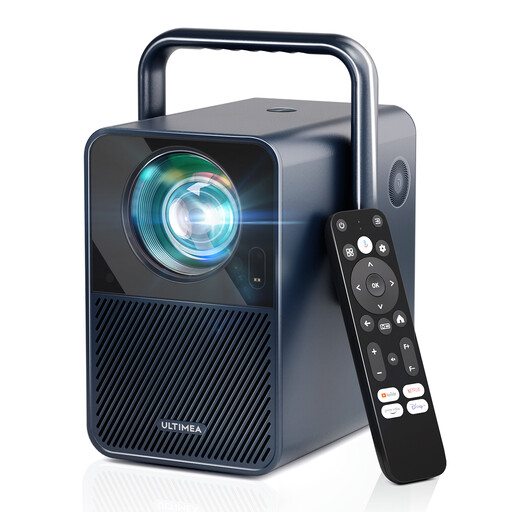 Image unavailable
Could suit you if you’re considering a projector with built-in sound and a stated Android TV environment. Check playback of your chosen title and subtitles.
Native 1080p (1920 × 1080); the product information lists 1.000 ANSI lumens, Android TV 11.0, Netflix, autofocus and 6D keystone correction. The recommended image size is 80–120 inches, according to the product information. Dolby Audio and 2 × 10 W speakers are also listed.
 Image unavailable
Could suit a darkened room where built-in streaming and flexible positioning are important.
Native 1080p and 1.000 ANSI lumens according to the product title. The title lists officially licensed Netflix and Whale TV OS. The product information mentions short-throw projection, image sizes of 60–140 inches and two built-in 8 W speakers.
 Image unavailable
Could suit you if you want to position the projector in different directions. Check beforehand that the image size will fit the room.
Native 1080p and 1.000 ANSI lumens according to the product title. The title lists an image size of 40–150 inches, a 360° rotating design and TOF autofocus. The product information mentions VIDAA OS, Wi-Fi 5 and Bluetooth 5.0.
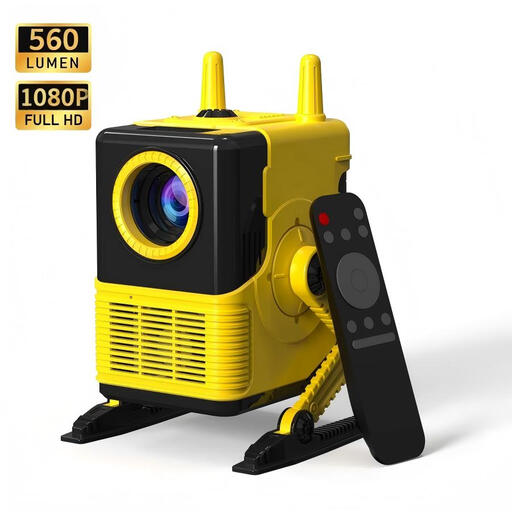 Image unavailable
Could suit a portable set-up where you want to connect an external playback device.
The product information lists support for Full HD 1080p and a light output of 560 lumens. The title lists Wi-Fi, Bluetooth 5.0, four-point keystone correction and HDMI and USB connections.
No, 4K isn’t essential for readability. First check the focus, image size and viewing angle from the back seat, then test the subtitles for your chosen title on the playback device you plan to use. Netflix says language and display options can vary by title or device.
Before buying, measure the distance from the lens to the projection surface for the image size you want. The required distance varies by model. Set up the projector in advance and check the focus and text from your seats.
No. Netflix describes settings for size and style, but says they aren’t available for some languages or connected TV devices. Check your chosen title on the player you actually plan to use.
For an online consumer purchase in the Netherlands, you generally have a statutory 14-day cooling-off period after delivery, with some exceptions, according to ACM ConsuWijzer. If a product doesn’t meet what you could reasonably expect during normal use, you’re also covered by the statutory guarantee against the seller. This is separate from any voluntary manufacturer’s guarantee.
CE marking is required only for products covered by harmonised EU rules that make it mandatory, according to Your Europe, the European Union’s official website. The requirements that apply to a particular projector and power supply depend on the product design and the relevant rules.