What should you look for?
Start by considering how much light falls on the projection surface while you’re watching. Then measure the distance and check that subtitles look sharp and dialogue is easy to follow from your seat.
| What to consider |
What to look for when buying |
Who is this important for? |
| Readable subtitles |
Compare native resolution and focus, and assess the text at your intended picture size and viewing distance. BenQ Netherlands warns that keystone correction can affect sharpness and the edges of the image. |
If I need subtitles to follow the drama, I want the text to stay sharp at my viewing distance. Around 31% of consumers put subtitle readability first. |
| Picture with kitchen lights on |
Assess how much light reaches the projection surface and compare brightness figures measured on the same basis. Epson Netherlands suggests 2,500–3,500 lumens as a guide for living rooms with some ambient light. |
When the kitchen lights are on, I want the picture to remain visible in the room. For around 31% of consumers, picture quality in ambient light is the top priority. |
| Set-up near the kitchen |
Measure the distance from the lens to the projection surface and check the throw ratio and optical alignment of the exact model. Choose a position away from direct cooking fumes and follow the installation instructions. |
With limited space, I need to get the distance and position right while keeping the projector away from cooking fumes. A suitable and safe set-up comes first for around 25% of consumers. |
| Dialogue and sound |
Check the quoted fan noise for each mode, your listening position and whether there’s a suitable audio output if you want to use external speakers. |
When there’s activity in the kitchen, I want to keep hearing dialogue clearly without a distracting projector. Dialogue and sound matter most to around 13% of consumers. |
Projectors at Joybuy
This selection of Joybuy products includes native 1080p models, projectors with a quoted brightness and short-throw options. Check the measurement basis, picture size and distance your room allows for each model.
 No image available
Yaber L2 projector, native 1080p
An option to consider if you’re looking for a short throw and a projector that’s easy to position, and can keep kitchen light to a minimum.
The description quotes native 1080p, 520 ISO lumens and a 1.17:1 short-throw ratio. It also mentions a 360° gimbal and two 5 W speakers. 520 ISO lumens doesn’t guarantee a clear picture with kitchen lights on.
View at Joybuy
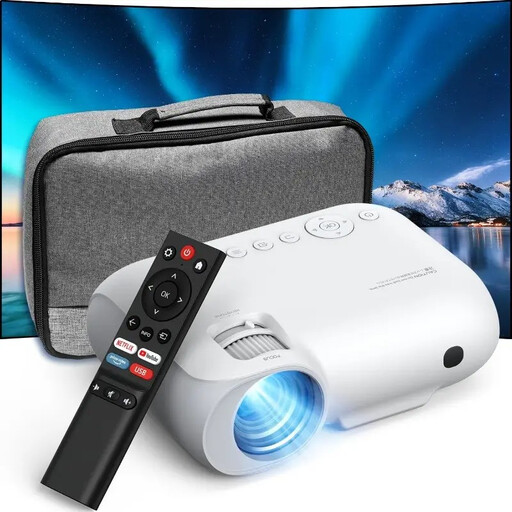 No image available
YOTON Y7 native 1080p Full HD projector
Native Full HD can be a good starting point if sharp subtitles matter; assess the text at your viewing distance and screen size.
The title lists native 1080p Full HD, 4K compatibility, Wi-Fi and Bluetooth. It also claims 9,000 lumens but doesn’t state the measurement basis, so don’t compare this figure directly with ANSI or ISO lumens.
View at Joybuy
 No image available
Yaber K2s native 1080p projector
An option if you’re looking for native 1080p and built-in speakers; check that the projector can be aimed straight enough at the screen.
The product information lists native 1080p, 4K support, Google TV, Wi-Fi 6 and Bluetooth. It also mentions autofocus, keystone correction and two built-in 10 W JBL speakers. 4K support isn’t the same as native 4K.
View at Joybuy
 No image available
XGODY N7 Cine Smart projector
The quoted short throw could be useful if you have limited space between the projector and projection surface; measure the distance before choosing a model.
The product title lists native 1080p, 1,000 ANSI lumens and 4K support. The description gives a throw ratio of 1:1 and 15 W speakers; the quoted brightness doesn’t guarantee that the picture will remain clearly visible with kitchen lights on.
View at Joybuy
 No image available
BenQ MX825STH short-throw XGA projector
The short throw could suit a room with limited space, but native XGA is worth bearing in mind if you need subtitles to be clear and easy to read.
The title lists 3,500 ANSI lumens and native XGA (1024 × 768); the description mentions two HDMI ports and built-in 10 W speakers. XGA offers less image detail than Full HD, which can matter for subtitles.
View at Joybuy
Frequently asked questions
Do I need 4K to read subtitles?
Not necessarily. Also consider native resolution, focus, picture size and alignment. BenQ Netherlands says that heavy digital keystone correction can affect sharpness and the edges of the image, so check how subtitles look at your viewing distance.
Can I mount a projector next to the kitchen?
Only choose a position where grease and cooking fumes won’t reach the projector, and check the installation instructions for the exact model. Epson warns that greasy vapour can damage components in its projectors when they’re mounted on a ceiling or wall, and may create a risk of the projector falling.
How can I reduce fan noise during quiet dialogue?
Compare the noise level for each mode on the exact model and assess it from your planned seat. Projectors need cooling, so don’t block the ventilation to reduce noise.
What are my rights if I’m unhappy with an online purchase or my projector is faulty?
For online purchases from a business, you’ll usually have a 14-day cooling-off period, although conditions and exceptions may apply. If the product is faulty in the Netherlands, the retailer is the point of contact for a solution. The Dutch government explains that there’s no fixed statutory two-year guarantee period.
What should I check if a projector is offered from outside the EU?
Check who the seller is, what product information is provided and what returns terms apply. According to the Dutch government, electronic devices placed on the EU market must carry a CE marking; a Dutch-language online shop doesn’t, by itself, tell you where the seller is based.


