If it’s difficult to darken your shared viewing space, start by looking at a home cinema model with a higher stated brightness. A compact projector may be more practical in a room you can darken or if you’ll be moving it around frequently. BenQ and Epson publish brightness specifications for the models mentioned, but these aren’t measurements taken in your room. So first measure the projection distance and available screen space, then check your preferred streaming and audio setup.
Who is this choice relevant to?
Housemates with a bright living room
You want to watch films together without having to darken the shared space completely every time. Pay particular attention to the ambient light in the room and your preferred screen size; the manufacturer’s specifications don’t tell you exactly how the picture will look in your room.
Viewers who move between rooms
You want to put the projector away after use or set it up somewhere else. Weight, power supply and how easy it is to realign the picture are practical points to consider.
Housemates sharing the whole setup
You want to agree in advance what equipment you’ll need to play films and provide sound for the group. So look beyond the projector itself and check the connections and devices you already have.
What should you look for when choosing?
| What to consider |
What should you look for? |
Who is it important to? |
| Picture visibility in ambient light |
Compare the stated brightness and unit for the exact model, and take room-darkening options and screen size into account. |
If the living room isn’t completely dark during the film, I want everyone to be able to see the picture clearly. Around 31% of consumers give visibility in ambient light top priority. |
| Complete setup |
Agree on a total budget together and check which playback devices, cables or speakers you still need. |
If we buy a projector together, I want to know in advance what else we’ll need for picture and sound. Around 25% of consumers put the cost of the complete setup first. |
| Positioning and moving it |
Measure the distance from the lens to the wall and the clear screen space. Decide whether a fixed position or easy realignment matters more. |
If the projector needs to fit in a small space or move between rooms, I want to know whether it can produce a suitable picture there. Around 25% of consumers give positioning and portability top priority. |
| Film playback and sound |
Check your preferred streaming service, available connections and the audio output on the exact model. |
When we start a film with our housemates, I want our film source to work and the sound to suit the group. Around 19% of consumers give playback and sound top priority. |
Pitfalls to avoid when buying
-
Focusing only on a large stated screen size
The available projection distance and clear wall space help determine whether the projector can produce a suitable picture from your chosen position. Image correction doesn’t change the distance or available screen space.
Measure the intended position and compare the placement details for the exact model before ordering.
-
Assuming a battery-powered projector will suit every film night
Nebula states that the Capsule 3 Laser offers up to 2.5 hours of video playback on its built-in battery. Playback time can vary depending on the film and settings; ambient light and screen size also matter when choosing.
Compare the playback time with the film you want to watch, and make sure you have access to a power supply if needed.
-
Confusing a manufacturer’s warranty with all your warranty rights
ACM ConsuWijzer explains that statutory warranty exists alongside any manufacturer’s warranty. If a product is faulty, the seller is responsible for providing an appropriate solution.
Keep your proof of purchase and the product description, and tell the seller about any problem with what you could reasonably expect from the product.
Brands to compare
BenQ
The TH575i is a Full HD model for a fixed viewing position, where its stated brightness and included streaming dongle may be deciding factors.
- BenQ lists 3,800 lumens and a Google TV dongle for the TH575i.
- These are manufacturer specifications, not a measurement of the picture in your room. Also check that the projector can be positioned suitably.
Epson
The CO-FH02 is a Full HD, 3LCD model to compare for a shared viewing space that’s used more often.
- Epson lists 3,000 lumens for both white and colour light output, plus HDMI and an Android TV dongle.
- Epson’s stated lamp life is based on its own usage assumptions and isn’t a guarantee for every situation.
Philips
The NeoPix 330 is a compact Full HD model to consider for a room you can darken and an existing HDMI film source.
- Philips lists 250 ANSI lumens, HDMI, four-corner correction and a 3.5mm connection for this model.
- Take ambient light and screen size into account when choosing. These features aren’t a review of all Philips projectors.
Nebula by Anker
The Capsule 3 Laser is designed for housemates who want to carry the projector between rooms.
- Nebula lists 300 ANSI lumens, 1080p, a weight of 950 g and up to 2.5 hours of video playback on the built-in battery for the Capsule 3 Laser.
- Check that the stated battery life suits your film and settings. Don’t confuse this laser model with the differently specified Capsule 3.
Samsung
The Freestyle+ is an option to compare if you’ll be setting up the projector in a different position often.
- Samsung describes the Freestyle+ as offering automatic keystone correction and adjustment for walls and obstacles.
- Image correction doesn’t replace checking the available projection distance and screen space. This description applies to this model, not the Freestyle 2nd Gen.
Projectors at Joybuy
These projectors are worth considering for film nights together, with different options for positioning, streaming and built-in features.
 No image available
Yaber L2 Projector, Native 1080P, 520 ISO Lumens
An option to compare if you’re looking for a projector that can be set up in different positions and play films via built-in Google TV.
Native 1080P, 520 ISO lumens, built-in Google TV, two 5W speakers and a 360° gimbal.
Joybuy
 No image available
XGODY Gimbal A8 Projector, Native 1080P
An option to compare if a rotating projector with built-in Android features suits your viewing space.
Native 1080P, 1200ANSI, Android14.0, WiFi6, BT5.4 and 180° rotation.
Joybuy
 No image available
XGODY N7 Cine Smart Projector, 1000 ANSI Lumens
An option to compare if its stated streaming features work with the film source you want to use.
1000 ANSI lumens, Native 1080P, Official Netflix and Whale TV OS.
Joybuy
 No image available
XGODY Gimbal N6 Pro Portable Projector, Native 1080P, 700ANSI
An option to compare if you’re considering a portable projector with built-in streaming apps.
Native 1080P, 700ANSI, WhaleOS 3.0, Official Netflix Apps, WiFi6 and BT5.4.
Joybuy
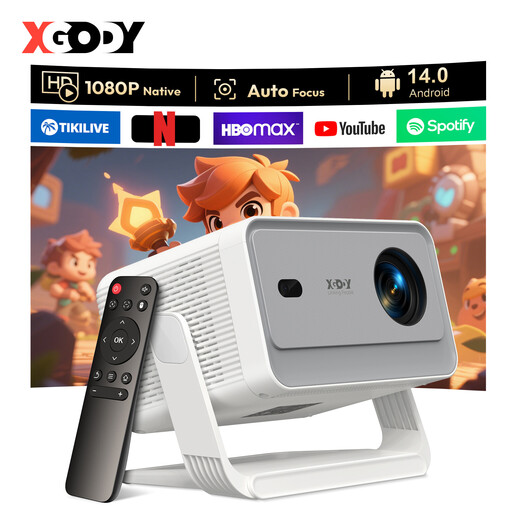 No image available
XGODY Gimbal A6 Pro Portable Projector, Native 1080P, 650ANSI
An option to compare if an adjustable stand suits the place where you want to set up the projector.
Native 1080P, 650ANSI, Android 14.0, WiFi6, BT5.4 and a stand with 135° adjustment.
Joybuy
Frequently asked questions
Do you need a screening licence for a film night in a student house?
That depends on whether the screening is limited to a private household or is public. The Rijksoverheid explains that copyright-protected material can’t be shown publicly without permission; FilmService states that permission is needed for public film screenings outside the home. The exact situation depends on the audience and how the event is organised.
How can you check whether the projector will fit in your room?
Measure the distance from the lens to the wall and the available screen space, then compare these with the placement details for the exact model. Keystone or four-corner correction can help align the picture, but it won’t automatically make an unsuitable position work.
Will every film app work without an additional device?
No. Check the playback options for the exact model and the service you want to use. BenQ lists a Google TV dongle for the TH575i; Epson lists an Android TV dongle and HDMI for the CO-FH02. Also check whether your housemates already have suitable equipment.
Who can help if the projector breaks too soon during normal use?
According to ACM ConsuWijzer, the seller is responsible under Dutch statutory warranty if the product doesn’t meet what you could reasonably expect. A manufacturer’s warranty doesn’t replace this right; the appropriate solution depends on the fault and the circumstances.


