
Watching together in a bright living room
If your housemates are watching while there’s still daylight coming in, consider the stated brightness, the image size you want and how much you can darken the room.


Start by considering how much light you can block out, then measure the distance to the wall. A projector with a higher stated brightness may suit a shared room that you can’t always darken; a short-throw model can help when space is limited. Also check how you’ll watch travel programmes and whether the sound will work from your seating area. Epson rates the CO-FH02 at 3,000 lumens, while BenQ says the TH671ST can project a 100-inch image from around 4.9 feet away.
If your housemates are watching while there’s still daylight coming in, consider the stated brightness, the image size you want and how much you can darken the room.
Measure the distance between the projector and the wall before choosing a standard or short-throw projector. The distance chart for the exact model will help you work out which image size will fit.
If you want to take the projector to another room, consider its portability and whether it has a built-in battery. Also think about how well you can darken each viewing space.
| What to consider | What should you look for? | Who will care about this? |
|---|---|---|
| Visibility in ambient light | Compare the stated brightness and consider how much you can darken the room for your preferred image size. | If we often watch with some light in the room, I want to know in advance whether the image will still be visible at the size we want. Around 26% of consumers put visibility in ambient light at the top of their list. |
| Projection distance and image size | Measure the distance to the wall and the available wall width, then check the distance chart for the exact model. | With limited depth in our shared room, I want to know whether the projector can produce the image size we want from the available spot. Around 21% of consumers say placement and distance are their main buying concerns. |
| Playback and sound | Check that it supports your preferred streaming service, has the HDMI connections you need and offers suitable audio connections or speaker options. | If we watch together, I want to be able to play travel programmes and hear them clearly from our seats. Around 21% of consumers give playback and sound top priority. |
| Shared costs | Agree who will own it and who will contribute. Also check what’s included with the exact model and who the seller is. | When housemates share the cost, I want to agree in advance who owns it and whether any extra equipment is needed. Around 16% of consumers put shared costs at the top of their list. |
| Moving between rooms | Check the weight, power supply and stated battery life, and consider how bright each viewing space is. | If I want to use the projector in more than one place, I want to know whether it’s practical to move and whether there’s a power socket nearby. Around 16% of consumers say portability matters most. |
The amount of ambient light and your preferred image size both affect how visible the projection will be. A stated lumen rating alone can’t predict how the picture will look in your room.
Consider brightness alongside how much you can darken the room and the image size you want.
Your preferred image size may not fit from the spot where you can place the projector. A short-throw model has its own distance requirements.
Measure the available distance and wall width, then check the distance chart for the exact model.
Support varies by device and service. Netflix’s help centre lists supported external devices, such as a computer or streaming stick, which can be connected via HDMI or a suitable video adapter.
Check that the exact model supports the services you want and has the connections you need. If necessary, allow for an external playback device or adapter.
Nebula lists the Capsule 3 and Capsule 3 Laser as different models, with different stated brightness ratings.
Compare the full model name and the specifications of the version you’re considering.
The CO-FH02 is an example of a Full HD 3LCD projector for a permanent shared viewing space.
The TH671ST is a short-throw option for spaces where projection distance is limited.
The Capsule 3 Laser is a compact option if you want to move a projector between rooms.
The MoGo range includes portable models; the MoGo 4 is an example of a Full HD model with a built-in battery.
The NeoPix 330 NPX330/INT is an example of a compact Full HD projector with an HDMI input.
These Joybuy picks are suited to watching together, streaming and setting up a projector at home.
 No image available
Its stated battery life and built-in Google TV suit a portable viewing setup without a separate streaming stick.
The product information lists native 1080p, 800 ANSI lumens, HDMI 2.1, USB-C and built-in speakers.
Battery: up to 2 hours of video playback, according to the product information.
 No image available
The built-in speakers and automatic image adjustment may be useful if you share the viewing setup and want to adapt it as needed.
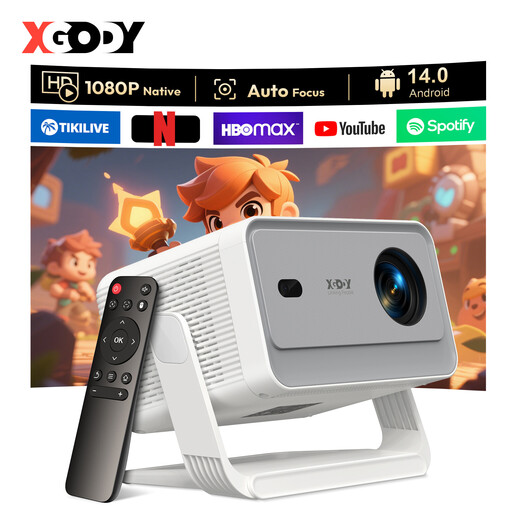
The product information lists native 1080p, 1,200 ANSI lumens, Android 14.0 and two built-in 8 W speakers.
The product title mentions support for 4K and 8K video decoding. This isn’t the same as native 4K or 8K resolution.
 No image available
Its built-in smart features and speakers suit a shared viewing space, without necessarily needing a separate streaming stick.
The product information lists native 1080p, 1,000 ANSI lumens, Whale TV OS and built-in stereo speakers.
The product information lists an official Netflix licence. Check that the services and features you want are available on your model.
 No image available
The product information lists built-in stereo speakers and smart features for a flexible viewing setup.
Stated specifications: native 1080p, 700 ANSI lumens and WhaleOS 3.0.
The product information lists official Netflix apps. Check that the services you want are available on the exact version.
 No image available
The product information lists built-in speakers and automatic image adjustment for a flexible viewing setup.
Stated specifications: native 1080p, 650 ANSI lumens and Android 14.
Measure the distance between the planned projector position and the wall, and work out how much wall width is available. Then check the projection distance for your preferred image size in the specifications for the exact model. The term ‘short throw’ doesn’t replace this check.
First, check whether the service supports the exact device. The Netflix Help Centre lists supported external devices, such as a computer or streaming stick, which can be connected via HDMI or a suitable video adapter.
Agree on a permanent spot that will be kept clear, and store the cables and remote control together. Follow the manual for your model when cleaning and maintaining it.
For an online consumer purchase, ACM ConsuWijzer says you generally have a statutory 14-day cooling-off period after delivery. The seller is also responsible for putting things right if the product doesn’t meet what you could reasonably expect under normal use.
Don’t assume that you can. The Dutch government distinguishes between making a private copy for personal use and distributing copyrighted material. Check what permission you need before showing it outside your household.